Update: as of December 2025 (in git) and Plasma 6.6 (released), KDE supports custom modelines that will let you add custom resolutions and refresh rates to the ones reported by your display.
The full details are in the merge request libkscreen MR!266, but it generally goes like this:
To add a custom full screen 1920x1080 with 75Hz refresh:
kscreen-doctor output.1.addCustomMode.1920.1080.75000.full
You can then see the result in the output of kscreen-doctor -o:
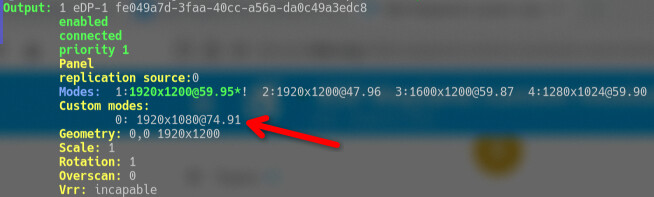
(The refresh rate is “not accurate” because things like actual display bandwidth, etc)
You can remove such custom mode by using the index number of the custom mode (the first one is 0, as can be seen in the screenshot) like so:
kscreen-doctor output.1.removeCustomMode.0
The full at the end of the addCustomMode command means that the new mode is stretched to fit the screen. The other option is reduced which will leave black bars on the aspect that doesn’t fit when kwin matches resolution and aspect ratio for your screen - this could be top and bottom black bars if you set the height “too low” or right and left black bars if you set the resolution not wide enough.