Hello.
I’m triying to blur an image in kdenlive. This image has transparency, and no matter what blur effect I use, I get the same problem: the image becomes more black. I’ve tested this with the latest Kdenlive from Arch repositories, and with the latest appimage.
Original frame
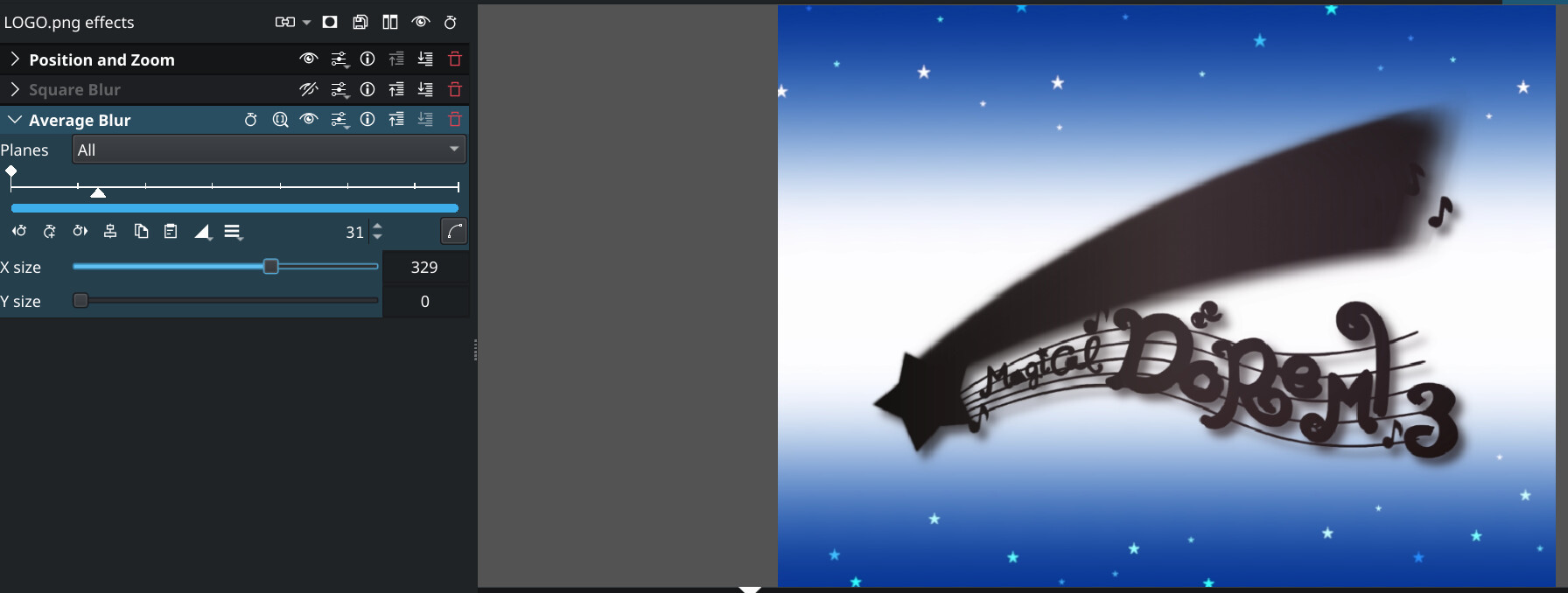
This is what I get with Gaussian blur, SquareBlur, BoxBlur, Average Blur, Blur - Deprecated…
And this is what I expected (and want). This was made with GIMP, applying gaussian blur
You can see Kdenlive is making the image darker when I blurry it.
Trying some things, I found that If I only blur in one direction, I can make the image black. That makes absolutely no sense.
Am I doing something wrong? What should I do to get the effect I want?
Maybe it’s a bug? I would never expect this behaviour…
Thanks!!
Please try it without the Position and Zoom effect, use the Transform effect instead. PaZ has some known issues with compositing.
It’s not because PaZ. I tried with the blur effect alone, same result 
I’ve noticed that Transparency (again with no other effect) also darkens the image… Seem like there’s something wrong with alpha
Is this an issue only on my end? Seems something too big to have gone unnoticed untill now…
What is the preferred compositing method? See Settings > Configure Kdenlive > Misc, about halfway down the window.
You may also want to check the Premultiply effect.
Compositing method is set to auto. The dropdown has three options: auto, frei0r.cairoblend and qtblend.
I tried the other two. frei0r exhibits the same behaviour. Then I set it to qtblend, and this is what it does
I’ve checked different frames, and it makes the completly transparent pixels black, and the rest of the transparent pixels into solid color.
I tried with Premultiply, and checking unpremultiply makes the alfa whiter? But the blur still makes the letters darker…
25.08.0 appimage on Debian Trixie:
Square Blur with Kernel Size = 10, frame extracted to clipboard from project monitor. Looks pretty good to me.
Not sure, but it starts looking like it. Which version of Kdenlive on what OS did you try this?
I couldn’t replicate the blacking of the image using Average Blur with a ridiculously high parameter for X. Mind you, I downloaded the original picture you posted above, so maybe this is not the original source but it downloaded as a .png
I also tried various blur effects on dark and bright color backgrounds. As you would expect from a blurring effect, it kind of merges colors from adjacent pixels. So what was white becomes slightly colored by the surrounding pixels’ colors, right? So, in your original picture there is blue and a dark-grey shadow next to the text, and so one would expect the color of the text to be “tainted” by the colors next to it - and blue and dark-grey are all darker than pink, wouldn’t you agree?
I tried arch linux with kdenlive 25.04.3 and kdenlive 25.08, and windows 11 (in a vm) with 25.04.3. The three have the same behaviour.
The image I posted has no alpha on the logo, since it’s just an screencap. I’ll attach the source files
Yes, I expect the merging of colors- in the way that the colors in the image you posted merge. What I get is the shadow becoming darker even thought the background is whiter. Just compare the 2nd and 3rd images from the op… The shadow should get lighter but it gets darker.
Btw, thank you for helping me
Thanks for providing the original images.
I fiddled with it a bit, and none of the blur effects comes close to the GIMP blurring as a reference, except for the Square Blur. I also played around with the Alpha Operations effect, and when set to this
I got this:
Square Blur with Kernel Size=15
The way the blur effects/filters are implemented in melt (the underlying engine doing all the track compositing and effect/filter application) is seemingly different than how GIMP does it, and the alpha channel is tripping it up. Sorry.
Wel, thank you anyway. I’ll ask upstream about this behaviour. Thanks again.