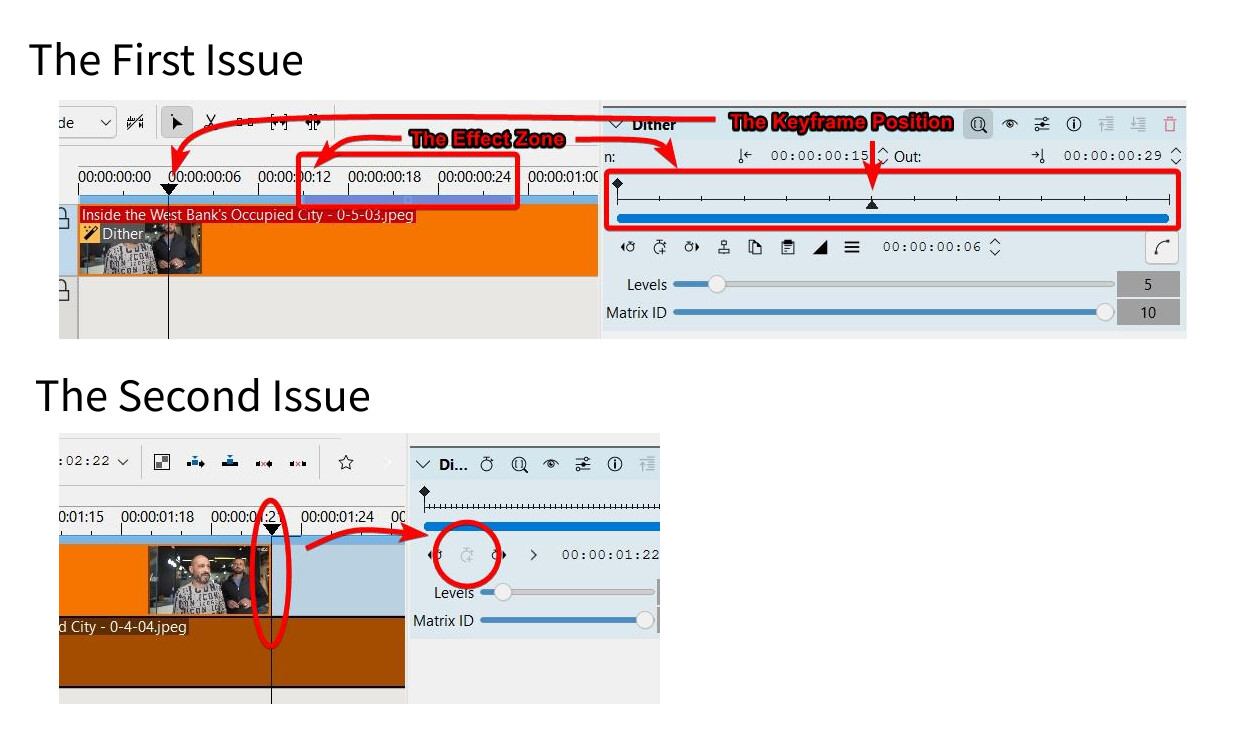
1- (Currently) Let’s say you have created an effect zone and are trying to create keyframes of that effect.
The keyframe range shrinks with the effect zone, but the range starts at the start of the clip, not the effect zone.
Shouldn’t it match the zone?
2- (Currently) The general keyframe range doesn’t seem to include the very end of the clip. I cannot create a keyframe at the very end of the clip (see the timeline), and the keyframe at the end always has to be set one step closer inward.
Shouldn’t it (both visually and mathematically) match where the clip ends?
++
Had to edit the image due to the stupid KDE rules to limit the number of embedded images.
Hmm, that’s an interesting question. I bet there are pros and cons for that, but I lean towards “yes, that should be the case”. So, I encourage you to open a wish list item for that in the bug tracker. Please describe the use case as detailed as possible so that we can work with that.
Shouldn’t it (both visually and mathematically) match where the clip ends?
You jumped to the beginning of the next clip which in your case is one frame after the last frame of the previous clip. If you use the arrow keys and go back one frame you will see the icon light up and you can create a keyframe.
Are you sure it’s not just a bug? When you create an effect zone and drag keyframes in the effect panel, the range(length) is literally limited to the effect zone’s length. But it doesn’t match the effect zone’s position in the timeline.
As a result, in the current state, creating an effect zone limits the adjustable keyframe range toa small portion of the start of the clip. Are you saying this is by design?
If you’re saying that it just what happens internally, it makes sense. But it’s still confusing and tricky to use because it never visually lines up.
This is one frame back, i.e. the last frame of the previous clip (or the end of it, right? ).
Think of it as in the old days when cutting was always between two images in the film strip.
Alt+arrow_key jumps to the next cut, edge of a clip, or marker. When it jumps to the end it is the edge of the last clip in the timeline. This is important when you want to add another clip because if the jump positioned the playhead to the last frame (see the last picture above), a clip-insert action would cut the clip, insert the new one, and then place the last frame of the previously last clip at the end.
Is it really relevant when adding keyframes for effects tho? When you’re selecting an effect for a clip, any keyframe manipulation will affect the effect in the selected clip only. I don’t see any potential for papercuts from ‘fixing’ it for effects (and transitions too).
I could try when I have time. I’m not sure how complicated the process is for bug reporting, how much detail you need, etc.


 ).
).