Keyboard input issues with GTK applications only on Kubuntu 25.10

Hello,

Yesterday I updated my system from kubuntu 25.04 to 25.10 yesterday (sorry, I forced it, I know the autoupdate is not out yet), so sitting on:

Operating System: Kubuntu 25.10
KDE Plasma Version: 6.4.5
KDE Frameworks Version: 6.17.0
Qt Version: 6.9.2

After the update, I noticed that on GTK applications only, the input system seems quite broken. I have no dead-keys combiners (like to make accents such as áéíóúḱḿá) nor pressing shift+letter makes it capital. It works alright on qt-based applications.Furthermore I checked with SDL applications and the same problem happens.

While playing a game, I noticed that holding tab (which should highlight something) was getting interpreted as if I was spamming tab like 20 times a second or something. This led me to test and indeed the shift, which I saw was not registering, was doing the same.

I already thought that maybe this was IME issues, with fcitx and environment variables, I troubleshooted that to the best of my abilities but concluded that’s not it, as launching applications with these env-variables unset or set to different values didn’t affect anything.

Another thing I did test, which did make the shift work, as toggling off the “key bindings configuration” here:
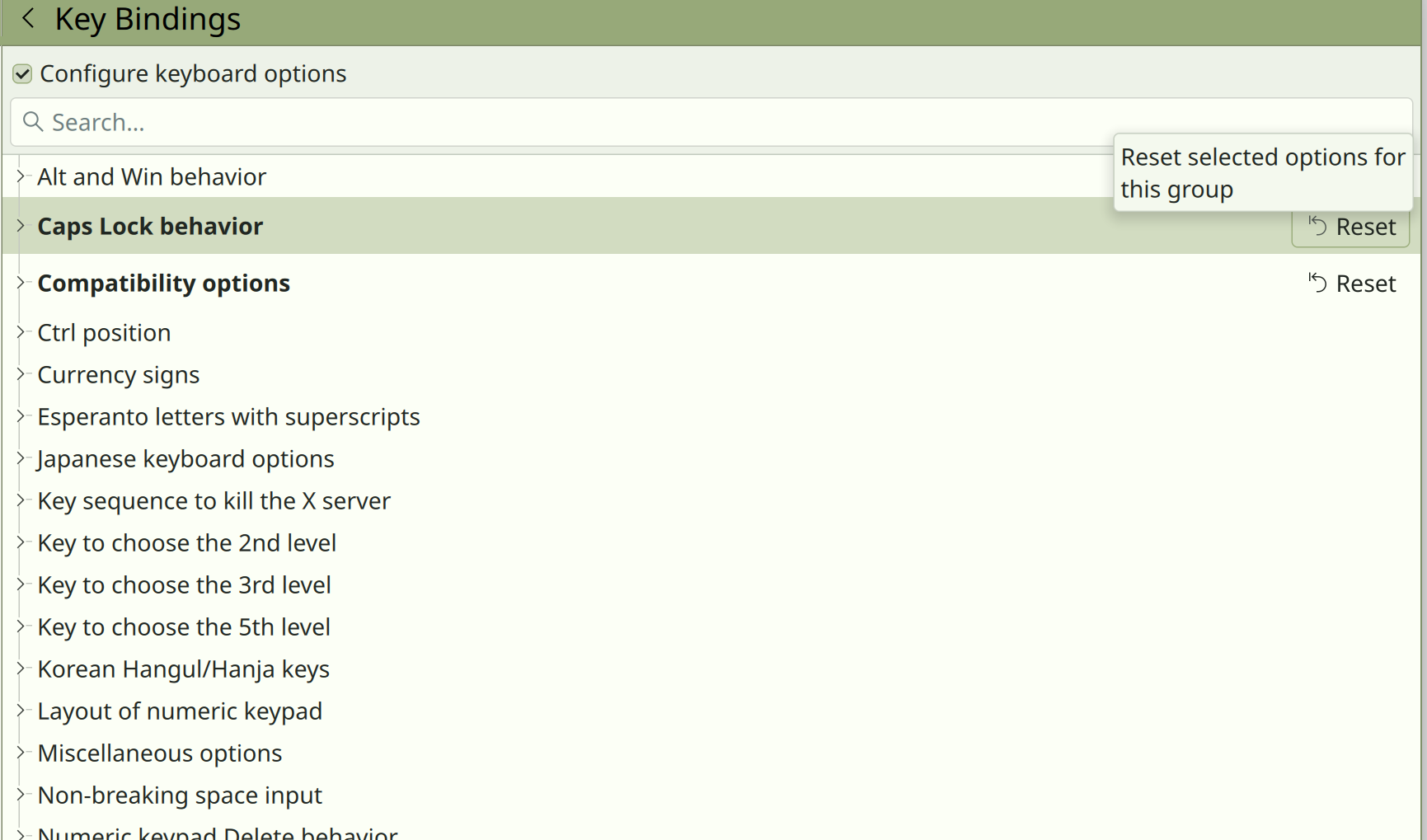
Normally I use caps-lock as another escape key and double-shift for caps-lock. Toggling this off made shift work but not any of the other things (dead keys, tab repeating like crazy)

I’m at my wits end on how to troubleshoot this, maybe someone has an idea.

Thanks!

Are you running Wayland or Xorg ? I’ve been looking at some posts about how 25.10 is a ‘Wayland only’ installation, and as I had major errors/bugs with keyboard and many other issues with Wayland, I’ll most likey be delaying a 25.10 install.

However, back to your problem. Can you login with Xorg ? There is usually an option at the login.

See Fresh install of Kubuntu 25.04 - now some keys not working

25.10 is not “Wayland only”. With 25.10 one can install plasma-session-x11

sudo apt install plasma-session-x11

then restart to get the X11 session option on the login screen. I had to do that even after release upgrading from 25.04 running Xorg; annoying.

IMO you’ll be waiting a while for Wayland bugs and omissions to be corrected, possibly years.

1 Like

Oh okay, great thanks. The reason I stated that was from reading various articles about 25.10, which all seemed to give the impression one could not use Xorg on 25.10

Now I can plan to go to 25.10, thank you.

This was one of the articles I had come across, ..misinformation no doubt - Kubuntu 25.10 Embraces the Future: Wayland-Only Installation as X11 Support is Dropped - ServerHost Hosting Solutions Blog

Hi, sorry for the late response (I forgot about this after a few days). I’m running on wayland so kwin here is responsible for inputs. In the end, I decided to add backports (sudo add-apt-repository ppa:kubuntu-ppa/backport) which brought in kde 6.5.1, and that solved it.

A friend of mine just installed 25.10 himself and met the same issue, so something seems broken with base 25.10. Once again, adding backports fixed it.