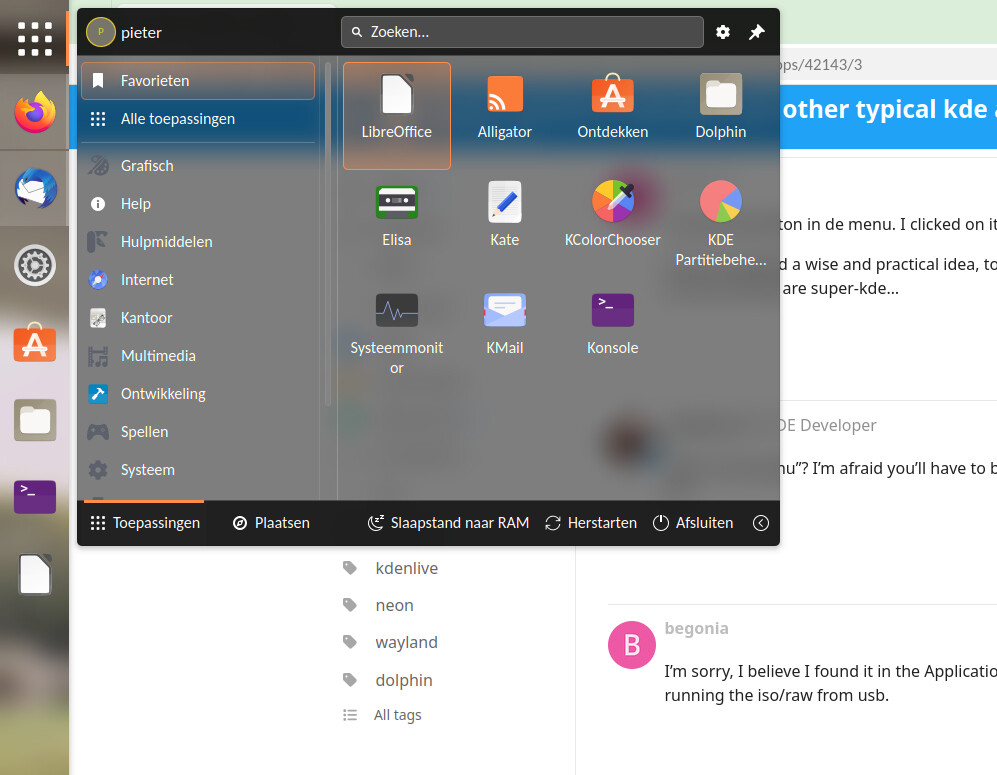
I tried kde-linux. There was a button “install kmail”. But it didn’t work.
Will all those typical kde applications be included in kde-linux or do they also have to be installed using flatpak/snap/distrobox or other options?
I tried kde-linux. There was a button “install kmail”. But it didn’t work.
Will all those typical kde applications be included in kde-linux or do they also have to be installed using flatpak/snap/distrobox or other options?
KDE Linux intentionally ships with a fairly minimal set of apps and invites users to install what they need for their personal needs and desires.
Where was this button you found? And when you clicked it, what happened instead of installing KMail?
I found the button in de menu. I clicked on it and nothing happened.
To me it seemed a wise and practical idea, to optionally provide these apps “from inside”… In the end they are super-kde…
What is “de menu”? I’m afraid you’ll have to be more descriptive. A screenshot would help, too.
I’m sorry, I believe I found it in the Application Dashboard program starter. I was only running the iso/raw from usb.
Come to think of it… I guess I didn’t replace the default startmenu with the application dashboard. So I think it was the default one.
I found the usb and ran it again. Now I understand what was the matter. In the startmenu (screenshot above) search box I typed “kmail” and than it showed me the option “install kmail”. But to do that it calls Discover. That is what happens… I had never seen that Discover is so tightly integrated in de kickstart menu so I interpreted it wrong.
Great, glad you figured it out!
What do you think would have made this more obvious?
I think it is OK the way it is. Only it had me standing on the wrong leg because I had never seen this behavior of kickstart/discover. And perhaps I was a little stressed because I was testing kde-linux and so I didn’t take the time to look so well at it.
Still I would find it a good idea when core kde apps like merkuro and kmail came from within the kde-linux distribuition itself. So that their colors and so integrate seamless in the system
The challenge here is that “core KDE apps” has a different definition to everyone. A desktop email client may be core to you, but a Matrix chat client may be core to someone else. What about a local music library manager? A programmer’s text editor?
Ultimately we lean on users to know their workflows and discover apps that meet them. If there’s any part of this process with too much friction, well that’s the thing we need to improve!
some distro offer a “bundle” of software as a group… this would seem to be a good fit for KDE Linux (or whatever it ends up being called) to offer a suite of software as an immutable add-on to the core as like a modular extension (i know, i’m using all the buzzwords because i don’t know the actual words to use, but you get the idea right?).
connectivity bundle:
news, devices, remote desktop, etc
productivity bundle:
office suite, calendar&schedule, pdf , etc
development bundle:
IDE, tool kits, debuggers, etc
creator bundle:
audio, video, image tools, etc
gaming bundle
steam, bottles, controller tools, VR, etc
the idea is that these would each include software that was tested to work together as an immutable package so that they could just be plugged in to add functionality to the core in groups rather than individual packages via a docker or VM type method.
That sounds really practical to me Skyfisgoo… Also reassuring when those apps are also installed in a “imutabel” way. It seems a little misplaced to me that my Thunderbird that I download from Mozilla and my LibreOffice I download from the document foundation (and install in my home folder) integrate better in my system than all kde apps.
Btw Nate thank you for your answers. I know kde-linux will be a smash hit!
Thanks for the kind words!
Ultimately a focus right now is helping Flatpak-based apps achieve better system integration. The work right now is organized at Tracking issue for bugs in KDE software caused by running all apps as Flatpaks (#71) · Issues · KDE Linux / KDE Linux · GitLab.
You won’t see Merkuro or KMail listed there because nobody has done the work yet to organize the issues into bug reports and mark them down there. It’s a great opportunity for someone to help out.
But in the world of skyfishgoo I would without hesitation choose to install the “productivity bundle”. And be totally happy
And perhaps after a while I would install the creator bundle.
This idea a seems great to me. Simple and safe to the user.
What if the “productivity bundle” included 10 apps you never use? You’d then ask for a way to remove them, and be told no, because that’s how the proposed “immutable add-ons” would work.
… sometimes the answer is no.
for those ppl the other methods of installing will still exist so that they can just install what they need, but i would think installing 3 separate packages (each with their own runtimes) would take up just as much space as a bundle with only the one runtime and two extra applications you don’t use.
Thank you for asking. I will give a really honest answer to you question.
I wouldn’t bother at all with the applications I wouldn’t use so much.
Will kde linux have it’s own flatpak repositories? Or do we depend on unknown parties for those?
KDE Linux ships with apps from a mix of Flathub and the KDE nightly build repos.
This is user-selectable; those repos can be replaced with whatever the user desires.
Note that Flathub is hardly an “unknown party”; KDE people have been involved for years.
Again I thank you for your attention Nate and this will be the last remark I make in this topic, but I think that having the users trust is the most important thing. It would make KDE linux irresistible.
If you eg. were to offer the five basic package bundles Skyfishgoo mentioned (connectivity bundle, productivity bundle, development bundle, creator bundle, gaming bundle) and be 100% trustworthy with that, KDE linux would really fill a big gap.
KDE linux would stand out and differentiate itself from everything that is already there and make a flying start.