A .colorscheme for konsole, f.e. this one
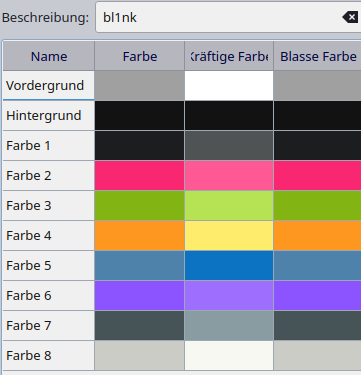
has colors:
- Foreground
- Background
and
- Color 1
…
- Color8
for each defining a Normal, Faint and Intense value.
Is there any description, where these definitions are used? I guess:
- machine’s name is color 3 intense
- actual directory is foreground intense
- $ ls
<Directories> are color 5 intense
- …
Such a full list would be helpful for me. Thank You!
2 Likes
Here we go, hopefully I got everything right, if not please let me know.
To apply these colors you use ANSI escape codes (highly recommend reading that page) like this or whatever abstraction your shell (or prompt generator) uses.
Here’s a table of what each color maps to:
| Name |
ANSI Code |
ANSI definition |
Konsole Normal |
Konsole Bold |
Konsole Faint |
| Foreground |
\033[39m |
Usually text |
[Foreground] |
[ForegroundIntense] |
ForegroundFaint |
| Background |
\033[49m |
Usually Background |
[Background] |
[BackgroundIntense] |
[BackgroundFaint] |
| Color 1 |
\033[30m |
Black |
[Color0] |
[Color0Intense] |
[Color0Faint] |
| Color 2 |
\033[31m |
Red |
[Color1] |
[Color1Intense] |
[Color1Faint] |
| Color 3 |
\033[32m |
Green |
[Color2] |
[Color2Intense] |
[Color2Faint] |
| Color 4 |
\033[33m |
Yellow |
[Color3] |
[Color3Intense] |
[Color3Faint] |
| Color 5 |
\033[34m |
Blue |
[Color4] |
[Color4Intense] |
[Color4Faint] |
| Color 6 |
\033[35m |
Magenta |
[Color5] |
[Color5Intense] |
[Color5Faint] |
| Color 7 |
\033[36m |
Cyan |
[Color6] |
[Color6Intense] |
[Color6Faint] |
| Color 8 |
\033[37m |
White |
[Color7] |
[Color7Intense] |
[Color7Faint] |
To change the style of the color you append these escape codes to the color:
| Style |
ANSI Code |
| Normal (the default) |
\033[0m |
| Bold (bright, intense) |
\033[1m |
| Faint (decreased intensity, dim) |
\033[2m |
Example:
print -P "\033[2m \033[31m Faint red"
print -P "\033[0m \033[31m Normal red"
print -P "\033[1m \033[31m Bold red"
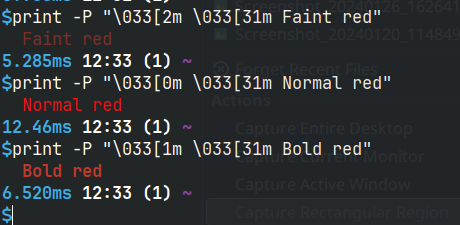
Here’s a function I have in my shell config that prints these colors:
function testcolors() {
DEFAULT="\033[39m"
RESET="\033[0m"
NORMAL="\033[22m" # Normal color or intensity Neither bold nor faint
BOLD="\033[1m" # Bold or (bad behavior) increased intensity
FAINT="\033[2m"
echo -e "${BOLD}${DEFAULT}DEF(39) BLA RED GRE YEL BLU MAG CYA WHI"
echo -e -n "${RESET}${BOLD}${DEFAULT} Bold "
for i in {30..37}; do
printf "\e[${i}m %d " "$i"
done
printf "\e[0m\n"
echo -e -n "${RESET}${NORMAL} Intense "
for i in {30..37}; do
printf "\e[${i}m %d " "$i"
done
printf "\e[0m\n"
echo -e -n "${RESET}${NORMAL} Normal "
for i in {30..37}; do
printf "\e[${i}m %d " "$i"
done
printf "\e[0m\n"
echo -e -n "${RESET}${FAINT} Faint "
for i in {30..37}; do
printf "\e[${i}m %d " "$i"
done
printf "\e[0m\n"
}

1 Like
Thanks a lot, much of your input is important for me.
But in addition to that I would like to know, where the definitions are used, f.e.
- Foreground = Usually text, but where is ForegroundIntense or ForegroundFaint used?
- Background = Usually Background, but where is BackgroundIntense or BackgroundFaint Used?
- Foreground = Usually text, but where is ForegroundIntense or ForegroundFaint used?
Intense variant is usually used to add emphasis to text, and faint to decrease it.
So intense would be used for bold (important) text, and faint for text that is supposed to have lower emphasis so it shows as dim
Where are they used or if they are used at all depends on the CLI program your are running. For example ls command uses them, another good examples that use a lot of colors are htop or btop.
Please note that in total there are 256 colors, konsole (and most terminals) only change a small subset of them.