KWallet blocking Wi-Fi setup is pushing new users away from KDE Plasma

Hello everyone,

I’d like to report a usability issue that has affected me and my family, and I believe it affects many new users who try KDE Plasma for the first time.

Recently, both my father and my wife tried using Linux with KDE. When they attempted to connect to a Wi-Fi network, a KWallet prompt appeared asking them to create a password. Neither of them understood what this was, or why a “wallet” was required just to connect to the internet. They got stuck, couldn’t finish what they were doing, and eventually gave up and went back to Windows.

I’m an experienced Linux user, and even I had trouble recently: while using CachyOS during an important exam, I tried connecting to the Wi-Fi at the location and the KWallet dialog appeared. I didn’t know how to handle it at that moment and lost time. It was extremely frustrating.

I understand that KWallet provides important security features. However, making it mandatory with no clear explanation or a simple option to skip it creates a huge barrier for new users. At first glance, it looks like an error or something broken.

My suggestion is:
Please consider disabling KWallet by default for basic Wi-Fi usage, or offering a clear option like “Skip / Don’t use KWallet now” during the first setup.
This would drastically improve the first-time experience without harming security for users who want to enable it later.

Thank you for taking the time to read this. I really appreciate the work the KDE community does, and I hope this feedback helps KDE Plasma become even more welcoming to newcomers.
2 Likes

Huh… i have Kwallet installed, and never had to manually set up kwallet or its password for Wifi or other things, as far as i’m aware. In spite of that, after installing wallet manager, my network passkeys are in there.

I’m running Arch though, so it could be a configuration matter on my end, but i did use archinstall, instead of running things manually. I can’t fathom why it would be a default behavior on other systems and not through the automated install on Arch.

I second this, especially since on other platforms—especially iOS/Mac—a “wallet” dialog implies that a financial transaction is about to take place.

3 Likes

On some distros, setting up desktop autologin breaks the kwallet autologin. When doing this after the install, you do get messaging about this in System Settings, but if you set this up during the OS install, you don’t see this at all.

But I think mentioning that Kwallet provides password manager functions in the popup would be much more useful.

3 Likes

I’ll agree here as well, as just a few weeks ago I had a friend trying a Linux desktop with a new Kubuntu for the first time, and he had what sounds like the same issue that went through this fighting with Kwallet.

After updates and reboot, it locked his network settings, signal, and other stored secrets, and just confused him, thinking of it as a keepass-style password manager, then after popping up constantly. It then conflicted with his user pass, then didn’t let him access his stored settings, no idea that the wallet was related, and just frustrated him to finally bug me about it. I wasn’t sure as I haven’t setup a fresh ubuntu/kde in forever to run into this, but recommended chatgpt which seems gets asked this a lot and knew how to deal with it, which I think just needed setting the pass the same as the user account.

However Kubuntu or Plasma itself is handling new-user onboarding with kwallet, it seems simply more confusing than it ought to be for new users. I remembered running into this ages ago myself when still using Ubuntu with some old Plasma, but with Arch for the past 7-8 years haven’t run into fighting with kwallet.

1 Like

i’m using kubuntu 24.04 and i’ve never had to deal with kwallet at all… and that’s the way i like it.

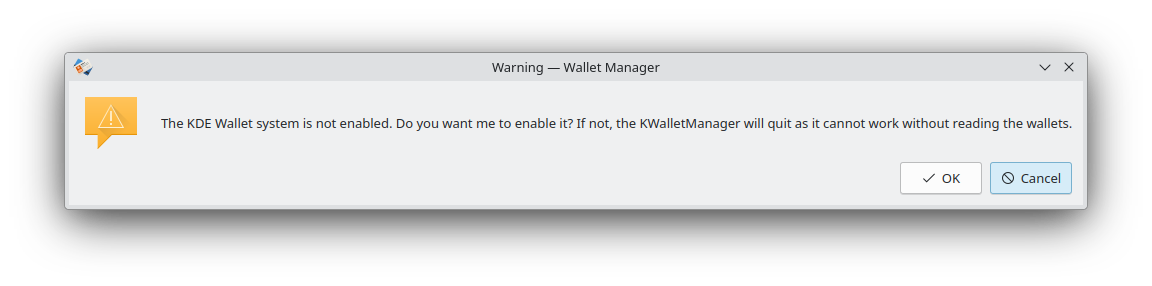
when i go to kwallet manager i get this message

if i wanted to use kwallet, then i would activate it.

this default should be the standard KDE recommended default unless a distro wants to change it.

hopefully kubuntu 26.04 will keep the same defaults as i have now.

1 Like

Being a very new user, I can confirm that calling the functionality ‘wallet’ is an unfortunate choice.

1 Like

I don’t have a problem with the name kwallet (and I don’t feel a name change is needed, after all Kwallet has been around since 2004 - KDE 3.2), but new users seem to need what it is spelled out more clearly (for whatever reason a quick internet search to figure out what kwallet is isn’t thought of, but even if the user does they shouldn’t have to.) When clicking Help :right_arrow: About Wallet Manager, may I suggest it add: password manager

So it would say something like: KDE Wallet Management Tool. KDE’s password manager.

I also noticed clicking help leads to a webpage that says:
The application kwalletmanager could not be found. Please check if you entered the name correctly, or use the navigation on the left to access the complete KDE User Documentation. Even a very brief description without full explicit instructions yet added would be helpful I think.

1 Like

oh, it’s a kwallet wallet …. that clears things right up :slight_smile:

there is room for improvement here.

2 Likes

My understanding from blogs over the last couple of months is that the default approach for WiFi secrets will be to store them on the system level instead of the user level.

That sounds like a bad idea for several reasons.

As a user you don’t want to have any of your passwords stored in some unprotected way and you would only delay the setup to the next program that wants to store login information.

Ideally this would have been set up during account creation because then the password store can have the same password as the login credentials and there is already a system in place to unlock password storage on login if that is the case.

That’s essentially what it is.
Just an alternative implementation of a so-called “secred service”.

There are currently considerations to move to a different default provide for this so that different desktop projects share the same one instead of each having their own.

The desktop specific services, like KWallet or GNOME Keyring, are mostly a legacy from early times when no standard interface had been agreed yet.

At this point that is mostly a transitional problem.

Applications are being ported from a KWallet specific API to a more generic Secrets API.
The store service might also be consolidated or provided by a third party (e.g. KeePass) depending on user choice.

See also Marco’s blogs around these changes

2 Likes