Hey, sorry if someone asked this before but I’ve been googling for hours and I’m at my wit’s end.
I’m a new linux user and I understand that usually there’s apps/extensions/widgets made by very kind people to lower the screen brightness below the minimum. I’ve had “redshift” on linux mint previously and “soft brightness plus” on fedora workstation. I have not been able to find one such widget for fedora kde plasma 6.
Please help. My eyes hurt.
hi, welcome.
does your monitor not have a brightness control on it?
I have a laptop so I can’t just change the settings like that.
… unless I can and I just don’t know about it.
most laptops have an Fn key that enables additional functions on the keyboard, but often these are proprietary windows specific functions and are frequently ignored by linux.
but if it supported by the firmware and linux recognizes the acpi calls there are sometimes workarounds.
the package ddccontrol may give you some level of control if you can’t access the keyboard controls.
Okay so a bit of googling brought me here: GitHub - ddccontrol/ddccontrol: DDC Control
I installed the command line version and the command sudo ddccontrol -p gives me this.

What do I do now? 
sorry, my notes must have dropped the “g”
the package to search for in discover is gddccontrol
it’s a GUI with all point and click

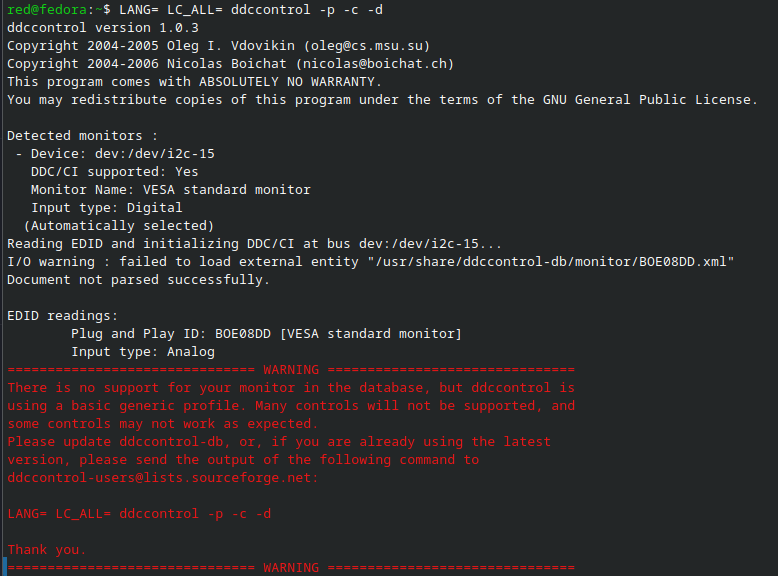

if you just click OK it should take you to a screen with some basic controls like brightness, but if they don’t work as expected then you will need your monitor added to the db.
you can try to clone the latest db to see if someone has already included it since you distro was made.
or you can can add your monitor to the db by following this guide (wweeeeee)
when i use sudo ddccontrol -p it shows two monitors i2c-12 and i2c-10
when i use sudo ddccontrol -c dev:/dev/i2c-10 it shows my device as AUS2400 which is not listed in the folder /usr/share/ddccontrol-db/monitor/ with a corresponding .xml file.
so, in theory, i would add one and it would then be recognized by the GUI program as well as the command line program and then i would be able to control the brightness via the GUI.
but since i have buttons on my monitor with its own OSD, i just use that.