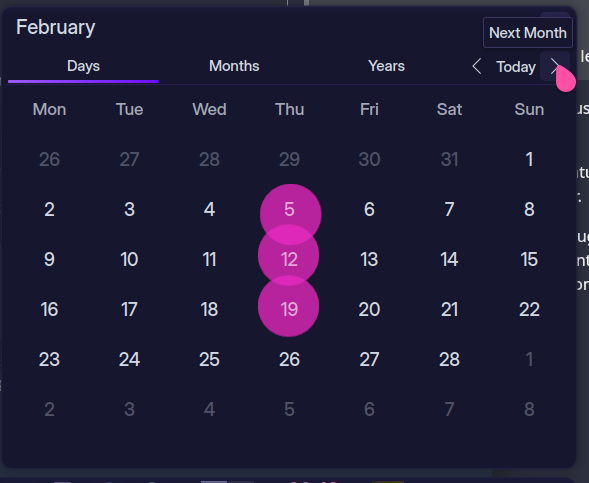
I find the current implementation to be hard to use, it will keep snapping the scroll position making it impossible to simply count week by week across several months.
I think the way the Windows 10 one works is perfect, it lets you scroll to any position without getting in your way.
To quickly explain my reasoning, here a quick example: If you wanted to know what the date will be exactly 6 weeks from now, in the Win10 calendar you can just start at the current date and simply count 6 rows down in that column. Easy.
The plasma widget however won’t let you do this without constantly fighting you, and snapping the scroll position away, so you lose count. This is further compounded by the fact that first and last rows of each page overlap, so counting straight down will actually give you wrong result if you don’t take that into account…
do you don’t mean smooth scrolling—as in one pixel at a time—tho, right?
snapping a week at time seems like the sweet spot
that way the month header and the bolder day numbers in the display would be based on which month had the most number of days visible within the 6 week window of the widget.
and since weeks are an odd number of days there should always be one month with more days visible than another (i would think…. probably have to game that out to be sure).
i’ve taken the liberty of editing the title slightly to hone in on the change desired
Currently, one notch on the wheel will actually scroll 2 weeks, which is really ‘correct’ b ehaviour — but then it bounces back (and that’s more annoying than if it just scrolled a whole month each time).
Scrolling two notches moves to the next month, but it’s really janky!
ALT and scroll, it pulls up some month tabs on the right, which also bounce back out of view… and that doesn’t move across the tabs unless you scroll more - like 3-4-5 notches.
Obviously snap is right for the Alt scroll, but one notch should be enough to trigger it… but not for the Day view.
what op is referring to—they can correct me if i’m wrong—is that using the notches on the scroll wheel as a tactile way to count weeks is more difficult when it jumps a month (4 weeks) at a time.
whereas, if is was changed to one week at a time, you could keep your eye on and just scroll 6 notches, then the date under where you are looking is the date 6 weeks from today, easy peasy… with the snapping you have to count in increments of 4 and then visually drop down two weeks, which is more of a cognitive load, esp if you are at the bottom of the window.
no one disputes that you can count the weeks using your finger on the screen, but that either leaves finger prints on your screen or does other things if you using a touch screen.
that would indeed be annoying , but it doesn’t make sense because that’s not what i’m saying
the widget should scroll exactly one week per notch in the 6 week window presented by the widget.
and “current” month (the one displayed in the header) will scroll out of view until enough of the “next” month is loaded into the 6 week window so that it become the “current” month.
there is no more snapping of months—only weeks—and the months change based on how many of it’s weeks are shown in the 6 week window.
Haha well maybe - I was observing that it does indeed scroll 2 lines, but snaps back… instead of just scrolling one line at a time or one page at a time.
I don’t think it ‘should’ scroll line by line, it ‘should’ scroll month by month (and it already shows some overlap, you you don’t lose your place).
The fact that a mouse scroll notch TRIES to scroll 2 lines then snaps back is the bug here.
If it were designed to scroll line by line (as it tries to do) then there would be no overlap shown…
i do not see that behavior on plasma 5 so that does sound like a bug on your install.
but OP the monthly snapping is what the OP is trying avoid… it does make it harder to count weeks than if it just scrolled one week at a time.
also i would advocate that we keep the same 6 week window as we have now and keep the same highlighting of the month corresponding to the header as we have now.
we are just talking about the difference between scrolling 4 weeks at time vs 1 week at a time.
No, the same occurs on a fresh TEST user - if I want to scroll to the next month with the mouse wheel, I must do 3 notches - otherwise it looks like it’s trying to scroll by lines, but then snaps back.
Maybe this is an update from Plasma 5 - I really don’t remember, it seems like years ago now.
I think to count weeks, both is satisfactory - and indeed, simply scrolling by month is best (due to the overlap) as I do this frequently on desktop and in my phone… which is why there is some overlap to make sure you don’t lose your place.
I would describe it more as being akin to a phone/touchscreen interface…
So if you were using a finger, pulling it will show you the next page, but it will snap back if you don’t pull down more than half way.
fired up a kubuntu 25.10 session† over at distrosea.com to play with the clock - calendar widget and observed this 3 notch behavior you talk about as well the a bouncy animation OP was talking about and it was frankly nausea inducing… i don’t know how y’all live with that.
then i fired up a 24.04 session (plasma 5) and while it was still bouncy, it would scroll one month at a time per notch like what i’m used to.
then i realized that this bouncy behavior seems to be related to the animation speed in settings > general
mine is set to instant so i don’t get any of the bouncy bouncy and in the 24.04 session setting animation to instant stopped the bouncy as well, but when i changed the animation speed of the 25.10 session to instant it seemed to have little effect on the bouncy or the 3 notch issue, and remained nausea inducing.
so something has changed with the plasma 6 implementation of the animation and scrolling behavior of the calendar widget, and i would consider this a regression and report it, but since i’m on plasma 5 i have no standing.
one other thing about the plasma 6 behavior is the scrolling seems to change to one month per notch as you move a month or two away from \<today\> so it even more rubber bandy and nauseating than i first thought.
† same with fedora 43 as well as manjaro
———
bugs aside, i still feel the there should at least be the option to scroll one week at a time in the calendar.