Terminals are seem as daunting by new users and by those planning to migrate to a Linux distro.
Konsole, in particular, seems needlessly archaic in some aspects.
I could only come up with a few ideas, but perhaps by making this post might bring people with a lot more of them.
seems like 1 would require a lot of extra shell work to offer up suggestions, but the shell already offers you “did you mean…” type help if you type something close to command already in the [postmistresses!?!?!] repositories (at least for apt).
i must admit to being confused by 4 and as you point out 5 is already not possible due to ctrl-c being a long standing standard interrupt.
I think only the last line of the first idea would be difficult to implement. The rest would just require to have the most popular commands from the most popular distros.
4 is about the old caret ▮ becoming the modern | because it is inside characters’ spaces (unless when it’s after the last character), which is very confusing.
I put 5 there because the explanation was a bit too vague, it doesn’t even explain why the function of “interrupting running processes” assigned to Ctrl+C couldn’t simply trade places.
Isn’t it dangerous that new users could brick their systems by trying to copy something with Ctrl+C while updating the kernel, kwin, wayland or something?
The first one isn’t really Konsole’s responsibility.
You want the behavior provided by command-not-found (cnf) + shell completions. Your distro should have set it up for you.
The fifth one is not reasonable. Where possible, Konsole should not clash with (read: break) standard shell shortcuts. The shell’s behavior for Ctrl+C isn’t managed by Konsole.
That’s totally true. But I do wonder what is the future of the shell as we know. It really hasn’t changed in decades, from what I know. Mostly thinking about what the next evolution of terminal could be (not just console). Warp terminal was quite interesting in that way, but then they decide to go all-in with AI crap.
While that is true and was also my first thought about this when reading the request, when I started using terminals 2 years ago, I struggled with the same thing. And even today when using a Terminal (as Konsole), I am using copy paste more often than interrupting a running command and so I would prefer Ctrl+Shift+C as interruption command instead.
I know it is impossible (as in “we should never ever do this”) to make it a new default, but is there no way to make it an alternative or something? It would be a QoL improvement, but if there is no way … well, then it is as it is. It is not that big deal to me.
This is actually Konsole, and something which Kitty, for example, does implement - however, I think it’s rather pedestrian when using a TERMINAL which is a keyboard/text driven interface not to simply use keyboard shortcuts or arrows for moving the cursor around.
Again - this works in Kitty, for example, if you click in the middle of a word you can then delete things; this is a problem because you cannot place the cursor using a mouse in Konsole.
This confuses me, because Konsole can use Block, I-beam and Underline shapes for the Caret. Carets can vary according to context, for example when using Vim - I enjoy a Block or an Underline for editing in ‘Overwrite’ mode, an I-beam for ‘Insert’ mode.
This suggestion suggests to me that you didn’t look in your Settings before posting… perhaps you’re bored?
Yes, CtrlV pulls up Variables for me in the Fish shell…
If you use Ctrl_C to copy, then I can’t stop a program with Ctrl_C…
If you use Ctrl_V to paste, then I cannot use it to type special characters.
Shift is often used as a kind of emphasis or deliberate act; as with drag and drop, to MOVE instead of just copy a file…
Again, you opened a topic about Konsole and you’re arguing points that are directed at the Shell; there are solid reasons for doing these things, and no reason at all why you can’t change how it works if you prefer.
It’s better to learn how it works before you try to work out ways to ‘fix’ it.
Let’s not forget Middle-click to paste - another annoyance that many Windows users complain about when arriving in Linux, and work hard to disable or make more familiar, thus destroying a wonderful and superiour eco-system.
These ‘solutions’ will simply cause more issues than they solve in an attempt to dumb things down for completely new users (who can learn in seconds what they needed to learn).
I remember, from DAY 1 with Ubuntu (Gutsy Gibbon) how much joy I felt that I could select text and click to paste it with the mouse…
There are reasons some folks don’t want to keep moving their right hand from the keyboard to grab the mouse and aim, click click, then have to bring that hand back to the keyboard.
Here’s one example:
I want to create a file named ‘A file.txt’. How simple is that?
CtrlAltT opens Konsole.
Our command will be touch: touch A file.txt
Oh dear, now we have TWO files, one is A and the other is file.txt.
This is cool - you can create three files to test why it’s great: touch apple.txt banana.txt carrot.txt
You could also try this: touch apple/banana/carrot.txt
But what you really want is maybe a single file A file.txt.
How do you tell your computer ‘Don’t treat my next key as a command, just type it normally!’?
Ok, so normally we can do this with A file.txt or A\ file.txt.
Anyway, there’s an argument to be had here over whether the defaults could be changed for some people (again, a distribution level decision) or in some advanced shell configuration which might ask you questions at each stage (i.e. ‘will you accept ctrl_Shift_V paste or modify it?’ together with further steps (to warn of consequences and alternative actions).
I remember some steps between bash, setting up advanced behaviours in zsh (like ‘tab completion’ for alias commands and suggestions - then ‘command not found’ offering to search in package manager, flatpak, or something else)…
Whilst it might be feasible and possible to set up Ctrl_V, for example, this would be part of an advanced script (think of setting up the TIDE prompt or something) where the user must set up and make advanced decisions at each step.
Again, not a Konsole issue…
The one Konsole issue I see here is that mouse interaction (clicking in a line) can select text, but it can’t place the cursor.
You can. Konsole actually works pretty great if Copy is set to Ctrl_C: if text is selected - it does copy, if there is no text selected - it terminates program. So if I want to copy something - I select it and copy, if I want to terminate - I just click somewhere once and press Ctrl_C. Of course this might be not the most intuitive thing, but I find it extremely convenient.
I think at least making it as an option with some kind of onboarding experience would be nice.
I know with the Manjaro zsh, I had to sit and read it and practice in a terminal just to understand what the keybindings were, what they did…
The problem is that it’s fairly simple (though still not simple) on the surface, but pretty damn complicated on the inside. It’s used as a terminal, a text editor, etc… and those are so different.
Another usability issue I have had when I was a newbie. Ctrl + Backspace deletes the entire previous word at once everywhere, except Konsole. Ctrl + Delete (to delete the next word) works as expected, however.
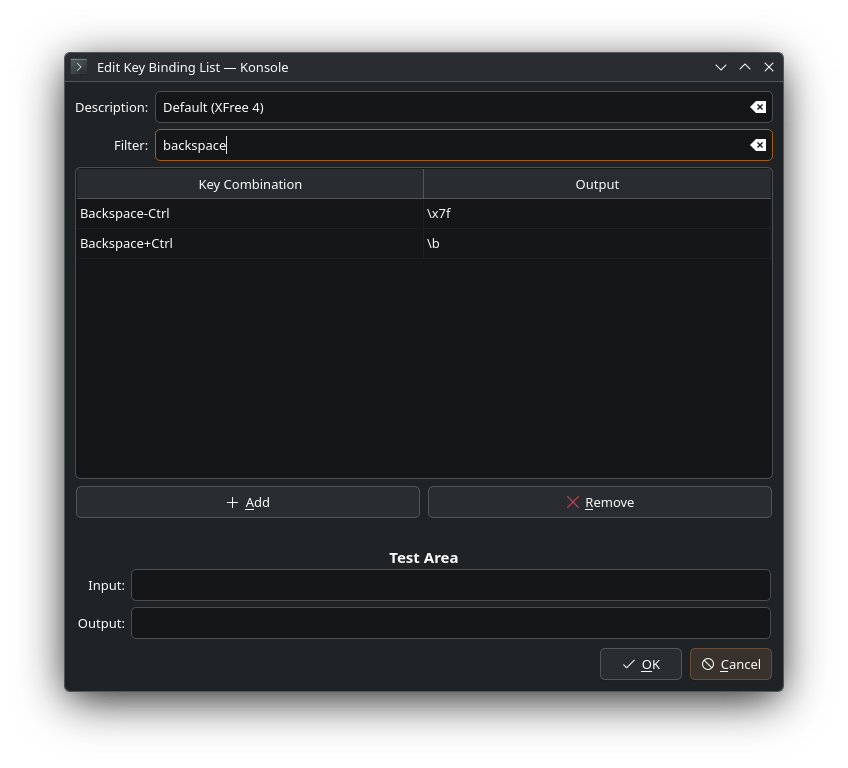
navigate to the keyboard tab, select the XFree 4 bindings and click Edit.
now filter for backspace and show me what is there… this is what mine looks like currently
Backspace-AnyModifier      \b

Backspace+Ctrl             \x7f
but i can only get the Alt+Backspace to delete the previous word, Ctrl+Backspace only deletes the previous character.
i’ve tried various combinations of the key combo and output and none of it seems to provide the expected results (or any change at all really), even after closing konsole and opening a new instance.
 Failed because “Ctrl + C” already does something else.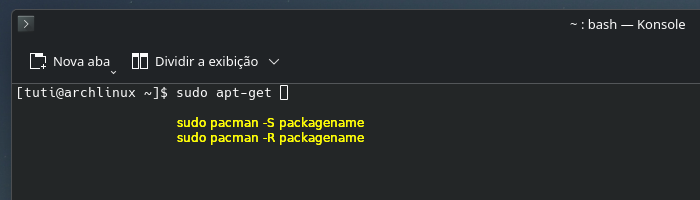
 Failed because “Ctrl + C” already does something else.