Hi,
A once speedy pc has now become sluggish and I don’t know where to start: boot takes more time than usual, Plasma loads but then makes me wait a lot for panels and the desktop to appear, the UX is at times responsive and at times is not. I’m looking for some advice on what to use or look for to troubleshoot the matter.
Specifics:
- Operating System: Fedora Linux 43
- KDE Plasma Version: 6.5.3
- KDE Frameworks Version: 6.20.0
- Qt Version: 6.10.1
- Kernel Version: 6.17.10-300.fc43.x86_64 (64-bit)
- Graphics Platform: Wayland
- Processors: 4 × Intel® Core™ i5-2400 CPU @ 3.10GHz
- Memory: 16 GiB of RAM (15.4 GiB usable)
- Graphics Processor: llvmpipe
- Manufacturer: LENOVO
- Product Name: 7052A9G
- System Version: ThinkCentre M91p
Notably, I struggled on installing Linux on this hardware for a long time: after installation distros won’t boot properly. I found that the something may be very old and I needed to use MBR as partition table instead of GPT. But it has always been like this, and before the system was very snappy.
Something I did recently (but I think still before this performance degradation) was reinstalling MariaDB for Akonady, as I tried replacing it with MySQL for some reasons and than reverted back when I saw that Akonadi wasn’t working.
The situation becomes a little better after some time from the boot, but the only startup application is Nextcloud. Even then, System Monitor generally shows this situation, where only background jobs and Firefox consume memory:

Something interesting: the userspace now loads in a lot of time!
samuele@192:~$ systemd-analyze
Startup finished in 734ms (kernel) + 2.311s (initrd) + 3min 43.066s (userspace) = 3min 46.112s
graphical.target reached after 25.253s in userspace.
samuele@192:~$ systemd-analyze blame
3min 26.753s plocate-updatedb.service
36.022s fwupd.service
16.326s dev-disk-by\x2did-ata\x2dCT480BX500SSD1_2043E4BDF397\x2dpart4.device
16.326s dev-disk-by\x2dpath-pci\x2d0000:00:1f.2\x2data\x2d4.0\x2dpart-by\x2dpartnum-4.device
16.326s dev-disk-by\x2duuid-44eb3bcb\x2d84e9\x2d4d12\x2d9392\x2d2b2ad927223b.device
16.326s dev-sdb4.device
16.326s dev-disk-by\x2dpartuuid-0bd2edd4\x2df51e\x2d4c46\x2da32c\x2d1c48ad1972e9.device
16.326s dev-disk-by\x2dpath-pci\x2d0000:00:1f.2\x2data\x2d4\x2dpart4.device
16.326s dev-disk-by\x2did-wwn\x2d0x500a0751e4bdf397\x2dpart4.device
16.326s dev-disk-by\x2dpath-pci\x2d0000:00:1f.2\x2data\x2d4.0\x2dpart-by\x2dlabel-ROOT.device
16.326s dev-disk-by\x2dpath-pci\x2d0000:00:1f.2\x2data\x2d4.0\x2dpart4.device
16.326s dev-disk-by\x2ddiskseq-2\x2dpart4.device
16.326s dev-disk-by\x2dpath-pci\x2d0000:00:1f.2\x2data\x2d4.0\x2dpart-by\x2duuid-44eb3bcb\x2d84e9\x2d4d12\x2d9392\x2d2b2ad927223b.device
16.326s dev-disk-by\x2dlabel-ROOT.device
16.326s sys-devices-pci0000:00-0000:00:1f.2-ata4-host3-target3:0:0-3:0:0:0-block-sdb-sdb4.device
16.326s dev-disk-by\x2dpath-pci\x2d0000:00:1f.2\x2data\x2d4.0\x2dpart-by\x2dpartuuid-0bd2edd4\x2df51e\x2d4c46\x2da32c\x2d1c48ad1972e9.device
15.981s dev-disk-by\x2dlabel-HOME.device
15.981s dev-disk-by\x2dpartuuid-0fe8ba45\x2daacc\x2d471b\x2db3a3\x2d33074673120b.device
15.981s dev-disk-by\x2dpath-pci\x2d0000:00:1f.2\x2data\x2d4.0\x2dpart-by\x2dpartnum-3.device
15.981s dev-disk-by\x2dpath-pci\x2d0000:00:1f.2\x2data\x2d4.0\x2dpart3.device
15.981s dev-disk-by\x2duuid-1627a1d2\x2db05d\x2d43b8\x2db1d6\x2dd66fbc19f0a7.device
15.981s dev-disk-by\x2dpath-pci\x2d0000:00:1f.2\x2data\x2d4.0\x2dpart-by\x2dlabel-HOME.device
15.981s dev-disk-by\x2dpath-pci\x2d0000:00:1f.2\x2data\x2d4\x2dpart3.device
15.981s dev-sdb3.device
15.981s dev-disk-by\x2dpath-pci\x2d0000:00:1f.2\x2data\x2d4.0\x2dpart-by\x2duuid-1627a1d2\x2db05d\x2d43b8\x2db1d6\x2dd66fbc19f0a7.device
15.981s dev-disk-by\x2ddiskseq-2\x2dpart3.device
15.981s dev-disk-by\x2did-wwn\x2d0x500a0751e4bdf397\x2dpart3.device
15.981s dev-disk-by\x2did-ata\x2dCT480BX500SSD1_2043E4BDF397\x2dpart3.device
15.981s sys-devices-pci0000:00-0000:00:1f.2-ata4-host3-target3:0:0-3:0:0:0-block-sdb-sdb3.device
15.981s dev-disk-by\x2dpath-pci\x2d0000:00:1f.2\x2data\x2d4.0\x2dpart-by\x2dpartuuid-0fe8ba45\x2daacc\x2d471b\x2db3a3\x2d33074673120b.device
15.975s dev-disk-by\x2dpath-pci\x2d0000:00:1f.2\x2data\x2d4.0\x2dpart-by\x2dpartuuid-f41aa128\x2d675d\x2d41d5\x2d99fa\x2d1ed3e033228a.device
15.975s dev-disk-by\x2dpath-pci\x2d0000:00:1f.2\x2data\x2d4.0\x2dpart-by\x2dpartnum-2.device
15.975s dev-disk-by\x2did-ata\x2dCT480BX500SSD1_2043E4BDF397\x2dpart2.device
15.975s dev-disk-by\x2ddiskseq-2\x2dpart2.device
15.975s dev-disk-by\x2dpath-pci\x2d0000:00:1f.2\x2data\x2d4.0\x2dpart-by\x2duuid-9c5530d4\x2d35b0\x2d4920\x2d8a5d\x2d0efa88aabc1b.device
15.975s dev-disk-by\x2dpath-pci\x2d0000:00:1f.2\x2data\x2d4.0\x2dpart-by\x2dlabel-BOOT.device
15.973s dev-disk-by\x2dpath-pci\x2d0000:00:1f.2\x2data\x2d4\x2dpart2.device
15.973s dev-disk-by\x2duuid-9c5530d4\x2d35b0\x2d4920\x2d8a5d\x2d0efa88aabc1b.device
15.973s dev-disk-by\x2dpartuuid-f41aa128\x2d675d\x2d41d5\x2d99fa\x2d1ed3e033228a.device
15.973s sys-devices-pci0000:00-0000:00:1f.2-ata4-host3-target3:0:0-3:0:0:0-block-sdb-sdb2.device
15.973s dev-disk-by\x2did-wwn\x2d0x500a0751e4bdf397\x2dpart2.device
15.973s dev-disk-by\x2dlabel-BOOT.device
15.973s dev-disk-by\x2dpath-pci\x2d0000:00:1f.2\x2data\x2d4.0\x2dpart2.device
15.973s dev-sdb2.device
15.967s dev-disk-by\x2did-wwn\x2d0x500a0751e4bdf397\x2dpart1.device
15.967s sys-devices-pci0000:00-0000:00:1f.2-ata4-host3-target3:0:0-3:0:0:0-block-sdb-sdb1.device
15.967s dev-disk-by\x2dpath-pci\x2d0000:00:1f.2\x2data\x2d4.0\x2dpart-by\x2dpartnum-1.device
15.967s dev-sdb1.device
15.967s dev-disk-by\x2dpartuuid-4b76e47b\x2d82fd\x2d42c1\x2d969d\x2dbd017a86a9e3.device
15.967s dev-disk-by\x2dpath-pci\x2d0000:00:1f.2\x2data\x2d4.0\x2dpart1.device
15.967s dev-disk-by\x2dpath-pci\x2d0000:00:1f.2\x2data\x2d4\x2dpart1.device
15.967s dev-disk-by\x2did-ata\x2dCT480BX500SSD1_2043E4BDF397\x2dpart1.device
15.967s dev-disk-by\x2dpath-pci\x2d0000:00:1f.2\x2data\x2d4.0\x2dpart-by\x2dpartuuid-4b76e47b\x2d82fd\x2d42c1\x2d969d\x2dbd017a86a9e3.device
15.967s dev-disk-by\x2ddiskseq-2\x2dpart1.device
15.846s dev-disk-by\x2dpath-pci\x2d0000:00:1f.2\x2data\x2d4.device
15.846s dev-disk-by\x2ddiskseq-2.device
15.846s dev-disk-by\x2dpath-pci\x2d0000:00:1f.2\x2data\x2d4.0.device
15.967s dev-disk-by\x2did-ata\x2dCT480BX500SSD1_2043E4BDF397\x2dpart1.device
15.967s dev-disk-by\x2dpath-pci\x2d0000:00:1f.2\x2data\x2d4.0\x2dpart-by\x2dpartuuid-4b76e47b\x2d82fd\x2d42c1\x2d969d\x2dbd017a86a9e3.device
15.967s dev-disk-by\x2ddiskseq-2\x2dpart1.device
15.846s dev-disk-by\x2dpath-pci\x2d0000:00:1f.2\x2data\x2d4.device
15.846s dev-disk-by\x2ddiskseq-2.device
15.846s dev-disk-by\x2dpath-pci\x2d0000:00:1f.2\x2data\x2d4.0.device
15.846s sys-devices-pci0000:00-0000:00:1f.2-ata4-host3-target3:0:0-3:0:0:0-block-sdb.device
15.846s dev-sdb.device
15.846s dev-disk-by\x2did-ata\x2dCT480BX500SSD1_2043E4BDF397.device
15.846s dev-disk-by\x2did-wwn\x2d0x500a0751e4bdf397.device
13.696s dev-disk-by\x2did-ata\x2dST500DM002\x2d1BD142_Z2AA3B91.device
13.696s dev-disk-by\x2ddiskseq-1.device
13.696s sys-devices-pci0000:00-0000:00:1f.2-ata1-host0-target0:0:0-0:0:0:0-block-sda.device
13.696s dev-disk-by\x2did-wwn\x2d0x5000c50035db4a60.device
13.696s dev-disk-by\x2dpath-pci\x2d0000:00:1f.2\x2data\x2d1.device
13.696s dev-sda.device
13.696s dev-disk-by\x2dpath-pci\x2d0000:00:1f.2\x2data\x2d1.0.device
13.692s dev-sda1.device
13.692s dev-disk-by\x2dpath-pci\x2d0000:00:1f.2\x2data\x2d1.0\x2dpart-by\x2dpartuuid-e2e1d3e8\x2daa1d\x2d451c\x2dba77\x2de8308cc9e420.device
13.692s dev-disk-by\x2dpath-pci\x2d0000:00:1f.2\x2data\x2d1.0\x2dpart1.device
13.692s dev-disk-by\x2dpath-pci\x2d0000:00:1f.2\x2data\x2d1\x2dpart1.device
13.692s dev-disk-by\x2ddiskseq-1\x2dpart1.device
13.692s dev-disk-by\x2did-ata\x2dST500DM002\x2d1BD142_Z2AA3B91\x2dpart1.device
13.692s sys-devices-pci0000:00-0000:00:1f.2-ata1-host0-target0:0:0-0:0:0:0-block-sda-sda1.device
13.692s dev-disk-by\x2dpartuuid-e2e1d3e8\x2daa1d\x2d451c\x2dba77\x2de8308cc9e420.device
13.692s dev-disk-by\x2dpath-pci\x2d0000:00:1f.2\x2data\x2d1.0\x2dpart-by\x2dpartnum-1.device
13.692s dev-disk-by\x2did-wwn\x2d0x5000c50035db4a60\x2dpart1.device
13.683s dev-disk-by\x2dpath-pci\x2d0000:00:1f.2\x2data\x2d1.0\x2dpart-by\x2dlabel-STORAGE.device
13.683s dev-sda2.device
13.683s dev-disk-by\x2dpath-pci\x2d0000:00:1f.2\x2data\x2d1.0\x2dpart2.device
13.683s dev-disk-by\x2did-ata\x2dST500DM002\x2d1BD142_Z2AA3B91\x2dpart2.device
13.683s dev-disk-by\x2dpath-pci\x2d0000:00:1f.2\x2data\x2d1\x2dpart2.device
13.683s dev-disk-by\x2dpath-pci\x2d0000:00:1f.2\x2data\x2d1.0\x2dpart-by\x2duuid-7ff738dd\x2d4ed6\x2d4622\x2d95a5\x2d2a9316703e86.device
13.683s dev-disk-by\x2dpartuuid-c86e4280\x2dc349\x2d469f\x2dad4d\x2d7e303800b485.device
13.683s dev-disk-by\x2did-wwn\x2d0x5000c50035db4a60\x2dpart2.device
13.683s sys-devices-pci0000:00-0000:00:1f.2-ata1-host0-target0:0:0-0:0:0:0-block-sda-sda2.device
13.683s dev-disk-by\x2dpath-pci\x2d0000:00:1f.2\x2data\x2d1.0\x2dpart-by\x2dpartnum-2.device
13.683s dev-disk-by\x2duuid-7ff738dd\x2d4ed6\x2d4622\x2d95a5\x2d2a9316703e86.device
13.683s dev-disk-by\x2ddiskseq-1\x2dpart2.device
13.683s dev-disk-by\x2dpath-pci\x2d0000:00:1f.2\x2data\x2d1.0\x2dpart-by\x2dpartuuid-c86e4280\x2dc349\x2d469f\x2dad4d\x2d7e303800b485.device
13.683s dev-disk-by\x2dlabel-STORAGE.device
13.628s dev-ttyS3.device
13.628s sys-devices-platform-serial8250-serial8250:0-serial8250:0.3-tty-ttyS3.device
13.626s dev-ttyS2.device
13.626s sys-devices-platform-serial8250-serial8250:0-serial8250:0.2-tty-ttyS2.device
13.611s sys-devices-pci0000:00-0000:00:16.3-0000:00:16.3:0-0000:00:16.3:0.0-tty-ttyS4.device
13.611s dev-ttyS4.device
13.608s sys-devices-platform-serial8250-serial8250:0-serial8250:0.1-tty-ttyS1.device
13.608s dev-ttyS1.device
13.557s dev-tpm0.device
13.557s sys-devices-pnp0-00:05-tpm-tpm0.device
12.692s systemd-journal-flush.service
12.385s sys-module-fuse.device
12.149s dev-ttyS0.device
12.149s sys-devices-pnp0-00:02-00:02:0-00:02:0.0-tty-ttyS0.device
12.116s sys-module-configfs.device
8.214s systemd-udevd.service
5.061s systemd-tmpfiles-clean.service
4.236s firewalld.service
4.071s passim.service
3.171s NetworkManager-wait-online.service
1.713s systemd-vconsole-setup.service
1.630s initrd-switch-root.service
1.357s mariadb.service
1.173s abrtd.service
1.118s upower.service
1.046s tuned-ppd.service
967ms geoclue.service
895ms udisks2.service
789ms polkit.service
785ms accounts-daemon.service
783ms home-storage.mount
736ms logrotate.service
687ms systemd-zram-setup@zram0.service
687ms chronyd.service
671ms tuned.service
670ms systemd-tmpfiles-setup-dev-early.service
655ms cups.service
640ms dev-zram0.swap
608ms dnf-makecache.service
504ms systemd-fsck@dev-disk-by\x2duuid-9c5530d4\x2d35b0\x2d4920\x2d8a5d\x2d0efa88aabc1b.service
462ms NetworkManager.service
419ms home.mount
395ms wpa_supplicant.service
369ms gssproxy.service
336ms systemd-tmpfiles-setup.service
325ms rsyslog.service
322ms systemd-random-seed.service
321ms systemd-sysctl.service
318ms user@1000.service
287ms systemd-udev-trigger.service
249ms ModemManager.service
235ms smartd.service
194ms unbound-anchor.service
187ms var-lib-nfs-rpc_pipefs.mount
186ms systemd-logind.service
176ms sssd-kcm.service
164ms rpc-statd-notify.service
144ms avahi-daemon.service
114ms lvm2-monitor.service
102ms dracut-shutdown.service
101ms boot.mount
98ms colord.service
93ms foomaticrip-upgrade.service
88ms systemd-resolved.service
86ms systemd-journald.service
83ms systemd-homed.service
74ms systemd-user-sessions.service
72ms rtkit-daemon.service
66ms dbus-broker.service
66ms switcheroo-control.service
65ms systemd-hostnamed.service
63ms packagekit.service
61ms uresourced.service
59ms systemd-oomd.service
57ms systemd-userdbd.service
56ms systemd-tmpfiles-setup-dev.service
49ms audit-rules.service
46ms plymouth-quit-wait.service
45ms auditd.service
45ms dracut-cmdline.service
45ms plymouth-quit.service
42ms systemd-binfmt.service
37ms dev-hugepages.mount
37ms dev-mqueue.mount
37ms systemd-udev-load-credentials.service
37ms flatpak-system-helper.service
36ms sys-kernel-debug.mount
35ms sys-kernel-tracing.mount
35ms plymouth-switch-root.service
33ms plymouth-read-write.service
33ms plymouth-start.service
32ms kmod-static-nodes.service
32ms systemd-fsck-root.service
28ms dracut-pre-udev.service
27ms user-runtime-dir@1000.service
27ms sys-fs-fuse-connections.mount
24ms modprobe@loop.service
23ms initrd-udevadm-cleanup-db.service
21ms dracut-pre-pivot.service
21ms initrd-cleanup.service
21ms systemd-userdb-load-credentials.service
20ms systemd-sysusers.service
20ms systemd-modules-load.service
20ms proc-sys-fs-binfmt_misc.mount
17ms systemd-update-utmp.service
16ms tmp.mount
16ms systemd-remount-fs.service
7ms initrd-parse-etc.service
5ms sshd-unix-local.socket
3ms systemd-coredump.socket
2ms lvm2-lvmpolld.socket
1ms systemd-bootctl.socket
1ms systemd-sysext.socket
1ms systemd-ask-password.socket
1ms systemd-factory-reset.socket
1ms systemd-udevd-control.socket
997us systemd-creds.socket
987us cups.socket
735us sssd-kcm.socket
643us systemd-userdbd.socket
455us dm-event.socket
420us avahi-daemon.socket
411us dbus.socket
311us pcscd.socket
301us systemd-oomd.socket
284us systemd-resolved-monitor.socket
248us systemd-udevd-varlink.socket
239us systemd-hostnamed.socket
224us systemd-logind-varlink.socket
170us systemd-journald-audit.socket
143us systemd-resolved-varlink.socket
133us iscsid.socket
88us systemd-rfkill.socket
87us iscsiuio.socket
82us systemd-homed-activate.service
79us systemd-journald.socket
79us systemd-journald-dev-log.socket
18us systemd-udevd-kernel.socket
After a reboot, the userspace loaded in 30 seconds, but the slugginesh is always there.
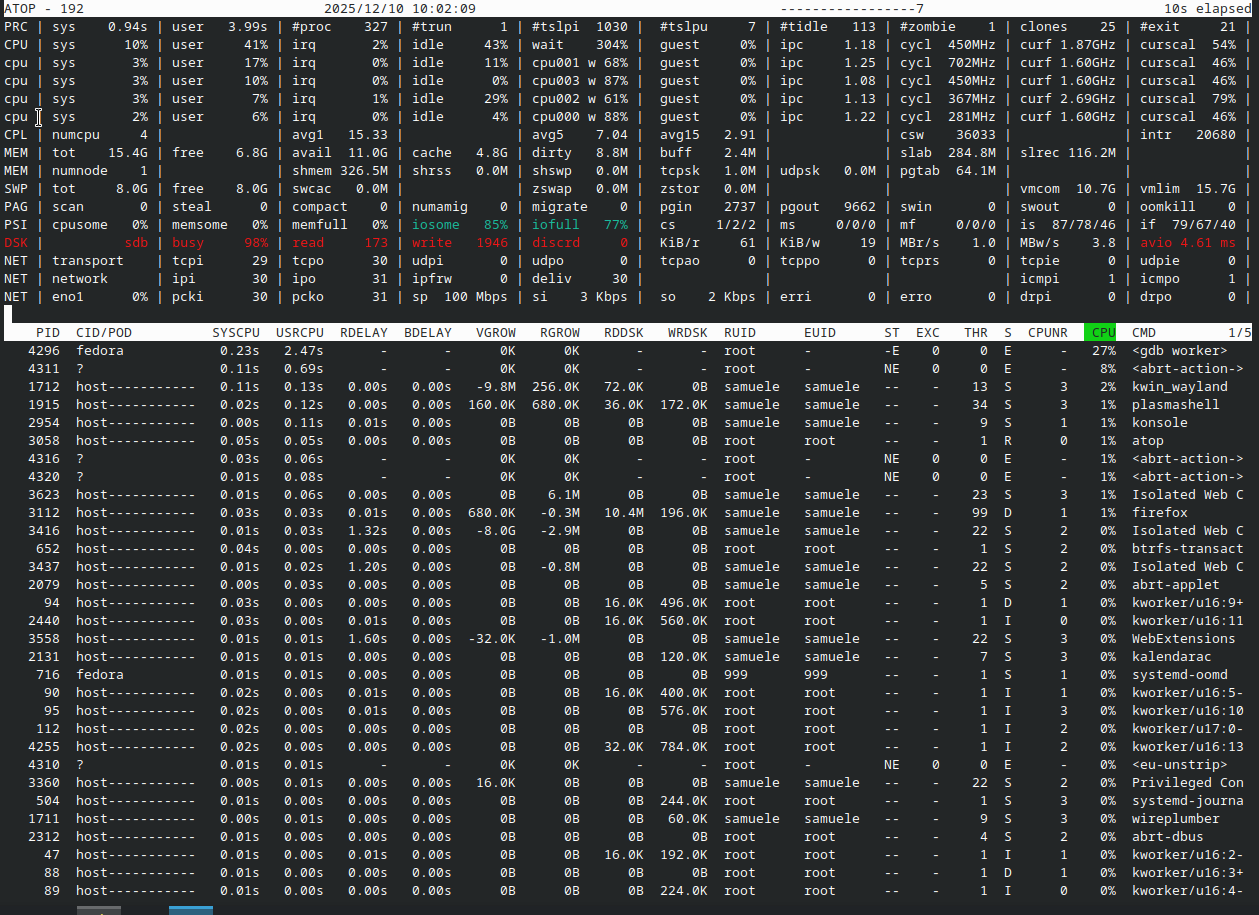
I launched atop during this second boot. The red DSK part appeared sometimes, but I think mainly when I launched Firefox after some time.