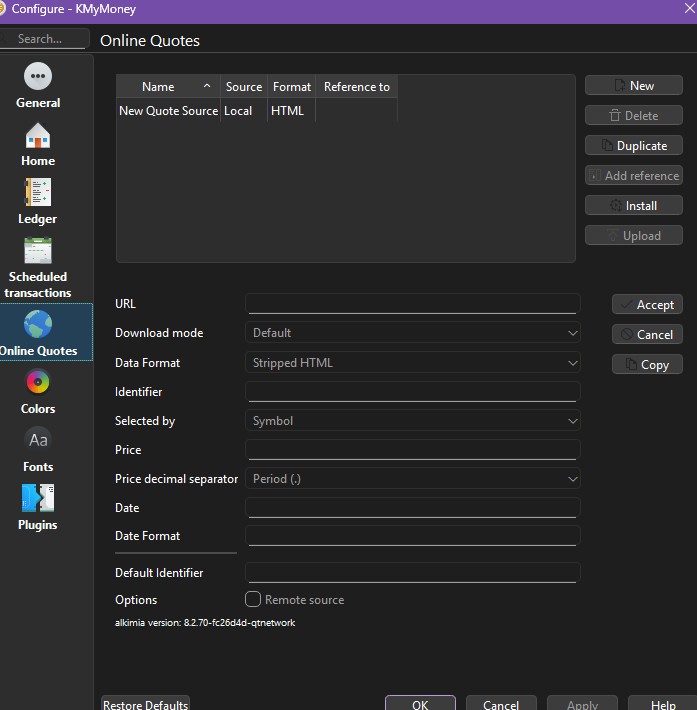
I just installed Kmymoney 5.2.1 c9bd024 on Windows 11 and online price update is not working at all. When I open the Online Sources there is none available. I opened my kmy file and still does not import or create any online source.
Thankfully I stil have the 5.1.3 version installed and it’s still working. I love the 5.2 version , loads up faster but I cannot add or set up any online pricing source. Please see the screenshot. Thank you
Any feedback please? I am still trying with Version 5.2 but when I open my file on 5.2 all my Online sources are gone and the set up looks different with an Install toggle and I don’t knwo what to do. I don’t have any of my previous price sources.
Apologies that nobody managed to reply to this. Between 5.1 and 5.2, much of how online quotes works was changed. The intent was to avoid the problem where sources (such as Yahoo Finance) would occasionally change the layout/formatting of the results, requiring changes to the KMyMoney settings. I had not realized that old quote sources got removed. I also realize that the Handbook has not been updated to reflect the new methods.
What you need to do is go to Settings/Configure KMyMoney… and select Online Quotes on the left. Click “Install” which will get you a list of the currently available sources. I installed and set up what I needed some time ago, so I don’t remember the details. However, on issue is that once you set up a new source, you will need to make sure that all your securities refer to that source by its new name. What I did to avoid needing to edit a very larger number of securities was to make a Duplicate of hte new source, using the same name as the old source (Yahoo Finance in my case.)
Let us know if this works for you, or if you still have questions.
Hello Ostroffjh thank you for replying. Thanks for explaining. I did manage to understand a bit and installed the available online quotes but I found that th eyahoo finance is not managing to fetch anything. I though so far managed to get the FX getting updated and used the same trick you posted, basically I duplicated the new currency online quote source and named the same as the one I used on the old 5.1.3 and it’s working fine.
@diegod There are more than one Yahoo based sources available when you click Install. I used Yahoo.com [Stock] to create my local “Yanoo Finance” (mainly there are separate Yahoo sources for stock prices and for currency exchange raters.) Not sure if that’s the one you tried using.
Hi there, thank you for replying so quickly. I have numerous problems now. Yes I used the same Yahoo.com stock and for stocks in London is now working. For other in US is giving an error “unable to find timestamp from date patter…” and same error on UK government bonds that used to work with my old Yahoo finance on Kmymoney 5.1.3 on all of those. In addition now the Currencies also not updating. I tried Duplicate the Yahoo.com (Currency) and changed to KMyMoney Currency but the error there is “KMyMoney Currency does not exist”. So for the moment online pricing is only working on UK stocks. I am still trying to change , duplicate, add something but I am stuck at 5.1.3 linux version because the 5.1.3 Windows 11 also not updating online prices on anything
Update : KMyMoney 5.2 online pricing source I finally managed to resolve the problem I had for the Currencies >> I did not know that I could change the source directly on the Online price update window by clicking on the source and choosing from a drop down. So I amended it to Yahoo (Currency) and it works fine. So the problems left is that the Yahoo (Stock) is working only for Uk listed equity and not for US and not working also for my UK bonds while before my Yahoo Finance source was updating everything without errors.
@diegod Can you provide your settings and a (US) symbol that is not working for you? To do that, please use the Copy button of the online settings on your Yahoo (Stock) entry.
Basically for all securities I am using the same Source which is Yahoo (Stocks) because on my Kmymoney 5.1.3 (linux based) everything was working from the same Yaoo Finance online source. But now on some of them I have an error ““unable to find timestamp from date patter…” or something like that
Update. The Stifel price was updated now I guess that “timestamp” code on the date settings is precluding sometimes updates outside market hours? Still I have the problem with the bonds that were working with Yahoo finance and still working on Kmymoney 5.1.3 (linux version) . I have the following error
I do not know if it is relevant here, but there have been reports of failing to get a price if the request is made on a weekend, for example, since there is no price for that day. Just to be sure this isn’t your problem, expand the dates requested to definitely include a working day.
Hello! Yes I think t’s relevant thank you. So I think that formula with a timestamp may mean that when market are closed the algo encounter an error. Still though I have the same error now on my UK bonds and the market should be open and even on another UK fund that is available on yahoo finance but same error.
0P00006TW8.L this is the fund that even if very similar to the regular UK stocks is no working and giving the same error.
Looking at it now looks like at leats on yahoo finance is “as of October 31st” so maybe it gets priced only once at the end of the day and that formula cannot pick it up?
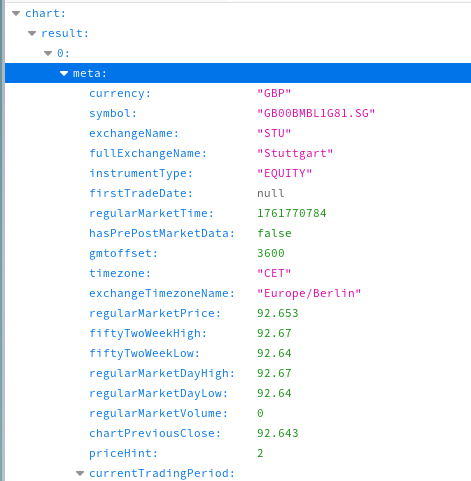
Hello, same situation with GB00BMBL1D50.SG which even if open and trading today but in Yahoo finance not beeing updated so the “time stamp” formula may get in the way to update the price and does not pick up the last.
Ok thanks. And for you it works on Kmymoney 5.2? I also used those seeintgs which are the same on my Yahoo Finance seeints on 5.1.3 but did not worl on 5.2. Will try again and let you know