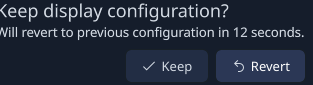
After updating to Plasma 6.6, some UI elements no longer render correctly at non-integer display scaling in themes that looked fine before the update.
Observed issues:
• Window decoration buttons (especially Aurorae themes) appear pixelated or incorrectly scaled
• Application style elements (e.g., check marks in dialogs like the Keep/Revert display settings prompt) are also affected
• These themes use large SVG assets that rendered sharply prior to 6.6
• Integer scaling (100% or 200%) renders correctly
• Fractional scaling (e.g., 125%, 150%) causes artifacts
This suggests a change or regression in the fractional scaling or rendering pipeline rather than a theme issue.
Has there been a change in how decorations or SVG assets are rasterized in 6.6, or is this a known bug?
I can provide additional diagnostics if needed. The screenshots below show 100% vs 125% scaling with vivid dark aurorae window decorations and application styles. Doesn’t show up with Breeze but these were crisp before the update.
I just responded on https://bugs.kde.org/show_bug.cgi?id=480863 … i accidentally added too many replies but someone else had the same problem in an earlier version of plasma. Also on opensuse TW curiously. Also it’s not just aurorae its also application styles. I’ll open a different bug report if you think I should. It’s a kvantum application style that is bugged out by the same author. Have used it for a long time