Notify users why a program fails to open

Greetings!

I’ve been discussing this privately for quite some time now and I decided to see what anyone working on the KDE project would think about trying to do a better job getting information to users without using the terminal. Currently when a user attempts to run a program that can’t run without a dependency they won’t get any dialogue at all. I think this a horrible UX experience and this could be handled much better. A very common complaint I run across is the lack of fuse being included with CachyOS. Whenever a new user tries to run an appimage it will fail to open. This would be a perfect opportunity for something in the linux ecosystem to pick up the fact that a dependency is missing and that it’s available for installation.

I think the ideal solution to these problems would be to pop up a menu that gives a list of missing dependencies and if they are available with a “install” button for the user to easily get the needed issues resolve and then run the program.
1 Like

But… That’s what the terminal excels at. Why would anyone go to the trouble of implementing which will undoubtedly be an inferior solution?

1 Like

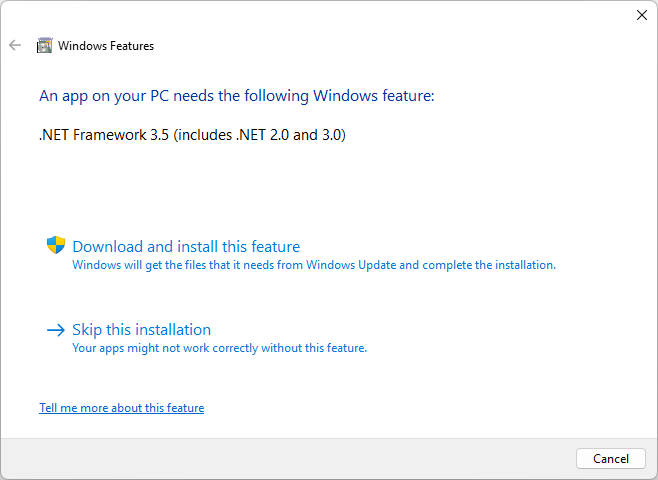
A lot of people prefer to have a GUI method to handle situations like this. Windows does this for .net framework, visual runtimes, and other random things pretty well. They don’t expect users to run to the CLI to let them know why a program failed to open. It’s a terrible UX experience.

1 Like

Here is a picture demonstrating precisely what I’m talking about on Windows.

i can agree that trying to launch a GUI program have absolutely nothing happen is a bad experience.

but that usually prompts the user to start investigating the myriad of things that could be preventing the expected result… from mis-configured settings, to incompatible hardware, to missing dependencies, to user error.

the first place to start that investigation it to try and run it from a terminal , but that requires you know the package name (not the GUI title) and it requires to you know what the command line parameters are for a “normal” launch… for this information, you need to look at the .desktop file to see how it was set up by the installer.

in the end, it would seem to be any sort of “overwatch” utility, constantly monitoring your screen clicks in hopes of detecting a launch attempt would be a massive burden on the OS and then it would have to make a lot of assumptions about the user’s intent in order to decide if it needs to intervene and start to diagnose, or if you “wanted” that outcome.

1 Like

Why do you keep saying it is “terrible”? If you think about it, there is little that could be more straightforward: App doesn’t work? Run it from the terminal. Get output.

Besides, that ALWAYS reliably works. You don’t have to expect the dev to include dialogue boxes or some other graphical element.

2 Likes

There is zero information given to the user. They don’t know if the program is just taking a while to launch, is running in the background, or failed to start. The issue I’m trying to highlight is that there is nothing to catch this event or inform the user on what to do. If there was something like “The program has exited unexpectedly, to get more information you can run it from the terminal to get more output” it would help some.

Many would say that having to resort to using the terminal for modern day tasks is a failure as well, at least from those who would be interested in coming to Linux from Windows. When you come from an arguably better UX (GUI) experience to one that relies heavily on the CLI for a crutch, it’s a bit rough.

2 Likes

Many would say

Who are these “many” you speak of?

that having to resort to using the terminal for modern day tasks is a failure as well,

Why?

at least from those who would be interested in coming to Linux from Windows.

AH! I see. Not “terrible”, not “a failure”. The word you are looking for is “unfamiliar”, and, to be specific, “for Windows users”. Don’t get me wrong, not deriding Windows users, just saying when you skip to another OS, is it not reasonable to think you may have to learn some things that may be slightly different from where you are coming from?

Sure, it would be kinda nice to have warnings of what’s going on if a program misbehaves (Plasma has this inbuilt already, by the way), but learning that very, VERY simple trick of “run it from a terminal” is all you really need most of the time to get an actionable diagnosis and it is not like it presents a massive learning curve.

2 Likes

how would this GUI element you are suggesting know the answers to these questions either?

i think what you are wishing for here is for apps to better communicate their errors to the user rather than just dump them into a console (if that).

and there i would agree, but these developers are not paid to make it super user friendly, in fact the are generally not paid at all.

The message in the image is clear, the application is needing a dependency and it is likely it won’t run without it installed. If you skip the installation the application may run into issues (so if you have issues, you probably know why). If you “skip” the installation and then nothing happens you know it’s probably because of .NET framework not being installed. Double clicking the .exe will pop up the installation prompt again making it easy to resolve the issue for a GUI focused user. In this instance it’s clearly curated by Microsoft at multiple levels to allow for such process control is possible.

I’m not arguing that the CLI method of doing things isn’t superior to the GUI approach, I don’t think anyone is. The expectations are different though for those who don’t want to do anything in the terminal. It’s an accessibility and usability issue that we are ultimately debating here. Ultimately users aren’t really interested in doing more (perceived) work to do the same tasks they’d get done on other operating systems.

As for familiarity, I have a few thoughts. Being familiar with something only creates a bias that can blind one from what truly is intuitive or not. We are familiar with opening programs with the terminal to get output, with may or may not be clunky to do depending on the device we are talking about (Touch only input devices are a sore spot for CLI). I wager to bet the overwhelming majority of people who use computers today would prefer to get information from the GUI if they interact with their computer with the GUI to begin with.

windows needs to do this kind of thing because they don’t have a package manager that takes care of all that stuff for the user.

this simply would not occur on a linux system.

the only way i can think of is if you tried to install a random .deb downloaded from the internet… and even then, the package manager will still inform you that it cannot be installed because of a missing dependency with a dialog much like this one.

2 Likes

Ok, so the core idea has merit - but it’s touching on a difference in philosophy more than a missing feature.

However, it’s not the Linux way (yet)…

With Windows, each application is an island, installingi it’s own copies of dependencies - but on Linux, the core concept is the package manager which shares dependencies system-wide.

So the ‘troubleshooter’ would be the package manager - and generally this works well in a terminal… but to some extent also in a ‘software centre’ - though I don’t really like those, the terminal is just easier and simpler and much more transparent.

Then there are other channel, like Appimages, or deb/rpm or binaries - so it gets way too complicated.

There isn’t a ‘Linux Feature’ like ‘.NET Framework’ - it just doesn’t exist - but finding missing dependencies (like somelibrary.so) wouldn’t be a universal troubleshooter for all distributions - it’s just too technically challenging.

However, I find that my package manager always manages dependencies automatically… and if that fails, then figuring out exactly what’s missing is nothing trivial…

The main reason you got shot down though is that most people with some experience don’t have any issue opening a terminal if the GUI doesn’t give enough clues.

Also, anyone who uses Windows will tell you that our package managers are no comparison for something like Windows’ DLL hell… and the user-facing error recovery is often far worse.

You just cherry picked one single example - how many others can you find? Also, distributions I used have always included relevant terminal output in their GUI, so it’s not entirely separated anyway (though Discover does tend to hide many details, though I never liked or used it myself).

So the answer really is - you’ll be waiting until it’s a cold day in hell before you get an automatic operating system that intelligently and reliably tells you everything that’s wrong as tidily as that prompt does.

1 Like

I don’t think this is a case of a user trying to force some change due to familiarity to Windows. I also think he is not talking about a personal desire, rather something that he thinks would benefit Linux beginners because they are familiar with GUIs, not because they are familiar with Windows. These are the same people that DEs like Plasma and Gnome help the most: Linux is becoming more and more ready for the masses because the terminal is less and less required, even if opening one would be a very simple trick.

For these reasons I think that the best approach to this thread is @skyfishgoo ‘s: it’s not a matter of “who needs that” (I too find frustrating that the GUI is not self-sufficient when a program doesn’t start, and I can use a terminal; furthermore, as he himself says, there are some prerequisites to run a program in the terminal that make it harder), nor that “developers are not paid for this”, rather a matter of “is it possible?”. Because it’s true that it would be difficult to automatize the analysis of what’s wrong, and that — as @ben2talk says — simple errors as missing dependencies don’t actually occur in Linux thanks to package managers.

5 Likes

You just cherry picked one single example - how many others can you find? Also, distributions I used have always included relevant terminal output in their GUI, so it’s not entirely separated anyway (though Discover does tend to hide many details, though I never liked or used it myself).

I admit that the most frequently reported issue comes from appimages do to them being shared rapidly as an alternative method for “paid” versions of applications. You will find appimages for programs like bambu studio which is used to handle proprietary features of the Bambu Labs 3D printers that have exploded in popularity over the years and have taken over the 3D printer market and r2modman which is a popular mod managing program that is used to easily manage mods for a large selection of games that also promote managing versions using appimages. There are also applications used alongside Path of Exile that are also exclusively managed using appimages, such as Awakened POE. If I think about this more and more I’ll be able to come up with many situations where software gets deployed like this and users are told that this is the “official” way to receive software updates from them.

I’m not a fan on how these packages get managed on the Linux platform, but I understand that there seems to be no changing the fact that it happens. I have already talked to a few devs on the CachyOS team about just adding appimage support to eliminate this common pain point, but those talks went nowhere sadly. This also wouldn’t fix the issue created by .debs and/or rpms being distributed in the wild as well sadly.

I don’t think this is a case of a user trying to force some change due to familiarity to Windows. I also think he is not talking about a personal desire, rather something that he thinks would benefit Linux beginners because they are familiar with GUIs, not because they are familiar with Windows.

This exactly, I try to be the voice for the people who feel like they don’t have one. I have used Linux exclusively for years and am comfortable on the Linux platform the way it is. I just want to see the platform grow and be more approachable to more people.

2 Likes

I don’t think it is realistic what is being proposed. Is this supposed to work at the desktop environment level? So somehow magically Plasma is supposed to know what has gone awry with every app in every situation, KDE or not and report about it in plain English? How is that supposed to work?

It is true that Plasma can already detect if an app is taking up too many resources and if it is taking too long to respond (in some cases), but not tell you why or much more beyond that.

Also, if using the terminal is beyond an end users’ required skill set, surely interpreting an error message is also out there.

And (surprise!) I still think the terminal is the best tool to get detailed diagnostics. Why would you over-complicate stuff when you already have Konsole? Sounds like a waste of human resources reinventing the wheel (but worse) to me.

Finally there is the matter of shared responsibility: when you become a free software user, especially if the software is created by a community of volunteers, like KDE, you also acquire a set of responsibilities. It is a bit like being required to know the highway code before driving a vehicle. The bear minimum would be, in my opinion, knowing how to run an app from a terminal and then knowing how to submit a bug report to help devs make the system better.

The alternative is being treated as a dumbf**k by corporations that want you to remain that way and then take advantage of you, thus leading to the appalling state of today’s digital landscape.

Been there, done that, let’s not go back, eh?

2 Likes

I would not have expected that a distribution would explicitly make it hard/impossible to run AppImage based software.
In such a case it might be better to move to one that doesn’t do that.

No layer above that can offer a fix if the foundation intentionally lacks support for something.

Such a situation is different because the package manager tool that handles the install will tell you about missing dependencies.

The only problem you can run into here is badly created packages that do not specify their dependencies correctly and just assume certain dependencies to be present.

I guess it would be very difficult to detect that reliably, let alone know in a cross-distro way which packages would need to be installed.

However, Plasma could potentially improve its feedback when a program fails to launch.

Not sure if the code for launching gets any output like a shell would but if it does it could potentially offer to show that.

Alternatively, or additionally, it might be able to offer a “launch in terminal” option to remove the need for the user to know or guess the executable name.

2 Likes

for appimage there are some GUI “managers” out there for this, but since “installing” an appimage is all just point and click from dolphin, i’ve not really seen a use case for these apps.

i remember being briefly stymied by the appimage for imagemagick after moving the downloaded file to my local bin directory and changing the file permissions to executable, i then tried to double click on it to run it.

nothing.

no error message, no indication that the file was even an executable at all.

then i tried running imagemagick from the command line and there it was.

duh, it’s a command line utility.

some user knowledge is always going to be expected, and i can’t envision a plasma feature that could possibly compensate for my error.

Then we agree: the issue is that it’s not possible, not that it wouldn’t be useful. Maybe something is possible, as @krake says, but a discussion on it should take place. I think that arguing in favour of requiring terminal usage from everyone who uses Linux is not a step in the right direction for such discussions: I see Plasma and Gnome developers working so that users can use the terminal less and this is what could drive Linux adoption.

It seems to me that you equal responsibility and freedom: big corporation are not giving you the freedom to use your device; Linux gives you the freedom to do what you want, but some free software helps removing responsibility from the user so that less experienced people can access it: DEs, GUIs, distros, package managers and so on. I think @ruineka is advocating for this and I too think that getting an error would be better than nothing: I cannot solve many things myself, but if I have the error I can ask around.

I think the discussion should go this way: what’s possible and/or convenient?

1 Like

Not going to beat this one to death as it is off topic, but I’d just like to point out that I am not saying “responsibility” equates “freedom”. I am saying that assuming a modicum of responsibilities (and educating yourself on how to manage these responsibilities) is how you defend your freedom.

But, yeah, let’s move on from this. This is a discussion for another thread.

1 Like

I think I agree with @krake here. Making it easier for new users to run application from console is a better solution here.

More advanced solution could be some kind of ‘investigation’ option, where you run the app and the output/error logs (if present) are caught, (displayed to the user) and analysed for any known/more obvious errors with some suggestions/way to export. But that screams power user more then the new one and the analysis part definitely wouldn’t be easy to create.

2 Likes