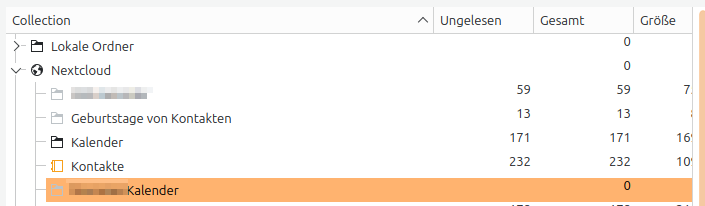
I use Nextcloud to host my calendar; I have four calendars there; 1. my personal calendar, 2. my contacts’ birthdays (automatically created by nextcloud, 3. a calendar shared with me by another user on this instance, 4. an .ics-Subscription.
All calendars are shown in Merkuro’s and KOrganizer’s side bar, however the events from 3. are not visible. They are visible in Thunderbird. This hasn’t been a problem in the past but I’m not able to pinpoint when the events from the shared calendar were no longer displayed.
What I’ve tried:
I’ve tried re-adding my Nextcloud account to KOrganizer → no effect.
I’ve also created a new user on my instance and let him share a calendar with me → the calendar and its events show up in KOrganizer → there seems to be a problem with this specific calendar.
Logs
There are some logs that might be related to the problem:
13:03:48 akonadiserver: org.kde.pim.akonadiserver: Error while handling command FetchItems on connection akonadi_davgroupware_resource_3 (0x5ca4b44f8900) 13:03:48 akonadiserver: org.kde.pim.akonadiserver: Error while handling command FetchItems on connection akonadi_davgroupware_resource_3 (0x5ca4b44f8900) 13:01:43 akonadiserver: org.kde.pim.akonadiserver: Handler exception when handling command FetchItems on connection ETMCalendar (0x5ca4b449a460) : Item query returned empty result set 13:01:43 akonadiserver: org.kde.pim.akonadiserver: Handler exception when handling command FetchItems on connection ETMCalendar (0x5ca4b44df460) : Item query returned empty result set 13:00:58 akonadiserver: org.kde.pim.akonadiserver: Error while handling command FetchItems on connection akonadi_davgroupware_resource_3 (0x5ca4b44f8900) 12:57:12 akonadiserver: org.kde.pim.akonadiserver: Subscriber Akonadi::Server::NotificationSubscriber(0x72f2a8152170) identified as “ItemMonitorMonitor - 105838506707616” 12:57:12 akonadiserver: org.kde.pim.akonadiserver: Subscriber Akonadi::Server::NotificationSubscriber(0x72f2a8151d40) identified as “ETMCalendarMonitor - 105838505083520” 12:57:12 akonadiserver: org.kde.pim.akonadiserver: Subscriber Akonadi::Server::NotificationSubscriber(0x72f2a812f080) identified as “TagCacheMonitor - 105838504647864” 12:57:12 akonadiserver: org.kde.pim.akonadiserver: New notification connection (registered as Akonadi::Server::NotificationSubscriber(0x72f2a8152170) ) 12:57:12 korganizer: endResetModel called on Akonadi::TodoModel(0x6042729696a0, name = “TodoModel”) without calling beginResetModel first 12:57:11 akonadiserver: org.kde.pim.akonadiserver: New notification connection (registered as Akonadi::Server::NotificationSubscriber(0x72f2a8151d40) )
I did quite some testing today with korganizer and nextcloud and haven’t found anything obviously broken. however, I don’t have any nextcloud calendars shared with other users.
a few things to try:
remove the sharing and see if that helps at all
did you try creating a new calendar (rather than a new user) and share that?
it could be your akonadi database is in bad shape. you could try running from the terminal akonadictl fsck and akonadictl vacuum
As the other NC user: Creating a calendar, creating an event, sharing the calendar with my NC user → I can see both the calendar and the event in KOrganizer, still not the calendar in question, though.
As the other NC user: Removing the sharing (made the calendar disappear from KOrganizer) and re-sharing it → Calendar appears again in the sidebar, but events are still not visible.
I’ve tried running akonadictl fsck and akonadictl vacuum, but they don’t seem to be doing anything, even after several hours. There’s no output whatsoever in the shell and according to system monitor, ‘akonadictl’ was never using more than 5mb of memory.
There are a few more lines in the logs that might be relevant though:
16:30:22 akonadi_davgrou: org.kde.pim.davresource: Unable to fetch collections 320 “Ungültige Antwort des Treibers”
This might’ve been after trying akonadictl vacuum for the first time, even though I have to admit I’m not sure about the timing anymore:
09:37:32 akonadiserver: org.kde.pim.akonadiserver: Handler exception when handling command FetchItems on connection plasmashell-1564900712 (0x654ee69574f0) : Operations based on remote identifiers require a resource or collection context
09:37:30 kalendarac: endResetModel called on Akonadi::EntityMimeTypeFilterModel(0x64f523f537a0, name = "Show headers") without calling beginResetModel first
09:37:30 akonadi_control: org.kde.pim.akonadicontrol: Akonadi server is now operational.
09:37:30 dbus-daemon: apparmor="DENIED" operation="dbus_bind"  bus="session" name="org.freedesktop.Akonadi.Janitor" mask="bind" pid=3458 label="/usr/bin/akonadiserver"
09:37:29 akonadiserver: Connecting to deprecated signal QDBusConnectionInterface::serviceOwnerChanged(QString,QString,QString)
09:37:29 akonadi_control: Connecting to deprecated signal QDBusConnectionInterface::serviceOwnerChanged(QString,QString,QString)
I tried running akonadictl fsck and akonadictl vacuum again this morning after a reboot and for some reason it worked this time; both commands finished after a few seconds with vacuum done and Consistency check done.
It doesn’t seem to have had an effect on the calendar in question though - its events still don’t show up in KOrganizer.
I still haven’t found the root of the problem, but have done some more troubleshooting: Subscribing directly to the calendar with the calendar owner’s credentials leads to the same problem: the calendar is visible in the list, but none of its events are shown. Sometimes triggering its visibility leads to a KOrganizer crash (but I’ve not been able to reproduce that reliably or get any meaningful logs about it). So the problem doesn’t seem to be caused by it being a shared calendar, but with the calendar itself. Are there any ways to find out what the problems with the calendar are without sharing it (because it contains personal data…)?
I’m having a similar issue, but also haven’t really gotten to a root cause: contacts work, the birthday calendar works, a Google calendar that I have subscribed to in my Nextcloud instance also works. It’s only the default calendar that stays empty for me in Akonadi-backed programs. The same default calendar works on iOS, so at this point I suspect it’s the combination of Akonadi and Nextcloud that’s responsible.
Seems there a a few people with the same Problems as here.
Since the upgrade to Debian Trixie kalender and kontacts are broken.
I use an external Nextcloud from my club. It works.
I have a radicale server running on my NAS. It stores personal appointments and contacts and is used to synchronize this data with my smartphones. Stock Android and GrapheneOS work wonderfully with it. Only the KDE PIM suite forgets all contacts and appointments from radicale as soon as it is unavailable. The only remedy seems to be to delete and recreate the address book and calendar in Kontact.
However, this also deleted the addresses on the radicale once. But these could be restored by resynchronizing from the smartphone.