Hello!
When i make a screenshot, and add some paints on it, i want to use “enter” instead of “ctrl+c” to copy it to the clipboard, but i can’t find such option anywhere. Please make such option. Thanks!
there is a copy button in the spectacle GUI, are you using spectacle, or something else?
Yes, i am talking about spectacle (i thought this is spectacle thread:) ), and i don’t want to use a copy button because it makes me click two extra times (three lines and that copy), and i am talking about an hotkey and option to change from ctrl+c to enter.
i’m using spectacle 23.08 so i don’t see the hamburger menu, i just see a row of buttons (so only one click for me)… is there no option to keep that menu expanded on your version? What happens if you hit Ctrl+M in your version?
anyway, if i understand your use case, you have made annotations but you don’t want to save them to a file, you just want to copy what is shown in spectacle so that you have it in clipboard, correct?
right now Ctrl+C is the global shortcut for Copy and you want a local exception in spectacle to make that shortcut as Enter… i guess an option in general like this?
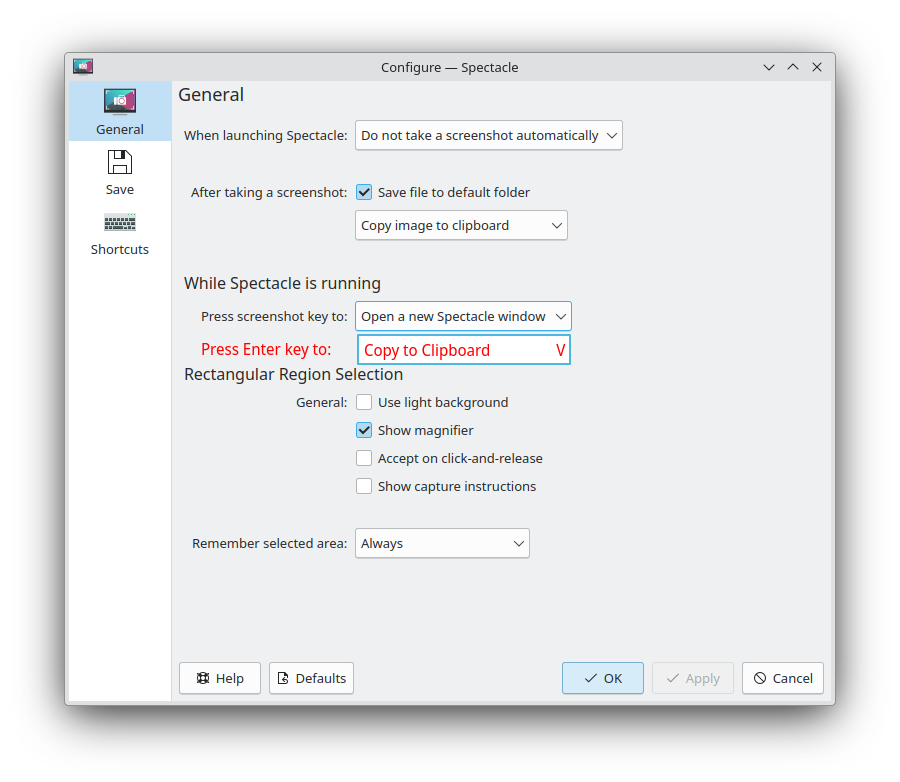
where i would argue the default would be “Do Nothing” and the other option would be “Save”
1 Like
You are right. That’s what i want!
Now i forget that i should use ctrl+c and i press enter - windows is closing and appears as a popup at the right bottom conner, than i notice i forget to copy it and i should click hamburger and then click “copy”. That was what i mean.
enter instead of ctrl+c (as it was at flameshot i guess) will be very helpful for me.
Did i answered on all you questions?)
Maybe we can have a fielf where we can select any key to copy, at the spectacle or at the settings - keyboard - shortcuts - spectale, no matter.. If it’s not too hard to implement)
Thanks!