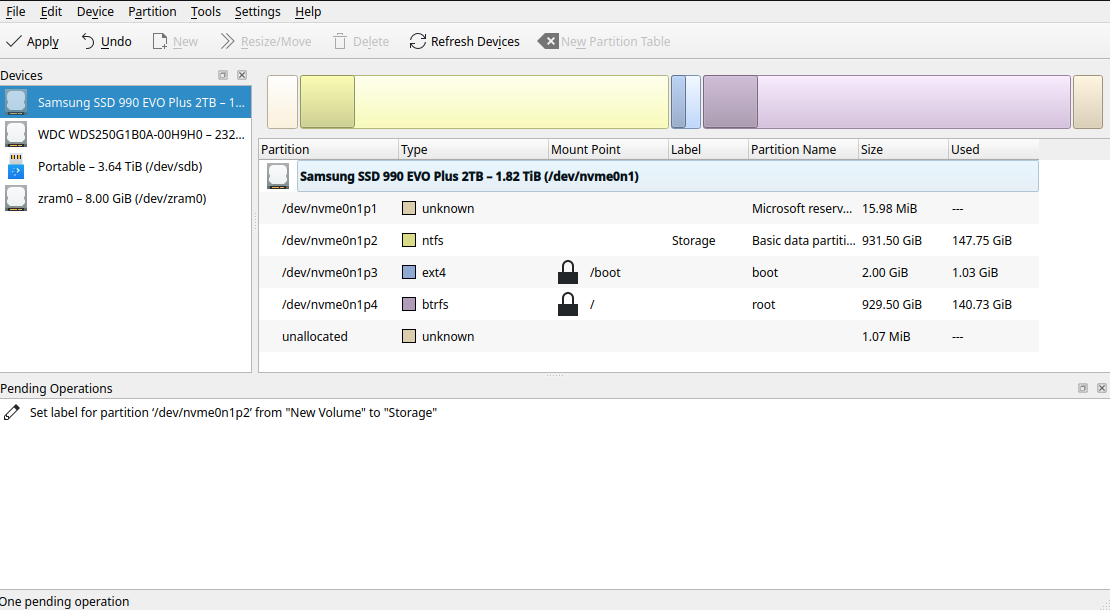
I am running Nobara Linux 42, with partitionmanager 25.08.0. My hard drive is a Samsung SSD 990 EVO Plus 2TB. My issue is as follows:
I launch partitionmanager from a terminal with sudo partitionmanager. I would like to rename the partition currently labeled “New Volume”.
I apply a new name by editing the properties and queue the operation.
When I apply the operation, I get a “All operations successfully finished” popup, but the partition’s name is still new “New Volume”. I’ve tried rebooting my system after applying the operation, but that did not work. Any ideas what’s going wrong?
Is a NTFS partition from M$. You tried from W$?
Regards
I have a confession to make…
I pretty much exclusively used Disks (gnome-disks) from Cinnamon to Manjaro ever since I royally messed up editing fstab and tried to reboot.
Try that and report back 
Today I learnt a hidden option of Disks (I already had it installed in my Plasma).
Regards
Krovikan’s suspicion that using Windows’ disk management to change the label would work was correct; it did work. Gnome-disks did not work, but does provide a more useful error message complaining that the operation fails due to a dirty filesystem. After using Windows’ chkdsk utility to repair the filesystem, gnome-disks still fails. My guess is that the problem is probably the fast startup setting that Windows likes to enable on disks it touches, but I didn’t check to confirm this.
Right now it’s necessary for my setup that Windows is able to see and run things from this partition. Once I’ve fully de-Windows-ified my system, I guess I should change the filesystem on this partition to something other than NTFS.
Thanks!