PC reboots instead of going to sleep/hibernating

[Cross-post from my post on the Unix StackExchange website.]

I have a laptop running Nobara Linux 42 (kernel version 6.17.7-200.nobaba.fc42.x86_64) with KDE/Plasma Desktop Edition (version 6.5.2) and Wayland. My processor is an Intel i7, and I have an Nvidia GPU. I cannot, for the life of me, make my Laptop go to sleep.

My power settings for battery mode (which I’ll presume the laptop is on, for the discussion) in KDE/Plasma’s settings, using powerdevil, are:
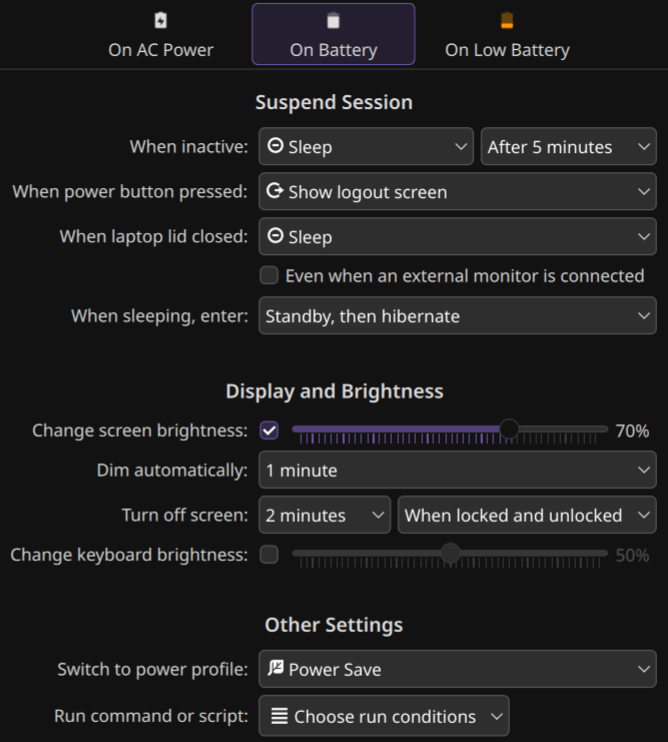
This means that the laptop should go to sleep (i.e. suspend) after five minutes and hibernate (i.e. hibernate) later, meaning it should enter suspend-then-hibernate mode. Note that the laptop does indeed dim and turn off the screen properly. My /etc/systemd/sleep.conf file is:

[Sleep]
AllowSuspend=yes
AllowHibernation=yes
AllowSuspendThenHibernate=yes
AllowHybridSleep=no
SuspendState=mem freeze
HibernateMode=platform shutdown
MemorySleepMode=deep
HibernateDelaySec=15min
HibernateOnACPower=no

and the outputs of cat /sys/power/ state\disk\mem_sleep are:

state: freeze mem disk
disk: [platform] shutdown reboot suspend test_resume
mem_sleep: s2idle [deep]

However, when using the keyboard shortcut (fn+f11), the power button menu (power key → sleep), the start menu (win key → sleep), or waiting for about ten minutes, the system hard reboots (turns off in less than a second without asking for confirmation and then turns back on again to the bootloader password screen); and when hibernating via the power button menu or the start menu, it hibernates (takes time to “hibernate”) and then hard reboots.

I have checked journalctl -b-1 and haven’t seen any errors, crashes, kernel panics, or anything wrong in general (but maybe I didn’t know to look for something), and I tried checking cat /proc/acpi/wakeup to see if I can disable/enable some devices which wake my system up, but I didn’t succeed. When using the command sudo systemctl suspend the issue remains.

I would really appreciate help with this issue. I’ve scoured the web, read the man page of systemd-sleep, etc. Thank you ahead of time.

i’ve had issues with freeze before, so my first suggestion is to remove that word from sleep.conf

you might even try removing platform in case your firmware is not able to respond.

and if using the plasma GUI controls is not working but using the command

sudo systemctl suspend-then-hibernate works then i would file a bug report about it.

i filed one about my plama 5 GUI controls and was told it’s not longer supported so i just use a script and i tell the GUI to do nothing

Thank you for the advice! I’ve removed freeze, and change platform to suspend, and now hibernation works but sleep still hard reboots the laptop.

However, I discovered, via systemctl is-system-running (which I also just discovered), that my computer’s performance is degraded. I then ran systemctl --failed and got back this info:

  UNIT                                   LOAD   ACTIVE SUB    DESCRIPTION                  
● systemd-suspend-then-hibernate.service loaded failed failed System Suspend then Hibernate

Legend: LOAD   → Reflects whether the unit definition was properly loaded.
        ACTIVE → The high-level unit activation state, i.e. generalization of SUB.
        SUB    → The low-level unit activation state, values depend on unit type.

1 loaded units listed.

Alright, that doesn’t seem right. But then I rebooted, and suddenly it’s fixed. So I switched back to platform, and it still works. Hibernation works now! And then I tried using sudo systemctl suspend and my screen went dark but then turned back on to the lock screen. And then I ran sudo systemctl suspend-then-hibernate, and nothing happened, and suddently systemd-suspend-then-hibernate.service is failing again. I ran systemctl status systemd-suspend-then-hibernate.service and got back:

× systemd-suspend-then-hibernate.service - System Suspend then Hibernate
     Loaded: loaded (/usr/lib/systemd/system/systemd-suspend-then-hibernate.service; static)
    Drop-In: /usr/lib/systemd/system/service.d
             └─10-timeout-abort.conf
     Active: failed (Result: exit-code) since Thu 2025-11-13 22:43:39 IST; 9s ago
 Invocation: 62f4caa8f3d34bf4b45773b6d6078298
       Docs: man:systemd-suspend-then-hibernate.service(8)
    Process: 7469 ExecStart=/usr/lib/systemd/systemd-sleep suspend-then-hibernate (code=exited, status=1/FAILURE)
   Main PID: 7469 (code=exited, status=1/FAILURE)
   Mem peak: 4.2M
        CPU: 65ms

Nov 13 22:43:38 Ethan-Computer systemd[1]: Starting systemd-suspend-then-hibernate.service - System Suspend then Hibernate...
Nov 13 22:43:38 Ethan-Computer systemd-sleep[7469]: Successfully froze unit 'user.slice'.
Nov 13 22:43:38 Ethan-Computer systemd-sleep[7469]: Performing sleep operation 'suspend'...
Nov 13 22:43:39 Ethan-Computer systemd-sleep[7469]: Failed to put system to sleep. System resumed again: Input/output error
Nov 13 22:43:39 Ethan-Computer systemd-sleep[7469]: Successfully thawed unit 'user.slice'.
Nov 13 22:43:39 Ethan-Computer systemd[1]: systemd-suspend-then-hibernate.service: Main process exited, code=exited, status=1/FAILURE
Nov 13 22:43:39 Ethan-Computer systemd[1]: systemd-suspend-then-hibernate.service: Failed with result 'exit-code'.
Nov 13 22:43:39 Ethan-Computer systemd[1]: Failed to start systemd-suspend-then-hibernate.service - System Suspend then Hibernate.

and now I’m stuck again, because trying to sudo systemctl restart systemd-suspend-then-hibernate.service throws an error.

I don’t know how to edit a post here so I’m posting another reply. I found this post (On the arch linux forums, id=306209, can’t post links here) online, and it did help, probably (because nvidia-suspend-then-hibernate.service was disabled, so I enabled it), but now sudo systemctl suspend/suspend-then-hibernate/sleep all make my PC hard reboot, even though sudo systemctl --wait is-system-running outputs running. I ended up restoring my PC to the previous kernel, which wiped sleep.conf, but still didn’t solve the issue.

for HibernateMode=

you want either

platform shutdown

using suspend will be likely be the same as SuspendState=mem which is probably confusing things.

i suggested shutdown as an option because your system appeared to be having issues with relying on platform to figure things out… you should only change this part if removing freeze doesn’t satisfy.

i would start over but do not introduce suspend into the mix.

I ended up starting over. Hibernate works now (without a sleep.conf file, and the mode is platform, so that wasn’t the issue, but suspend does not work and still crashed and reboots my PC.

when you say hibernate works, are you using the command line sudo systemctl hibernate ?

and are you saying if you use the command sudo systemctl suspend that it will crash?

have you tried using sudo systemctl suspend with the word freeze removed from your sleep.conf ?

I can use the command, the GUI options, all work.

It will indeed crash with the command. I have tried removing freeze; no difference.

please post the current contents of sleep.conf

[Sleep]
HibernateDelaySec=15min

that’s missing a lot of info… most importantly it means its still using freeze which you already identified as contributing to the issue.

just copy the whole thing in there and uncomment the parts you want to modify.

It’s not missing anything, because when the file lacks something, the default value gets used. The default file is in /usr/lib/systemd/sleep.conf[1] and contains what you would expect. However, just for testing purposes, I copied everything over to /etc/systemd/sleep.conf and got this file:

[Sleep]
#AllowSuspend=yes
#AllowHibernation=yes
#AllowSuspendThenHibernate=yes
#AllowHybridSleep=yes
SuspendState=mem
#HibernateMode=platform shutdown
#MemorySleepMode=
HibernateDelaySec=15min
HibernateOnACPower=no
#SuspendEstimationSec=60min

Anyway, the results before and after modiying sleep.conf are the same: the system crashes and reboots when using systemctl suspend.


Just for the heck of it, I modified SuspendState=mem to be SuspendState=freeze. And now it works. Fully works. Both systemctl suspend and systemctl hibernate.
I do not know why, or how this happened. I will report back in a day if it still works and no issues arise.


  1. As is noted in it: Entries in this file show the compile time defaults. Local configuration should be created by either modifying this file (or a copy of it placed in /etc/ if the original file is shipped in /usr/), or by creating "drop-ins" in the /etc/systemd/sleep.conf.d/ directory. The latter is generally recommended. Defaults can be restored by simply deleting the main configuration file and all drop-ins located in /etc/. ↩︎

1 Like

Reporting back: it’s somehow, magically, completely fixed… Sleep (via the GUI or a command) now suspends properly (S1, aka s2idle, aka freeze), and after 15 minutes starts hibernating (S4), and if I select hibernate directly it also works. The PC goes to sleep/hibernation as it should, and it wakes up when I want it too, restoring what I work on. So, to sum up the fixing procedure: uninstall the graphics drivers completely, reinstall them, reset sleep.conf, and then set it to what you want it to be. Oh, and obviously keep the settings GUI up-to-date and reboot between each step. Thank you for the debugging help, @skyfishgoo.

The only weird quick is that it seems I can’t wake my PC up from sleep (S1) using the integrated keyboard, mouse or power button, but a USB mouse works. I might try figuring that out another day, maybe via cat /proc/acpi/wakeup.