Plasma 6.5.2 : System Monitor GPU monitoring

Hi,

I’ve just tested out the Fedora 43 Kde live and the gpu monitoring on the system monitor work perfectly however my laptop is currently running Debian Unstable with latest kernel 6.17.6 and the gpu monitoring isn’t working at all it always show 0, so could someone help me out? What’s the differences in terms of the software / package that I might needed for it to work?

Thanks in advance!

I’m sorry I couldn’t find the edit button.

I should be more precise about my problem the gpu monitoring isn’t woking on the pie chart which doesn’t show any activities, however it show the correct usage on the application panel with added gpu column so is this a bug in plasma on Debian, becuase in Fedora 43 both pie chart and the application panel also correctly show the values.

Thanks for the help!

Hi what kind of gpu(s) are you using. Since there is not a standard way it depends on the vendor how we fetch that info.

Hi davidre,

My apology for not providing the system details on the first post.

Operating System: Debian GNU/Linux 13
KDE Plasma Version: 6.5.1
KDE Frameworks Version: 6.18.0
Qt Version: 6.9.2
Kernel Version: 6.17.6+deb14-amd64 (64-bit)
Graphics Platform: Wayland
Processors: 16 × Intel® Core™ Ultra 7 255H
Memory: 32 GB of RAM (30.7 GB usable)
Graphics Processor: Intel® Graphics
Manufacturer: ASUSTeK COMPUTER INC.
Product Name: ASUS Zenbook 14 UX3405CA_UX3405CA
System Version: 1.0

The GPU is Intel Arc 140T which is an integrated gpu on the Intel Core Ultra 7 255H.

I understand that it could be the vendor related, however after testing with Ubuntu 25.10, Kde Neon Unstable, Debian Kde Plasma Testing as well as Fedora 43 Kde Plasma, the only one that work flawlessly is the Fedora 43, and the most buffling question is why the Pie Chart not showing anything while under the Application panel do show the gpu usage as well as memory usage correctly regardless of the distro.
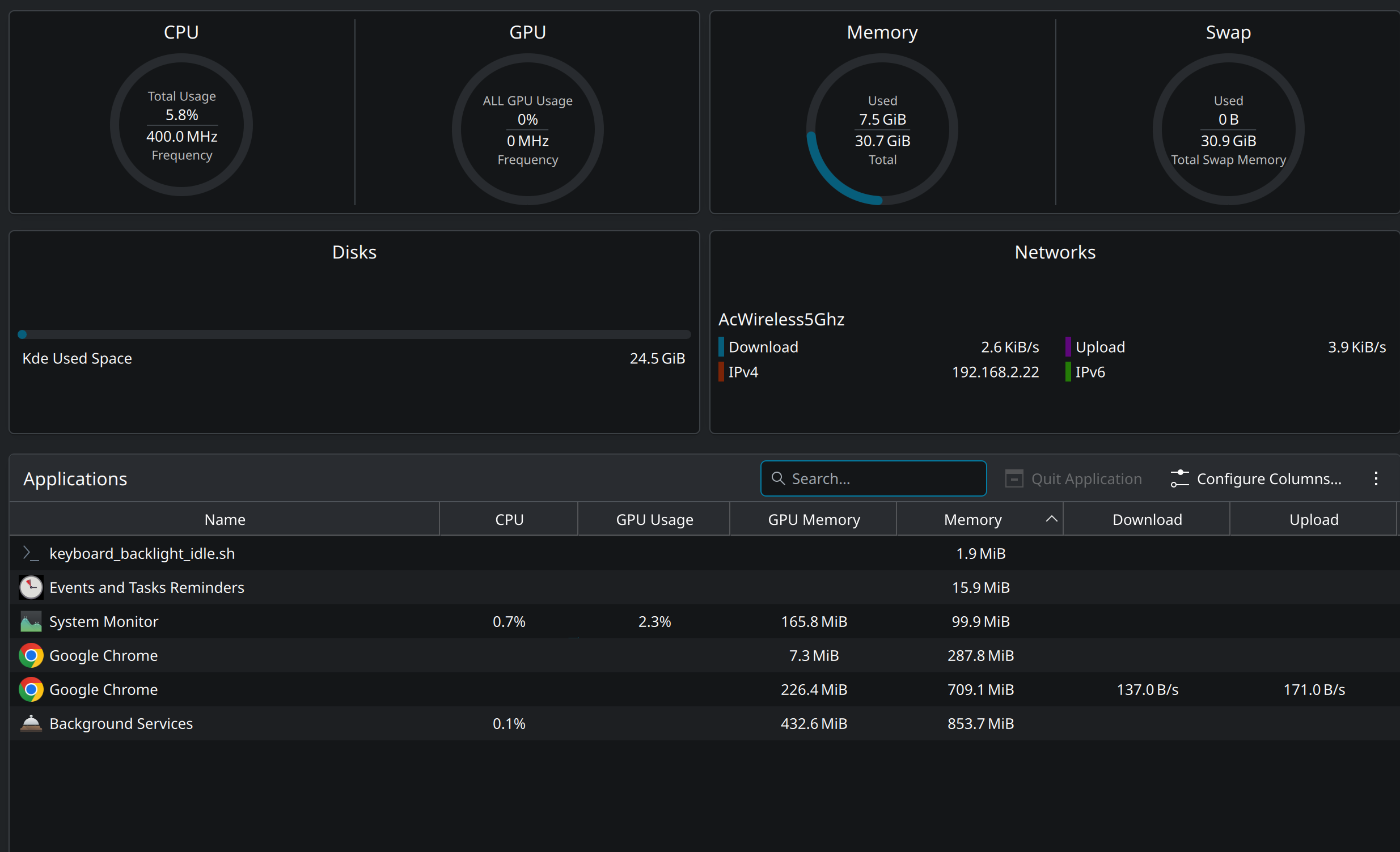
This is the screen capture of the system monitor hopefully it shows the issue more clearly.

Thank you so much for responding and helping!

Process gpu info and total gpu usage are collected in two different ways.

If all the tests were done on the same system, I suspect a distro issue. ksystemstats_intel_helper which iss needed for intel gpu needs special privileges (CAP_PERFMON) Heads up: ksystemstats 6.4 will include a helper that wants CAP_PERFMON

Hi davidre,

Yes all the testing are done on the same machine the only different is the distro.

I have already reported to Debian bug report and hopefully the issue will get sorted shortly.

Thank you for the helps!

Hi davidre,

I got replied from the Debian maintainer / developer who suggested me to try

sudo setcap “CAP_PERFMON=+ep” “/usr/lib/x86_64-linux-gnu/libexec/ksystemstats_intel_helper”

however the gpu monitoring still showing 0.

Do you have any further idea of how to solve such issue?

Thank you so much!

Best Regards,

David

Hi,

Turn out it’s the “syntax” error and I set both CAP_SYS_ADMIN as well as CAP_PERFMON and reboot and now the pie chart showing the value correctly.

sudo setcap ‘CAP_SYS_ADMIN=+ep’ /usr/lib/x86_64-linux-gnu/libexec/ksystemstats_intel_helper

sudo setcap ‘CAP_PERFMON=+ep’ /usr/lib/x86_64-linux-gnu/libexec/ksystemstats_intel_helper

and I’ve already reported to the Debian and hopefully they will release a patch very soon.

Thank you so much!