When I connect a wireless controller to my desktop (a DualShock 4 v2, in my case), the Power Management system tray entry becomes Power and Battery, and shows the controller’s battery level. I have this icon set to ‘Shown when relevant,’ however it seems to stay ‘irrelevant’ despite a battery device being connected.
Would it be possible to make Power and Battery become relevant when a device whose battery level it can display is connected?
1 Like
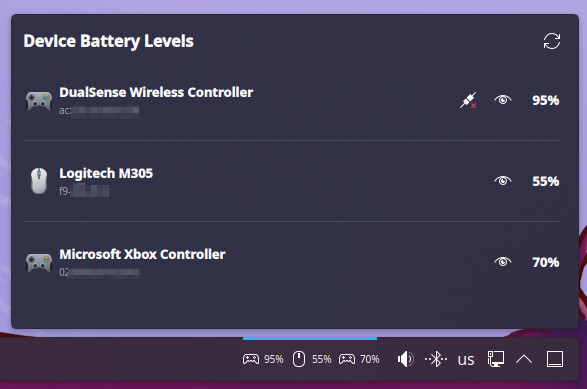
Hey, I was actually for this as well (but with a dualsense in my case  ) and then thought it would be even more comfortable if I would simply see the battery level of the controller directly on the panel instead of having to click on the Power and Battery icon.
Since I couldn’t find any widget that does that I decided to take the opportunity and learn how to build one.
Have a look at BatteryWatch, it allows you to:
-
See battery percentages for all your Bluetooth and wireless devices in the tray area
-
Supports game controllers, mice, keyboards, headphones, etc. Pretty much everything that’s Bluetooth or wireless and reports the battery status
-
The tray icon automatically hides itself when nothing’s connected, so it doesn’t take up empty space
-
Click the icon and you get a nice list of everything with their battery levels
-
Disconnect Bluetooth devices straight from the widget
-
Hide specific devices from the tray area if you don’t want them showing up there
I would love for some user testing since I could only test it on devices I had at home - you can find it in the KDE Store.
Hope you find it useful (like and rate if you do!) and would love to hear your feedback!
2 Likes
You can find it on the KDE Store or my GitHub
That is so cool! Thank you for taking the time to make this.
1 Like