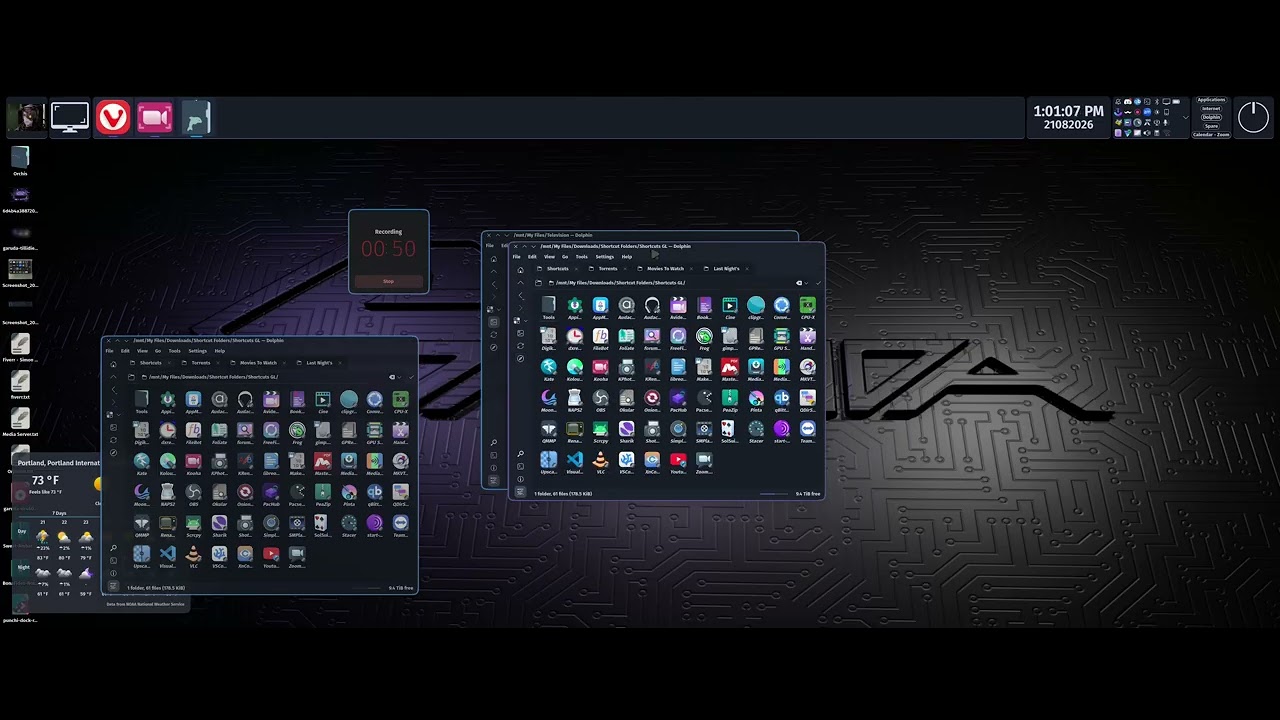
I just did the updates for the second computer in the house and after a reboot instead of having what you see in the first image with Preview on I got what you see in the second Image with Preview on, and when I toggled Preview off I got extremely tiny icons. I’m going to create a custom snapshot, update this machine, reboot and see what I get here.


I’m not experiencing your problem. I wonder, could it be that you’re not fully updated? When there’s a big update, I always make sure my mirrors are updated so I don’t end up in a partial-update situation that can cause problems.
Keep it in your own thread cause the above is not a issue with the icon spacing. My preferences are not your preferences. In other words the icon spacing is perfectly fine for me, it’s that the preview is broken.
@darryl yes both systems are fully updated. No partial updates on either system. I just did the updates on my system, closed Dolphin, reopened Dolphin and it’s the same issue as on the other machine, preview not working in any view setting not just Icon View. Tried to toggle a different size and it didn’t change the size at all.

I just found a second Dolphin issue with this update. I keep three Dolphin windows open. two with four tabs, and one with a single tab. normally when Save Last Session is set and you open Dolphin it opens to the last tab(s) that were open before you closed it. Now the first instance opens the four tabs as it should but launching further instances of Dolphin after that opens a single tab. /home/(user)/ specifically.
could be a stale .cache issue… try just deleting the folder and let dolphin rebuild everything
This is across ALL folders and their content. What I will do is create a replacement folder for say movies and move the movies into it to see what I get. That said if that solves the issue for that folder then it’s still a bug in either KDE or Dolphin that needs to be fixed, cause we can’t be expected to replace each and every folder.
EDIT:
Or did you mean delete the .cache folder / file?
I deleted everything in .cache, rebooted and still the same two issues.
Did you turn off previews by accident? Try pressing f12
No neither one of us turned off previews by accident. It is broken.
Same issue here
The icon / preview issue or the issue of Dolphin opening the wrong locations?
I have rolled back the update for now. Will be creating a bug report.
EDIT:
Just created the bug report for both issues.
Sorry for this being unrelated but I’m just wondering howcome your Dolphin looks “different”? It looks smoother, more “round” like the corners and everything. Is it a specific modded version or perhaps it’s a result of your linux ricing?
Please link the bug report here; it’s super handy when others come looking for a solution.
Tell you what create a new topic and PM me about it then. I’ll go through my settings and make you a list of what I have. With a topic others can use whatever they want from my setup.
Just love getting chastised for putting both these related bugs in the same report cause most likely the fix for one fixes the other and the other hand full of other Dolphin issues that popped up after the Gears update, and both my and the other users bug reports being marked resolved and fixed when it’s not the case.
I just experienced this issue myself. But I think I “fixed” it. Wouldn’t really call it a fix but after closing and re-opening dolphin, the issue didn’t re-occur like it has for you.
The Fix (I thought was “the” fix, but isn’t) 
- Open Dolphin.
- Go to Hamburger Menu > Configure > Configure Dolphin.
- Go to the “View” settings.
- Under the “Icons”, “Compact” and “Details” tabs, change any setting.
- Click “Apply”.
- Change the setting back to what it was (or adjust it as needed).
- Click “Apply” again.
- Click “OK”.
- Close and re-open Dolphin.
- All should be well.
It’s the simple “turn it off and turn it on again fix”. 
Well, this worked for me, at least. 
EDIT
Fake news! Decided to do a thorough check by logging out. Once I logged back in and turned off thumbnail previews, it went back to basically invisible icons with just text.
Even did some further tests and had the same results after:
- changing to the Ubuntu font
- changing to Breeze icons
- turning off my Kvantum/qt6ct settings and environment variables (.bashrc incl.)
- testing it in KDE X11, Openbox, and Labwc
All the same result, except that it only happens if I turn off thumbnail previews.
Further testing
I’m on Arch, so I downgraded all the way to dolphin-26.04.3-1 and the issue is now gone and back to normal.
Downgrading to any version after 26.08.0 resulted in the same error (i.e. 26.08.0-1, 26.08.0-2, and 26.08.0-3). Downgrading to any 26.07.0 version caused Dolphin to fail to launch (didn’t check for errors in terminal).
So, I assume the issue started in 26.07.0 since Dolphin fails to even launch, and since an even older version works. But it could be specific to the 26.08.0 versions.
You can copy all of this and add to the bug report if you want.
My inxi:
System:
  Kernel: 6.18.45-2-lts arch: x86_64 bits: 64 compiler: gcc v: 16.2.1
  Desktop: KDE Plasma v: 6.7.4 tk: Qt v: N/A wm: kwin_wayland dm: SDDM
    Distro: Archcraft base: Arch Linux
Machine:
  Type: Laptop System: LENOVO product: 20HKCTO1WW v: ThinkPad P71
    serial: <superuser required> Chassis: type: 10 serial: <superuser required>
  Mobo: LENOVO model: 20HKCTO1WW v: SDK0J40697 WIN
    serial: <superuser required>
    part-nu: LENOVO_MT_20HK_BU_Think_FM_ThinkPad P71 Firmware: UEFI
    vendor: LENOVO v: N1TET70W (1.44 ) date: 07/31/2024
CPU:
  Info: quad core model: Intel Core i7-7700HQ bits: 64 type: MT MCP
    arch: Kaby Lake rev: 9 cache: L1: 256 KiB L2: 1024 KiB L3: 6 MiB
  Speed (MHz): avg: 3494 min/max: 800/3800 cores: 1: 3494 2: 3494 3: 3494
    4: 3494 5: 3494 6: 3494 7: 3494 8: 3494 bogomips: 44817
  Flags-basic: avx avx2 ht lm nx pae sse sse2 sse3 sse4_1 sse4_2 ssse3 vmx
Graphics:
  Device-1: Intel Kaby Lake-H GT2 [HD Graphics 630] vendor: Lenovo
    driver: i915 v: kernel arch: Gen-9.5 ports: active: eDP-1 empty: none
    bus-ID: 00:02.0 chip-ID: 8086:591b
  Device-2: NVIDIA GP104GLM [Quadro P3000 Mobile] vendor: Lenovo
    driver: nvidia v: 580.178.04 arch: Pascal pcie: speed: 2.5 GT/s lanes: 16
    ports: active: none empty: DP-1,DP-2,DP-3 bus-ID: 01:00.0
    chip-ID: 10de:1bb8
  Device-3: Chicony Integrated Camera driver: uvcvideo type: USB rev: 2.0
    speed: 480 Mb/s lanes: 1 bus-ID: 1-8:5 chip-ID: 04f2:b5ab
  Display: wayland server: X.org v: 1.21.1.24 with: Xwayland v: 24.1.13
    compositor: kwin_wayland driver: X: loaded: modesetting,nvidia
    unloaded: fbdev,vesa alternate: intel,nouveau,nv dri: iris gpu: i915
    display-ID: 0
  Monitor-1: eDP-1 model: AU Optronics 0x109d res: 1920x1080 hz: 60 dpi: 128
    diag: 437mm (17.2")
  API: EGL v: 1.5 platforms: device: 0 drv: nvidia device: 1 drv: iris
    device: 3 drv: swrast gbm: drv: iris surfaceless: drv: nvidia wayland:
    drv: iris x11: drv: iris inactive: device-2
  API: OpenGL v: 4.6.0 compat-v: 4.6 vendor: intel mesa v: 26.2.1-arch1.1
    glx-v: 1.4 direct-render: yes renderer: Mesa Intel HD Graphics 630 (KBL GT2)
    device-ID: 8086:591b display-ID: :1.0
  API: Vulkan v: 1.4.357 surfaces: N/A device: 0 type: integrated-gpu
    driver: mesa intel device-ID: 8086:591b device: 1 type: discrete-gpu
    driver: nvidia device-ID: 10de:1bb8
  Info: Tools: api: clinfo, eglinfo, glxinfo, vulkaninfo de: kscreen-console,
    kscreen-doctor, xfce4-display-settings gpu: nvidia-settings,nvidia-smi
    wl: wayland-info x11: xdriinfo, xdpyinfo, xprop, xrandr
Audio:
  Device-1: Intel HM175/QM175/CM238 HD Audio vendor: Lenovo
    driver: snd_hda_intel v: kernel bus-ID: 00:1f.3 chip-ID: 8086:a171
  Device-2: NVIDIA GP104 High Definition Audio driver: snd_hda_intel
    v: kernel pcie: speed: 8 GT/s lanes: 16 bus-ID: 01:00.1 chip-ID: 10de:10f0
  Device-3: JMTek LLC. Plugable USB Audio Device
    driver: hid-generic,snd-usb-audio,usbhid type: USB rev: 1.1 speed: 12 Mb/s
    lanes: 1 bus-ID: 1-6.3:14 chip-ID: 0c76:120b
  API: ALSA v: k6.18.45-2-lts status: kernel-api
  Server-1: sndiod v: N/A status: off
  Server-2: PipeWire v: 1.6.8 status: active with: 1: pipewire-pulse
    status: active 2: wireplumber status: active 3: pipewire-alsa type: plugin
    4: pw-jack type: plugin
Network:
  Device-1: Intel Ethernet I219-V vendor: Lenovo driver: e1000e v: kernel
    port: N/A bus-ID: 00:1f.6 chip-ID: 8086:15d6
  IF: enp0s31f6 state: down mac: <filter>
  Device-2: Intel Wireless 8265 / 8275 driver: iwlwifi v: kernel pcie:
    speed: 2.5 GT/s lanes: 1 bus-ID: 04:00.0 chip-ID: 8086:24fd
  IF: wlan0 state: up mac: <filter>
  Device-3: Realtek RTL8153 Gigabit Ethernet Adapter driver: r8152 type: USB
    rev: 2.1 speed: 480 Mb/s lanes: 1 bus-ID: 1-1.1:7 chip-ID: 0bda:8153
  IF: enp0s20f0u1u1 state: down mac: <filter>
  IF-ID-1: wg0-mullvad state: unknown speed: N/A duplex: N/A mac: N/A
Drives:
  Local Storage: total: 4.09 TiB used: 2.93 TiB (71.5%)
  ID-1: /dev/sda vendor: Western Digital model: WD5000LPLX-08ZNTT0
    size: 465.76 GiB speed: 6.0 Gb/s serial: <filter>
  ID-2: /dev/sdb vendor: Seagate model: BUP Slim size: 931.51 GiB type: USB
    rev: 3.2 spd: 5 Gb/s lanes: 1 serial: <filter>
  ID-3: /dev/sdc vendor: Samsung model: PSSD T7 size: 465.76 GiB type: USB
    rev: 3.2 spd: 5 Gb/s lanes: 1 serial: <filter>
  ID-4: /dev/sdd vendor: Seagate model: Expansion HDD size: 1.82 TiB
    type: USB rev: 2.1 spd: 480 Mb/s lanes: 1 serial: <filter>
  ID-5: /dev/sde vendor: Samsung model: PSSD T7 size: 465.76 GiB type: USB
    rev: 2.1 spd: 12 Mb/s lanes: 1 serial: <filter>
Partition:
  ID-1: / size: 100 GiB used: 50.17 GiB (50.2%) fs: btrfs dev: /dev/sda2
  ID-2: /boot/efi size: 2 GiB used: 13.6 MiB (0.7%) fs: vfat dev: /dev/sda1
  ID-3: /home size: 263.76 GiB used: 233.96 GiB (88.7%) fs: btrfs
    dev: /dev/sda4
Swap:
  ID-1: swap-1 type: file size: 4 GiB used: 1.5 MiB (0.0%) priority: -2
    file: /swapfile
Sensors:
  System Temperatures: cpu: 88.0 C pch: 60.0 C mobo: N/A
  Fan Speeds (rpm): fan-2: 2734
Info:
  Memory: total: 16 GiB note: est. available: 15.34 GiB used: 4.96 GiB (32.4%)
  Processes: 383 Power: uptime: 3h 19m wakeups: 0 Init: systemd v: 261
    default: graphical
  Packages: 2309 pm: pacman pkgs: 2279 pm: flatpak pkgs: 30 Compilers:
    clang: 22.1.8 gcc: 16.2.1 alt: 15 Shell: fish v: 4.8.1
    running-in: xfce4-terminal inxi: 3.3.41