While installing my printers on openSUSE Leap 16.0 with KDE I found out the following:
-
Apparently there is no way to delete a printer from the “System Settings/Printers” menu. You have to stop cups, delete the printer definition from printers.conf and start cups.
-
When adding a new printer, the root password is requested twice.
-
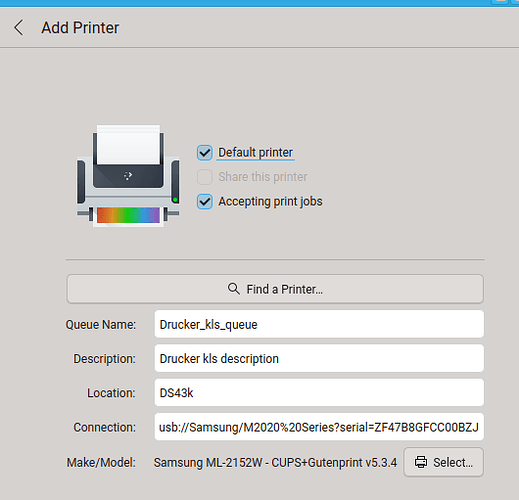
In the “Add Printer” dialog you can enter a queue name and a description:
- When you open that printer definition again later, the queue name is not shown any more:
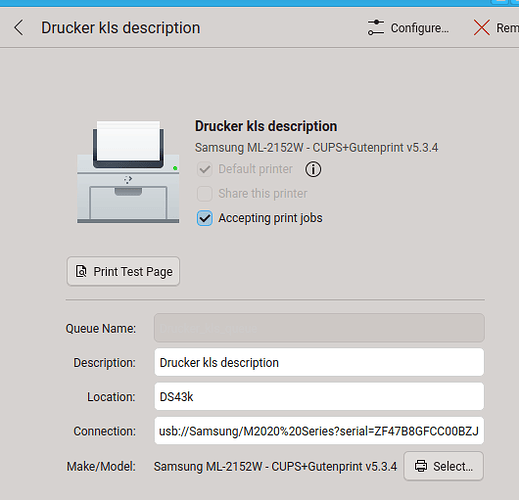
- On a side note: when you edit any of the strings in this dialog, the “Apply” button only becomes selectable after the focus is changed to one of the other input fields.
- Now for the strange part: The “Printers” list shows the string given in the “Description” field, and so does the “Print Queue” dialog. But the “Printer” dialog of an application (e.g. Kate) shows the queue name!
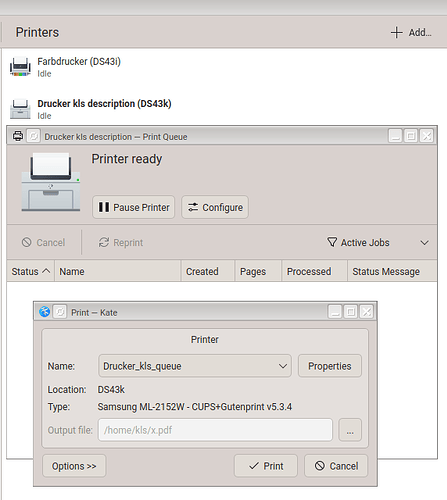
- As a user I would expect the “Printer” menu of applications to display the descriptions (as shown in the “Printers” list, and it might be a good idea to display the queue name somewhere in the “Print Queue” dialog.
- For the moment I can set the queue name to something descriptive, but unfortunately that doesn’t accept blanks, and also doesn’t display the Location. I hope this can be fixed in a future version.