problem with discover - package download failed (Kubuntu 24.04.03 LTS)

When I try to install anything through Discover, the installation fails with an error without description and nothing is installed.

Also when I right click on any app and choose the option “uninstall or manage add-ons” it doesn’t work. I guess it is the same problem.

Here is an image of the error:

I have already tried to solve this problem on my own, but I didn’t succeed. So I decided to write here.

I tried to follow the advice from here Discover not working on Kubuntu 24.04 - #15 by scallen . I uninstalled plasma-discover-backend-snap and rebooted. It didn’t help.

I also tried to fully reinstall Discover and I tried to write this in the terminal:

sudo apt update
sudo apt upgrade

I also tried reinstalling Kubuntu and testing Discover, but the problem persists, so I definitely didn’t have time to do anything that would break it.

Installing things through the terminal works smoothly.

If there’s anything else I need to share or to do to, please let me know. But please keep in mind that I’m a newbie, a bit slow, and just discovered the terminal yesterday, just like kubuntu and linux in general.

hi, welcome.

please share the output of kinfo so everyone knows what system you are running.

then try to run plasma-discover from the command line and share the output.

when posing terminal output use the Ctrl-E </> preformatted text block on a new line like this

type or paste code here
1 Like

Are there any updates showing when opening Discover? If so, what are they?

The error doesn’t sound like a problem with native Ubuntu deb packages (apt), but when you ran apt upgrade, were there any errors or messages?

This error could come from Snap packages, or Flatpaks, if you have installed anything that are in this format. Likley Snap, since Ubuntu uses this, so in Kubuntu Firefox and Thnderbird come in this format. It also could be from any KDE store theme items as well. These are all separate systems, so different tools might need to be used.

This is odd, really. I just installed 24.04 this morning, after an old drive died on me. I am not seeing this problem here. But that doesn’t mean anything, really.

Go to the terminal, and see what shows when manually updating Snap:

snap refresh

If something is ‘stuck’ there, maybe it will clear it up.

The old Discover in Plasma 5 is not as solid, imo as the current Discover version in a more current Plasma 6 setup (25.10 for Kubuntu for example), but it isn’t normally completely busted.

1 Like

here

Operating System: Kubuntu 24.04
KDE Plasma Version: 5.27.12
KDE Frameworks Version: 5.115.0
Qt Version: 5.15.13
Kernel Version: 6.14.0-37-generic (64-bit)
Graphics Platform: offscreen
Processors: 20 × 12th Gen Intel® Core™ i7-12700H
Memory: 38.9 GiB of RAM
Graphics Processor: Mesa Intel® Iris® Xe Graphics
fetch ratings! false
adding empty sources model QStandardItemModel(0x6039b1ddd550)
no component found for "com.ubuntu.ubuntu"
file:///usr/lib/x86_64-linux-gnu/qt5/qml/org/kde/kirigami.2/ScrollablePage.qml:200:9: QML MouseArea: Binding loop detected for property "implicitHeight"

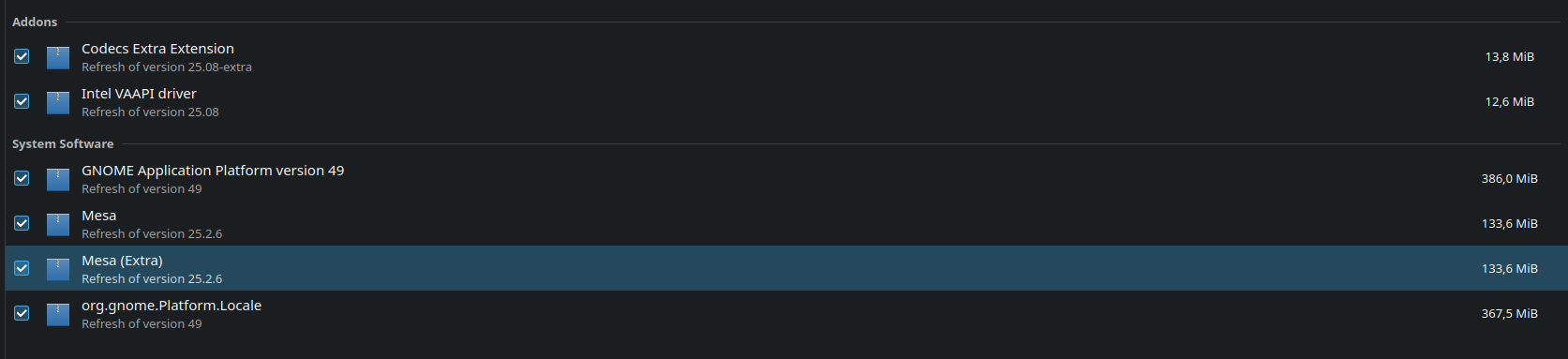
There was nothing in the updates. Today I woke up and discovered a couple of things:

I guess there are not any errors, anyway I’ll share what I see:

Reading package lists... Done
Building dependency tree... Done
Reading state information... Done
Calculating upgrade... Done
The following packages were automatically installed and are no longer required:
  fonts-katex libcmark0.30.2 libjs-katex libolm-dev libolm3 libpkgconf3 libqt5keychain1 libqt5location5
  libqt5location5-plugins libqt5positioning5-plugins libqt5positioningquick5 libqt5serialport5
  libquotient0.7 libssl-dev pkg-config pkgconf pkgconf-bin qml-module-org-kde-kirigami-addons-components
  qml-module-org-kde-kirigami-addons-delegates qml-module-org-kde-kirigami-addons-labs-components
  qml-module-org-kde-kquickimageeditor qml-module-org-kde-notifications qml-module-qtlocation
  qml-module-qtpositioning
Use 'sudo apt autoremove' to remove them.
Get more security updates through Ubuntu Pro with 'esm-apps' enabled:
  vlc-plugin-qt libvlc5 freerdp2-x11 libmagickcore-6.q16-7t64 libzvbi-common
  vlc-data libvlccore9 libjs-katex vlc imagemagick vlc-bin
  libmagickcore-6.q16-7-extra libwinpr2-2t64 vlc-l10n libcjson1 libavdevice60
  ffmpeg libpostproc57 vlc-plugin-samba libavcodec60 libavcodec60 libzvbi0t64
  libzvbi0t64 vlc-plugin-notify libavutil58 libavutil58 imagemagick-6.q16
  libswscale7 libfreerdp-client2-2t64 vlc-plugin-access-extra
  vlc-plugin-skins2 fonts-katex vlc-plugin-video-splitter libswresample4
  libswresample4 imagemagick-6-common vlc-plugin-video-output 7zip
  libavformat60 libfreerdp2-2t64 libvlc-bin vlc-plugin-base
  vlc-plugin-visualization libavfilter9 libmagickwand-6.q16-7t64
Learn more about Ubuntu Pro at https://ubuntu.com/pro
0 upgraded, 0 newly installed, 0 to remove and 0 not upgraded.

I also tried to put snap refresh in the terminal. Thunderbird was updated.

Idk how it is connected, but it fixed Discover for me completely.

Thanks for help :smiley: