Hello,
I am trying out KDE (and desktop linux in general) again for the first time since well KDE2
And I think Plasma is going to be the one that I choose for the shear familiarity of the UI.
I’m currently running it in a VM because there is simply far too many things to fix before I’d consider switch (from windows)
And one thing I notice is Alt Drag support, on windows I use that ALL of the time.
I tried to find where the configuration is for this feature but I can’t find it ?
There is an old thead on reddit that says it’s in
System Settings → Window Management → Window Behavior
But I can’t find it there, maybe it was removed ?
https://old.reddit.com/r/kde/comments/9ldyhs/altleftclickdrag_to_move_windows/
What I want to enable is changing the keybinding of this feature
On KDE it is
super key plus left click drag for window dragging
super key plus right click drag for window resizing
super key plus middle click for window swap Z order
I would like to change the super key in these key chord to ALT
But also Mouse Button 5 (also known as a hotclick)
I also would like to make hotclick scroll, change window opacity
and make hotclick middle click show an option menu that includes “set always on top
The software I am used to is called AltSnap
This software is really great and ingrained in my muscle memory. I don’t want to go without this functionality anymore. This could mean I’ll stay on Windows 10 forever.
Here are some of the functionality
This is the hotclick+middleclick menu
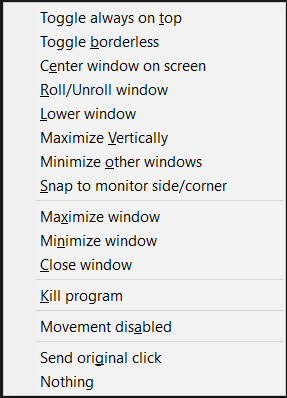
Also while you are LeftClick dragging, if you press right click, it will maximize the window
If you have setup snap zones (similar to fancyzones)
Then rightclick will maximize the window into the zone under the cursor, it works really well

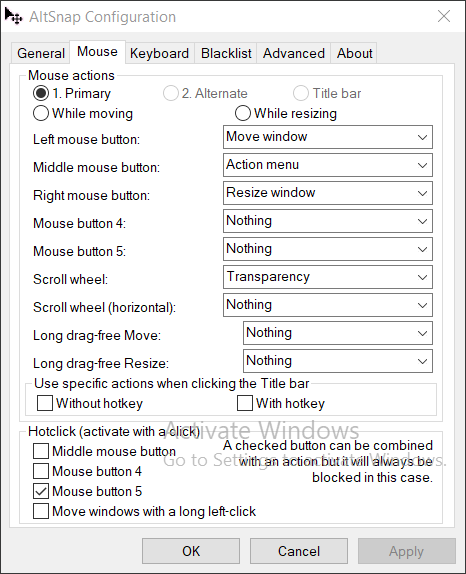

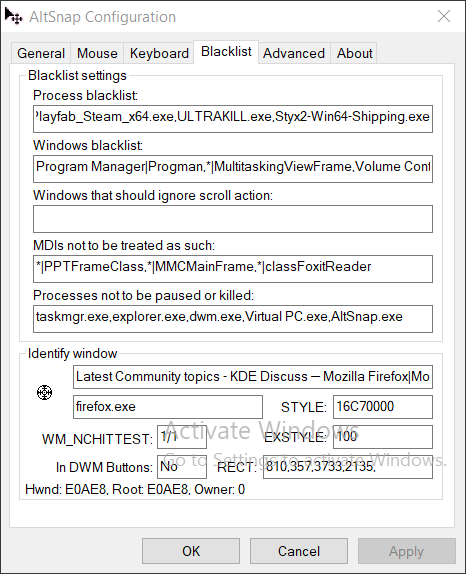

As far as I know, there is no such software in Linux, it has to be a part of each window manager
Also wayland might make this functionality as impossible as network transparency but I’m not sure…
In any case, I wanted to show it to you and maybe one or two of the things I want can be arranged
