Quotes CSV import with KMM

Dear all,

I’m seeking your help for clarification on KMM 5.2.1 running on Opensuse Tumbleweed.

I have a CSV file containing quotes as follows:

isin;nom;date;cours
FR0000121014;LVMH;30/09/2025;520,5
FR0000121972;SCHNEIDER ELECTRIC;30/09/2025;237,6
FR0000121972;SCHNEIDER ELECTRIC;30/06/2022;112,9
FR0011400T5U9;AIR LIQUIDE PRIME FIDEL 2027 - FR0011400T5U9;30/09/25;176,86

To import this file using the CSV import wizard, my understanding of this import process is to run it three times : one per each different securities (i.e. one for LVMH, one for SCHNEIDER ELECTRIC and one for AIR LIQUIDE PRIME FIDEL 2027).

Am I right ?

Is there a possibility to run this import all the securities in only one import process ?

Many thanks for you attention.

René

Hi Rene, I would be surprised if that were the case. Are these quotes for an investment account? And where did the quotes come from? A

This is currently not possible. A similar feature request already exists, though.

Many thanks for your question. This file is issued from downloading data from a same securities portfolio from my bank account website from a monthly report.

With this download procecss, I get a lot of data, corresponding to different securities appearing once in such data. Therefore I would like to import all of them in one import command using KMM. To separately import each security quote is the as doing it by hand.

Many thanks for your attention.

René

IPWizard knows the capabilities of the software far better than I do. I have never used CSV import for quotes. Like most people, I download them from the Tools tab in KMM. So, I am amazed that you cannot import multiple stock quotes using CSV. Is it not possible to export them in another format? OFX, for example? Or why can’t you use the same quote sources that is built in to the software? Sorry I am not more helpful. A

The CSV importer can only handle transaction data for one account at a time, so I am not surprised the stock price data is restricted to one security at a time.

As for using other sources, that might work, but I can see the desire to use prices provided by you own institution. However, if those new prices are for days where there were actual transactions that include the price, they might not actually be necessary. Unfortunately, for now, it is necessary to divide the source file by security. Converting it into an OFX file is certainly possible, but likely much more difficult. (I face the same issue with importing investment account transaction data from Merrill Lynch, currently only available as csv for all accounts at once.)

I’d go a different route: create an external application/script (e.g. bash/perl/python/your-choice-of-language) and call it e.g. $HOME/.local/bin/extract-price-from-csv. That script simply finds your most recent data file on your local drive (in case the name contains a date) or even downloads it from an online source (your imagination is the barrier here). Then it takes that file and greps out the lines for the symbol in question. The symbol will be provided as the first argument to the script.

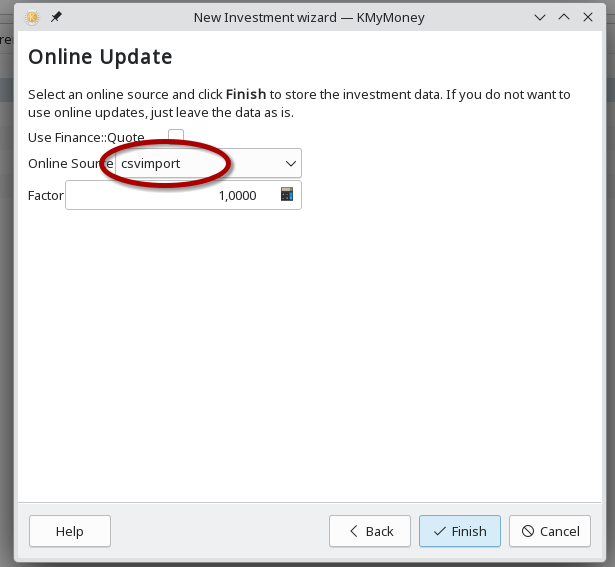
Once you have that, you create a new online source in the online quotes configuration, lets call it csvimport and simply configure the URL to

file:/home/user/.local/bin/extract-price-from-csv %1

Then price and date regular expressions may look something like this based on the data provided in the original post:

price: ^[^;]+;[^;]+;[^;]+;([^;]+)$
date:  ^[^;]+;[^;]+;([^;]+);[^;]+$

As a last step assign the new source to all the securities contained in the file as online source. Voilà.

Note: I wrote this without testing any of it. So you may have to tweak the instructions where necessary. But I hope you got the idea. Please feel free to update this post with your success message :slight_smile: or any adjustments you had to make it work so that others can benefit.

Thank you so much for your replies. I gonna work on the script you kindly provide me with.

Before your reply, my intention was to write a SQL script to update the kmmPrices table with the csv quote file as an entry, after some processing using python.

Your script will undoubtedly facilitate fixing the issue.

I’ll keep you informed.

Thank you so much.

René

After a number of tries, I’m close to solve my problem. I remains an issue I can’t fix. So I’m seeking your help. Please find below all the parameters:

Input csv quote file:

isin;nom;date;price
FR0000121014;LVMH;30/09/2025;520,5
FR0000121972;SCHNEIDER ELECTRIC;03/01/2026;300,67
FR0000121972;SCHNEIDER ELECTRIC;30/06/2022;112,9
FR0011400T5U9;AIR LIQUIDE PRIME FIDEL 2027 - FR0011400T5U9;30/09/25;176,86

Python script Ouput (script name: sanstitre17.py) : only one quotation

FR0000121972 300.67 2026-01-03 00:00:00

KMM parameters:

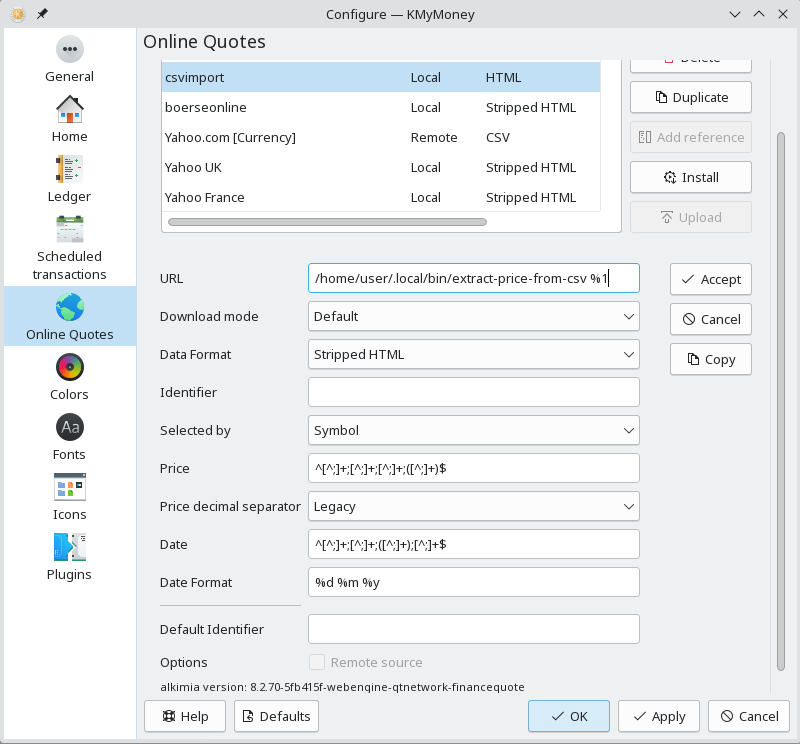
URL file:/mnt/path to directory/sanstitre17.py %1

Downloading mode: By Default

Data Format: HTML épuré

Identifiant: (^[A-Z0-9]+) [0-9]+?.[0-9]+? \d{4}-\d{2}-\d{2} \d{2}:\d{2}:\d{2}$

Selected by : Symbole

Price: ^[A-Z0-9]+ ([0-9]+?.[0-9]+?) \d{4}-\d{2}-\d{2} \d{2}:\d{2}:\d{2}$

Decimal separator : Legacy

Date: ^[ A-Z0-9]+ [0-9]+?.[0-9]+? (\d{4}-\d{2}-\d{2} \d{2}:\d{2}:\d{2})$

Date Format: %Y-%m-%d %H:%M:%S

Identifiant by default: empty

Distant source : not quoted

Security parameters:

Account name: SCHNEIDER ELECTRIC - FR0000121972

Investment type: Action

Symbole: FR0000121972

Fulle name: SCHNEIDER ELECTRIC - FR0000121972

Fraction: 1/1000

Market: EUREX

Id No: FR0000121972

Currency: EUR

Quote precision : 3

Remaining: Rounded

Entry quote: by default

On line Source : SG-Quotation

Fraction: 1,0000

Triggering on-line quote update results in the following error message:

(Debug) symbol=FR0000121972 id=E000048…

Exécution de /mnt/DC2A40D12A40AA7A/Nos_REPERTOIRES-20190904/Comptes_Bancaires/Tests/Pour_KMyMoney/Assurance-Vie-Développement/sanstitre17.py FR0000121972…

Symbole trouvé : « FR0000121972 »

Cours trouvé : « 300.67 » (300,67)

Date trouvée : « 2026-01-03 00:00:00 »

Format de date trouvé : « 2026-01-03 00:00:00 » / « »

A reçu un cours non valable pour FR0000121972, impossible de le mettre à jour.

In English: Received a non valid quote for FR0000121972, update impossible.

I don’t see what I can do anymore after a number of experiments, including changing the quotation date.

Could you, please, help me?

With many thanks.

René
Until the experts can weigh in here, I will just take a stab in the dark. In the past, sometimes problems with quotes were cleared up by using the date format of %u and not what you have above: %Y-%m-%d %H:%M:%S Bon courage, tu as fait de progres!

Looks like you need to change your script to get rid of the time information in the date. But without knowing the details of the script this is just a shoot in the dark.