I stumbled across .local/share/kactivitymanagerd by accident and got curious about the contents of its database, it turned out to have quite a lot of extra info I do not want KDE to keep track of:
Not just which apps I opened (which is okay), but exactly when and what was it being used for
Which URLs I clicked cross-application (i.e., if I clicked a link on Signal, it would end up here)
This, I found, was tied to the “Recent files” feature (as clearing that history in settings removed all of this information), but I do want to have files I have recently used readily available, as its quite useful when I want to send an image I saved again later to someone else. I do not however want which links I click to be saved to this database, in addition to my browser history (which many people disable). I believe the latter is a privacy liability, even if it is only stored locally (as being able to disable your browser history is a common feature), and makes me believe this bit of information shouldn’t even be kept track of by default.
I would appreciate more transparency in what KActivities actually keeps track of within settings and full control over it, because it seems to upset and confuse a lot of people. So far everyone I’ve shown this did not expect KDE to be keeping track of URLs accessed at all, which is honestly the most alarming thing to me.
There are currently also bugs in which it doesn’t even clear data properly (#478876), it didn’t happen to me when I cleared data for the first time but after re-enabling the feature for testing it does suddenly keep ResourceInfo in the database
I think you misunderstand, my main problem is that “Recent files” is not just “files”. It keeps track of other things–like URLs I click, which is IMO a privacy problem.
I just tried excluding my browser from that setting, and URLs still end up in ResourceInfo. I sent a link on my chat app, clicked it, and after running echo .dump | sqlite3 .local/share/kactivitymanagerd/resources/database I can see the link at the bottom of the ResourceInfo table:
INSERT INTO ResourceInfo VALUES('https://example.com/','','application/octet-stream',1,0);
I am clicking “Forget everything” and the ResourceInfo table remains there, with web URLs. There is a database~ file which is empty though so this might be a different bug, I don’t know.
The database~ file is likely a backup file as the main file is being written to.
How are they present in the xml file ~/.local/share/recently-used.xbel ?
It should tell which application shared the data, in particular in bookmark:application attribute name.
There might be a bug.
I’ve replaced recently-used.xbel with an unwritable file, and I see this error:
% xdg-open https://example.com
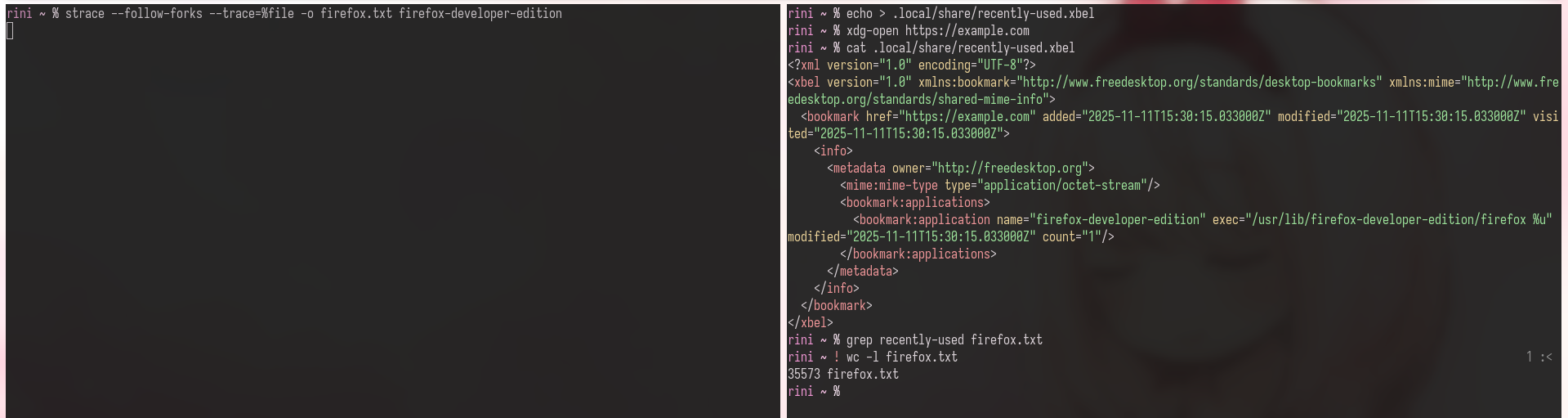
kf.kio.core: Failed to recently-used.xbel for writing: "Existing file /home/rini/.local/share/recently-used.xbel is not writable"
This isn’t a solution (since it breaks other apps’ recent files) but it tells me the problem isn’t kactivitymanager, but actually something in kde-open (called by xdg-open) writing URLs to recently-used.xbel without respecting settings
I still think non-file:// URLs shouldn’t be written to that file at all, but going back to my main point, this should at least be a setting
recently-used.xbel is written to directly by apps.
Gtk has an internal implementation to add them, must be used in firefox.
kio does the same for its applications.
Kio cleans some things from this file (reducing its size, removing hidden files IIRC) but it could do more, like purging applications you don’t want an history for. In Kactivitymanagerd daemon probably.
There might be a feature request already, feel free to open one.
Wow, I didn’t know this. Have you found an easy way to solve this issue? I’ve read through the responses here and it seems to be just way out of my league.
As a non-dev who’s been using and customizing plasma for months: yeah, i’m with you.
As far as i see it, Recent files shouldn’t even be active by default. I had slid over that menu for months even though i never use the feature, and as a result i had no idea it was enabled or that it had a whole 4 months of memory.
Dolphin should show a display on first opening Recent Files linking to the settings window to enable it if you wish. It really should not be enabled by default. I’m not a dev, but i’m hardly dumb- i just was unlucky and missed this one setting i would have disabled month ago.
Similar to the OP, I’d prefer KDE not constantly store off what files and paths are used.
I went into System Settings→Recent Files, set it to Clear History (Forget Everything) and disabled storing documents(checked “do not remember”). But the ~/.local/share/kactivitymanagerd/resources/ files still existed and stored information that supposedly was just cleared. I was able to see some of the contents with “strings *”
I went ahead and wiped them out with:
cd ~/.local/share/kactivitymanagerd/resources find . -type f -exec truncate -s 0 {} \; -print
which finds every file under the resources and truncates it to 0 bytes. I’ll monitor that to make sure the files don’t fill back up
You can correct me if I am wrong, but by debugging using strace (which tracks all syscalls of a process), I can see that kde-open itself is writing the entry to recently-used.xbel. I am really not familiar with KDE internals so I can’t dig further, but I think it’s incorrect to say Firefox is writing these entries.
Judging by the comments, it seems that there’s not a way to stop this from happening. It seems that your history in saved in a lot of the apps to no matter what you do to your settings, which is ridiculous if you ask me.
From here forward, I think every time there is a release update available for my OS, I’m just going to do a fresh install each time. Not perfect, but at least my history will be cleared when I upgrade which I guess is better than nothing.
If anyone figures out an easier way, please let us know how to do it and thanks for pointing this out.
And in systemsettings “recent files” you can turn off the feature. This will stop the database to be populated. recently-used.xbel depends on applications.
Well then listen to me. You could have strace firefox.
As I said:
That includes kio-open. kio-open is more likely to add entries to the file in this instance.
Whether kio writes to the file doesn’t prevent other programs to write to it.