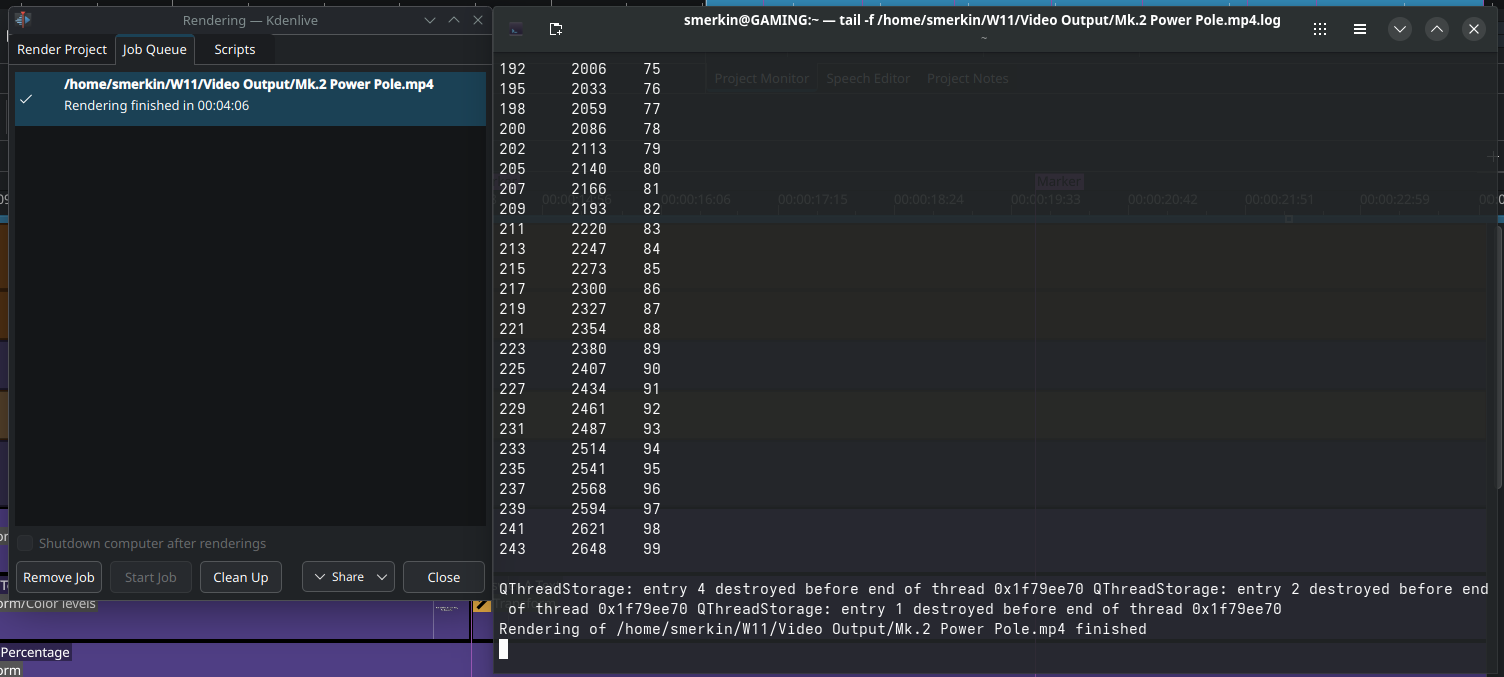
When I tail the log, I never see the newline progress. The progress lines above are not from the active render, this was from the last render I ran.
In System Monitor I can see melt is running and after a couple of minutes the render is complete and then all the progress lines appear, However Kdenlive still says Starting… and never completes.
Same thing over here, same distro, same bazaar flatpak. If it does not freeze at “starting” it just stops later. I’m trying to render a 20 minute video and my CPU starts at 50% but after a couple of seconds later it just goes down to 15-20% and while kdenlive still eats almost 7 gigs of RAM it barely writes with 1.2-2.0 MiB/s and progress bar doesn’t do anything.
In the past I edited 4 hours of footage into 1 and it barely took 40 ish minutes to render, now I’m sitting here trying to render a 20 minute video with very little cuts and no effect, and the bar is barely 1/5th the way and says there’s 35 minutes remaining, and it’s been like that for over 20 minutes.
Something definitely feels wrong.
Personally … I would just use the appimage … it’s the best tested and least fundamentally troublesome build, and you get to easily keep older versions always available if you need them for older projects that you want to open later without updating them ‘irreversibly’ (without restoring from backup) to the current kdenlive way of doing things.
The flatpak ‘sandboxing’ makes some things impossible that could be done with the appimage or a native package install, even when it is otherwise working correctly, without actually adding any real ‘security’ for you (if we’re actually untrustworthy or you accidentally download a malicious copy from somewhere, the ‘sandboxing’ won’t save you).
I don’t know anything about Bazzite … if it’s widely reproducible with our ‘official’ flatpak on all (or several) distros, that might be a bug we should know about - but it’s been a while since I’ve seen anyone talk about this problem or seen it myself - so right now I’d be a little suspicious that it’s something Bazzite is doing which doesn’t let the UI process monitor the progress log file - and if so, there might not be anything we can do about that at all.
So it would be good to confirm whether this is only happening on Bazzite to know where a bug report should actually go.
Well it seems as though the problem is no longer occurring. I thought the fix was related to something the appimage did to the environment so I spun up a clean VM of Bazzite and I can’t re-produce the problem in the clean build.
If it happens again and I spot a pattern I’ll return with more info. Thanks for the help.
That’s kind of like how I’ve seen it in the past, there’s no particular logic it when it starts, but it seems somewhat persistent until it isn’t again.
Are you one of those people (like me) who tends to accumulate crazy numbers of things open all at once? And would that have been the state of your machine when you saw this?
The problem smells like the UI failing to watch the rendering log file, but I’ve never had evidence of any reason why it should - but in the light of your “a reboot fixed it”, I now wonder if its happening after you hit the system inotify watch limit for your user, and it’s just not (clearly) reporting that root failure?
What DE are you using? I’m currently trialing Plasma on my bare metal, and a couple of days ago it warned me that I’d “hit 90% of my current limit” with the number of things I had open (but to put that in context - on MATE more than once I’d hit the limit of the number of terminals it would allow me to open without first closing some - I multitask pretty heavily sometimes
Possibly, being the first video I edited in Linux I had copied an existing Kdenlive project I created in Windows and was adjusting all the paths to match Linux, setting up SMB mounts and a few other tasks. It’s something for me to observe if the behaviour happens again.
I’m using KDE Plasma that comes as part of Bazzite. I’ve not had any warning appear but will keep an eye out in the future. I’m dual booting with Windows 11 so I’m still working towards using Bazzite more and Windows less, just figuring out how to move my workflow across. I am enjoying it though, very impressed with the overall experience Bazzite delivers.
So I’ve found the root cause of the issue, it happens when you open another instance of Kdenlive. It resolves itself when you close down all instances and open a fresh one.
For me, I’m editing a video and I need to reference another video to see how I did something, so I find the .kdenlive file in Dolphin and then double click it and it opens it in another instance. At this point the render status in the original instance will no longer work, but the rendering job will actually run. Even after closing the second instance and running a render job it won’t show the output, you need to close all instances.
Not sure if I should file this as a bug, I would be interested in seeing if you can reproduce it @ron. This never happened to me on Windows but thats probably because I’m running it as a flatpak (on Linux).
Can you reproduce it with the appimage? I couldn’t with a simple first test with 25.08.0.
I opened it, imported a few clips to the timeline, started a render to confirm the progress meter worked, opened a new instance, imported a clip - confirmed the render progress still worked in the first one. Closed the second instance - confirmed that the progress still worked again.
If it’s flatpak only, it could be something with the sandboxing permissions - if it’s not, then there’s something more needed than what I did to trigger it.