Slightly strange behaviour in Dolphin

Something I never encountered, as I love F4 pulling up a terminal.

We want three folders… the first scenario we want ~/1dog ~/2cat ~/3pig so we can do mkdir -pv 1dog 2cat 3pig.

The second scenario we want ~/1dog/2cat/3pig so we can do mkdir -pv 1dog/2cat/3pig. As I’m typing the names, I go all in and punch F4 and type into the terminal.

However, Dolphin is a GUI application, we can use keyboard shortcuts (Ctrl_Shift_N) to create new folders, typing each name as we go…

So open Dolphin ~.

Press Ctrl_Shift_N and type ‘1cat’ - you’ll see, it works.
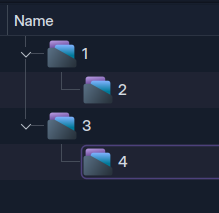
Press Ctrl_Shift_N again, type ‘2dog’ and you’ll see that 2dog gets entered into the 1cat folder… but if we press Ctrl_Shift_N again, we get 3pig not inside the 1cat or 2dog folders.

So repeating the same action created ~/1cat/2dog and ~/3pig.

With the GUI, I’d expect all folders to be created in the same level, or all folders to be nested.

I wouldn’t expect Dolphin to create one, then nest one, then just create another in the home folder.

This is another issue that makes me a happy terminal user. Is there a rationale here?

I made your test and I saw what happens.

When you Ctrl_Shift_N and type ‘1cat’ the folder ‘1cat’ remains in focus after the creation. Is the reason why ‘2dog’ is made inside ‘1cat’.

After these, ‘2dog’ can’t remain focused (because is inside of ‘1cat’). Is the reason why the 3rd Ctrl_Shif_N make ‘3pig’ at the level of ‘1cat’.

The solution is remove the focus from ‘1cat’ (clicking in blank area) before make the next folder.

Maybe the best solution is fix this behavior in Dolphin.

Regards

1 Like

maybe my dolphin is broken but when i ctrl+shift+N in the GUI is simply opens a new tab of the same folder (duplicates the tab).

typing doesn’t do anything.

also isn’t naming folders starting with an numeral rather taboo for various reasons, or am i dragging windows trauma with me?

1 Like

Make a check of your shortcuts.

new tab of the same folder (duplicates the tab).

This is the behavior of Ctrl+T.

Regards

1 Like

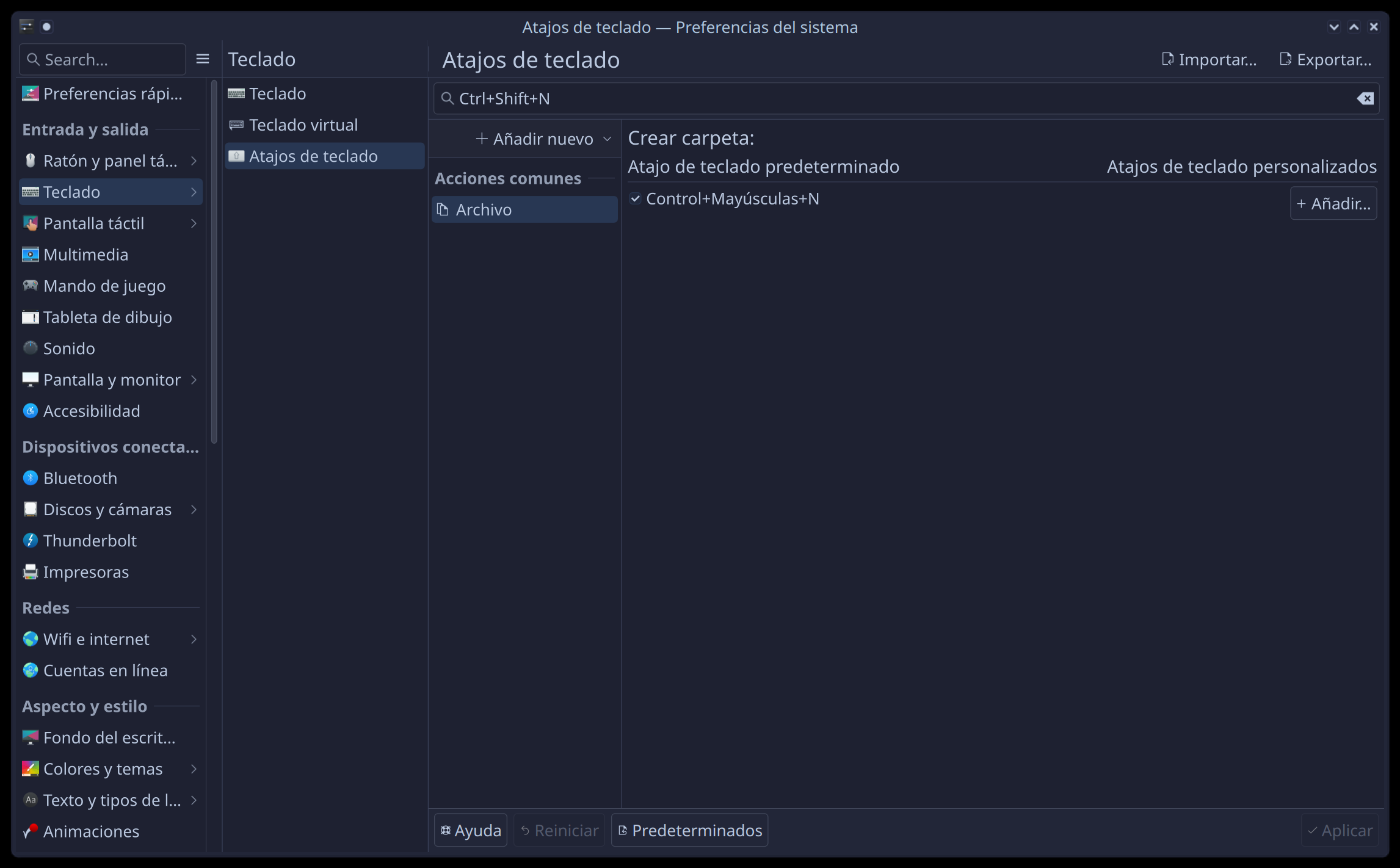
CtrlAlt, - Shortcuts.
Create Folder (Ctrl+Shift+N)
New Tab (Ctrl+T)
New Window (Ctrl+N)

An Arch user just told me they still use F10 shortcut to create a new folder (old installation).

Anyway, it’s clumbsy (it kind of makes sense, but it’s awkward) that if you create a new folder, it has focus, so making ANOTHER will make it inside that folder - but then focus is lost… it would be better if pressing Ctrl_Shift_N would simply make all folders in the same level (if you want to go inside, then select and enter maybe).

For me, I’ll stick with my terminal:

➤ mkdir -pv 1dog 2cat 3pig
mkdir: created directory '1dog'
mkdir: created directory '2cat'
mkdir: created directory '3pig'
➤ mkdir -pv 1dog/2cat/3pig
mkdir: created directory '1dog'
mkdir: created directory '1dog/2cat'
mkdir: created directory '1dog/2cat/3pig'

If I’m typing the names anyway, I might as well do that.

Note: abbr mkdir mkdir -pv is my personal setting.

It’s not something we do every day, how would you have done it before reading this thread?

I have a function ‘mkcd’:

➤ functions mkcd
# Defined in /home/ben/.config/fish/functions/mkcd.fish @ line 1
function mkcd
  mkdir $argv
  and cd $argv
end

Usually I just go one at a time, so instead of ‘mkdir build’ and ‘cd build’ it’s ‘mkcd build’ and I’m there… but only one level at a time.

➤ mkcd 1dog
➤ mkcd 2cat
➤ mkcd 3pig
 ~/1dog/2cat/3pig

got it, yes that works on my old timer install.

using F10 dolphin creates the first folder in the current folder and leaves it with focus (highlighted)

using F10 again does the same thing only now the newest folder has focus

this goes on indefinitely in the current folder (no nesting).

however if a use the context menu to create a folder it will nest it within that folder (even tho the F10 shortcut is listed, it does not work with the context menu open).

so:

  • keybind to create folder in the current context
  • context menu (or open folder) to nest folder

the behavior you describe sounds like a bug.

1 Like

Hi,

I’m the guy, who complained about this whole thing on reddit…

So my problem isn’t with this “first new folder got nested because of the focus, then the second isn’t”, but this whole nesting thing. No other filemanagers I ever encountered cares about what folder is selected when create a new folder. Every other manager just creates the folder in the current working directory. Dolphin did this a few updates ago.

Can we return to this behaviour?

4 Likes

that’s how i like it on plasma 5 and i don’t want to have to adapt to this “new” way for plasma 6 when i’m finally forced to use it.

1 Like

Absolutely—I’d love to know whether this behavior was an intentional UX shift or just an unintended side effect.

However, read the XY problem below before you are too entrenched in your position here…

Personally, I suspect it is deliberate.

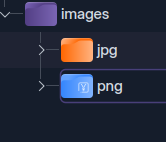
Whether it’s an improvement is debatable, though I can’t say I rely on Dolphin for this task anyway. I never really make more than one folder at any one time; and if I want all my ‘jpg’ files to go into a ‘jpg’ folder, all my ‘png’ to a ‘png’ folder, then I’ll select them all and use context ‘New Folder from Selected’.

To create multiple named folders, then typing folder names into popup dialogs feels clunky when I can just run mkdir 1 2 3 or mkdir 1/2/3 in the terminal and be done with it…

:warning: XY Problem

Start by thinking what you want to achieve (not just 'what I want to do now) - so before importing the image files, maybe I want three folders (mkdir 1 2 3) on the left… or I might want three nested 1/2/3 on the right.

So is this just hypothetical (XY problem looming here, why do we need to care about this?).

There is always a need to investigate the consequences of such changes, because ‘CHANGE’ in itself always comes up as a new papercut for users (of every other file manager)… but ONLY if they want to click click click on the new folder icon. When did you do that last?

Basically we just replaced the need to (pinky) ⏎Enter a folder to nest with the need to stretch up and Esc to avoid doing so.

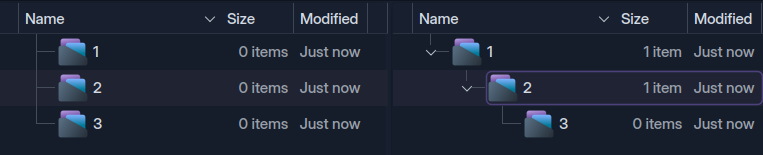
CtrlShiftN1 creates the first folder. Repeat this for 1 through 4 and you get:

Now you must Escape the focus before creating new folders to avoid nesting the next folder.

Nesting is still very easy and doesn’t need to be made easier:
ctrlShiftN1 and repeat for 2,3,4.

So it’s established that this CAN be more of a regression than an improvement; but then again, OP didn’t really state WHY they wanted to do this.

This change, alternating between nesting and sibling creation is a result of Dolphin’s new focus-following behaviour - not a bug, but a subtle shift in how folder creation will respond to context.

The drawback is that this is completely unique, and as such will be completely ‘unintuitive’. I would suggest that Dolphin’s behaviour in this regard should be a regression, despite the overall push for more context aware behavior being good.
1 Like

In the dialog you enter ”1cat/2dog/3pig” and you will get what you want. (mkdir -p built-in)

Or you would need to select the 2dog folder to create a sub-folder for it.

It seems nobody knew that was possible :stuck_out_tongue:

5 Likes

Haha well that’s really nice; but not quite the slamdunk :wink:

Sadly it fails attempting to similarly create 3 adjacent folders: mkdir -pv 1dog 2cat 3pig

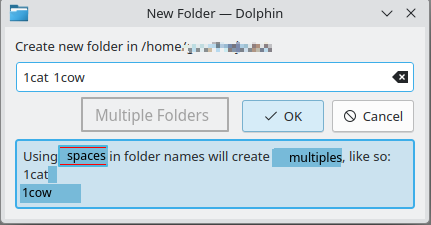
It results in one folder named 1dog 2cat 3pig (as the space isn’t interpreted as an ‘adjacent folder’ as the slash is interpreted as a ‘next level folder’; making it different to the terminal command behaviour).

i had no idea, but there is even a helpful context window that comes up to explain how the subfolders work

really nice feature (if a bit hidden).

2 Likes

there would need to be some way to tell it that the space is not just a space in the file name (which should be the default interpretation)

shift+space or something?

maybe the helpful context window could offer the same advice when it sees a space and inform the user of the shift+space feature

1 Like

You touched the discoverability of our features.

Indeed here, we would want to add some text.

Feel free to open a bug report (and if you do share the link to it here).

2 Likes

How about when the dialog is opened and input is valid, Shift+Enter would create the folder and reopen the dialog immediately?

We might have even a third button “Create another folder”.

But I have to weight-in the complexity of the UI added. People like that dolphin is lean is term of UI, not too much superficial things, that are rarely used by a few users, but complexity the UI for ALL users.

I mean how often do you REALLY create folders in batch ? Is dolphin the best tool(legitimate?) to accomplish this?

3 Likes

for discoverability, how about the dialog having a “Separate Folders” button greyed out, and as you type a space in the file name, it lights up as an available option along with the context window like this

images/jpg, images/png

A comma could separate folders. if entering images first then create jpg, png instead of one folder named jpg png.

Neither are satisfactory, users having , or in their folder names are semi-common and legitimate.

Hence my suggestions in Slightly strange behaviour in Dolphin - #15 by meven

3 Likes

Aha, that was my initial reaction to the thread - but it does seem strange that every other folder would be nested if you sit clicking the create button.

Soooo, back to the original question: can this behaviour be disabled?

2 Likes