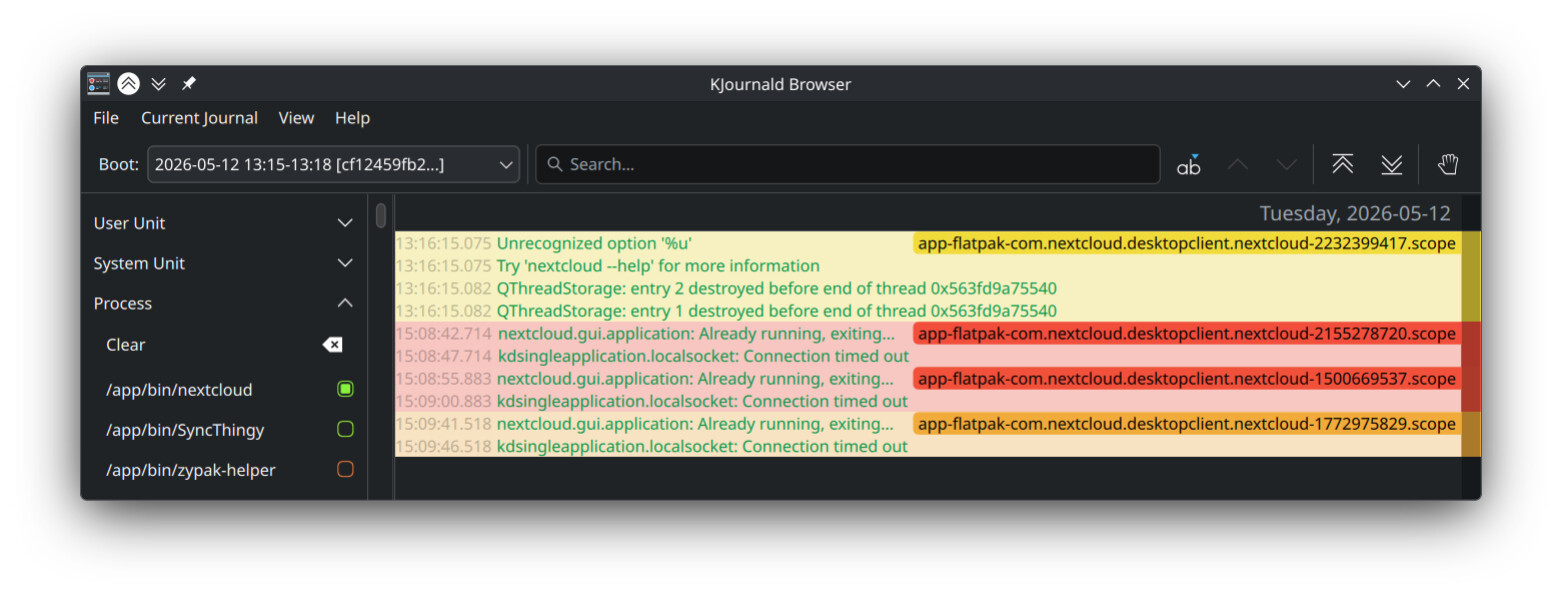
This is a long time issue,
some apps don’t show up when i open them via
Krunner,
Taskbar (Icons Only), and the
default Application Launcher.
For some apps, such as steam, i thought it was just a performance issue.
but some apps that ran perfectly fine before also show this behavior.
such as the Settings app, Godot Engine, Nextcloud and more
sometimes restarting fixed it, like in the case of settings.
but Nextcloud hasn’t opened in a good while.
I forgot to add what i am seeing here,
but when i click the app, it shows up on
the taskbar,
the icon bouncing under the mouse, and
in processes
but instead of running, all three disappeared without a trace, no notification for a crash or anything.
the process ceases 1-3 seconds after the icon disappears from the taskbar.
i have no explanation for this and hopefully im just forgetting something simple which just needs to be toggled off
when i open the nextcloud, it says nextcloud.gui.application: Already running, exiting..
then after it fails, it shows kdsingleapplication.localsocket: Connection timed out
i just learned how to use this app rn, so mb if i made a mistake
Id like to add that also the Discovery store isn’t opening anymore, it and settings both only work for a little bit after a restart. but some 1-2 hours after a restart, they both stop opening.
and i havent managed to get Nextcloud to even open, but all else seems working
atleast nextcloud works there. i dont have the time rn to do a proper check. since i have to keep using it for a bit for some apps to break. but since nextcloud was a consistently failing, i tried it there and it did work but maybe because it was logged out ¯\_(ツ)_/¯
for steam, you should be able to just open a terminal and type steam, but then i have a native steam application on kubuntu, i don’t know if fedora has one.
you can right click on the app menu and “edit applications” to look up your steam application’s settings… under the command and command line fields in the editor it will give you the exact command that it is executing when you launch it.
you can then either paste that exact command into a terminal or you can choose “run in a terminal” from the advanced tab… be sure to hit “save”… and then try launching it from the menu.
either way you should see a list of actions it is taking being output to the terminal in real time and see if there is anything to indicate why it is not launching as expected.
i got this error ibadullah@fedora:~$ run --branch=stable --arch=x86_64 --command=nextcloud --file-forwarding com.nextcloud.desktopclient.nextcloud @@u %u @@ bash: run: command not found... when i pasted it in the terminal, but when i did this:
it opened the konsole and showed this line nextcloud.gui.application: Already running, exiting... before just closing
Before anything else, check your system tray on the taskbar. The system tray is very similar to how the Windows system tray works. Expand the system tray and see if you can find an icon for NextCloud. If it is there, try opening it from the icon. If it won’t open from the icon, right click the icon and tell it to close. Then try opening it again.
If there is no icon for Nextcloud in your system tray, the next move is to open your app menu, go to the system submenu, run “System Monitor,” and then choose the applications tab. See if Nextcloud is in the list of running apps. If it is, select it and click on the “Quit app” button. Then try to run it again. If it isn’t in the “Applications” tab, search for it in the “Processes” tab and if it is there, tell it to quit. If none of this works, report back and we can continue from there, but it will involve you getting used to the Linux command line terminal.
and yup, i have already checked the system tray and also the Processes, the process starts but for some reason just dies out giving the errors previously mentioned.