Spacing is off in Application Menu

The Application Menu option for the “start menu” has recently changed the spacing of the left column that has the Favorites on top and below them the three Logout, Restart, and Shutdown buttons.

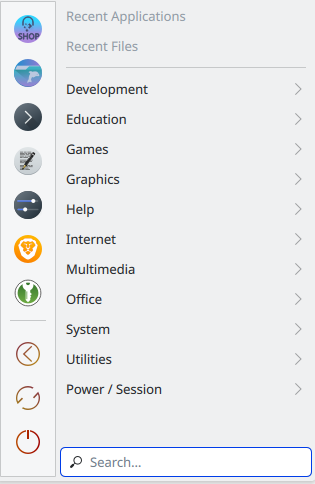
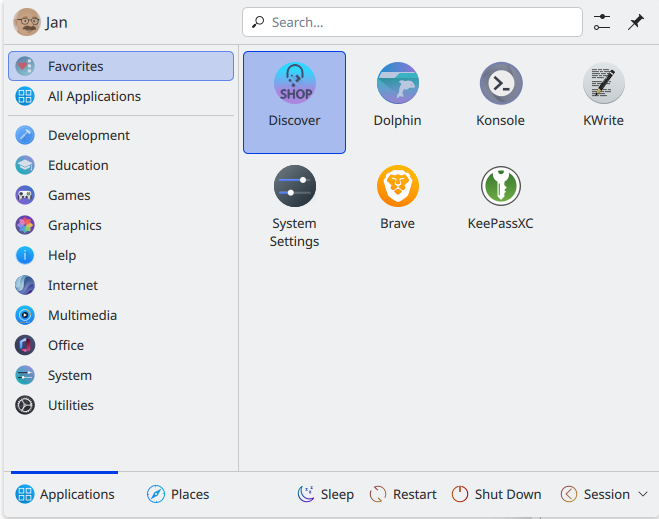
Before, the three buttons were just justified to the bottom, with padding after the last item in the Favorites. But now, they’re all bunched to the top of the column; removing favorites bumps those three buttons higher. This is breaking my muscle-memory for reaching for the Shutdown/Restart button. Is there a way to restore the padding after the Favorites to ensure the Logout, Restart, and Shutdown buttons stay justified to the bottom?

I wasn’t sure if this was a bug, which is why I posted here. Any help is greatly appreciated, or if this is indeed a bug, please steer me towards the proper reporting channels.

hi, welcome.

a picture would certainly help and if need be a link to imgur or someplace

you should be able post links and make attachments after a couple more replies.

Of course! It seems I might be able to attach here. This is the positioning we should see…

This is from the Fedora live image.

And here’s what happens now with KDE on Arch…

yes, that makes more sense now, and padding of the favorites bar seems to no longer be effective.

perhaps some other plasma 6.6 users can confirm this on their machines.

Is this layout with the favorites on the left a KDE 6.6 thing? I like it! (I’m still on 6.5)

on distrosea.com i did call up catchy (arch based) and it does not display your issue

this is likely something borked about your install.

if you try a new user does it still have this problem?

The padding issue exists on two separate systems, both running Arch. It appeared with the update to Plasma 6.6. I just spun up that CachyOS from distrosea, that image is running Plasma 6.0.2. This has got to be a 6.6 thing.

This is how it still looks in Fedora Kinoite 43, with KDE Plasma 6.6.1 and Qt 6.10.2


I see no differences here, but I must say I don’t use this menu, I use the Launcher.

You wouldn’t see the padding mishap here because the left column is fully populated. I’d be interested to see what happens if you removed some items from the Favorites.

Seems to be a bug. I just tried this with a new user account, switched to application menu, and I get the same incorrect spacing.

Operating System: CachyOS Linux
KDE Plasma Version: 6.6.2
KDE Frameworks Version: 6.23.0
Qt Version: 6.10.2

Thanks @darryl for confirming! I’m happy to submit a bug report, but I’m not sure which product to file it under at bugs.kde.org and searching for “application menu” didn’t help much. Would anyone have guidance on this?

your app menu image is inconclusive because what is driving the height of the menu is the favorites bar.

depopulate the favorites bar and see if the session controls stay at the bottom.

file it under plasmashell and then choose the component application menu.

1 Like

Here’s a screenshot:

You, and @skyfishgoo are absolutely right, I did not see that at the time. Here is another picture, now with less items in Favorites:


Also here the 3 buttons move up. Again, since I never use this menu I never saw this before.

Is a behaviour that will be changed to back in Plasma 6.6.3 to your screenshot of Before.

Regards

This is great to know! I’m having trouble connecting the dots between their statement on not including the the Panel Spacer Widget and fixing the issue, but I’ll wait and see when 6.6.3 comes out.

And thanks @skyfishgoo for the direction on the bug report, I’ll start contributing there now that I’ve gotten set up.

that’s definitely a bug.

Thanks for the guidance everyone. I’ve submitted my first ever bug report! Looking forward to contributing more now that I’m all set up.

1 Like