I recorded a video using camera mics and a separate recording device, and I’m trying to edit them together, but the separate audio track “frames” do not coincide with the frames on camera.
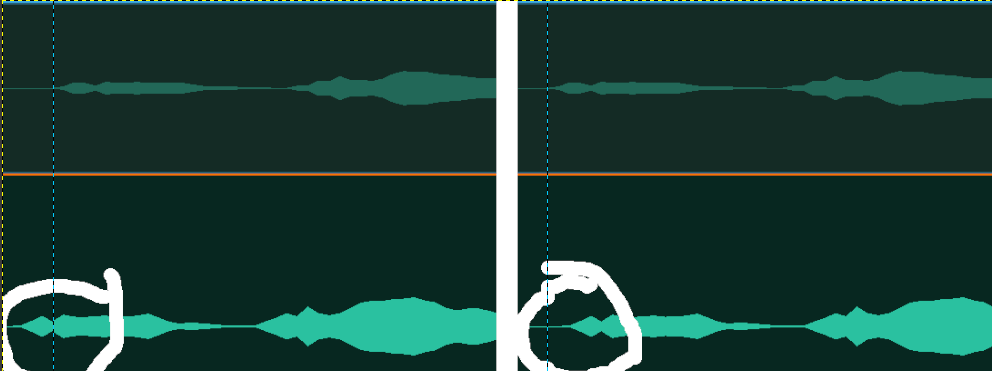
I can only move the separate audio track a fraction of a frame too early or a fraction of a frame too late (see image).
Is there a way to position the separate audio track independently of the camera frames?
Thanks!
1 Like
You can “position” them independently, but that’s clearly not what you mean here - in kdenlive you can only set the start of an audio track (or any other type of clip or transition) to positions that are multiples of the project frame rate.
In most cases, having audio misaligned by at most that amount isn’t noticeable, and is less than the (variable, and generally unpredictable) error in alignment that will occur in most playback devices. But if for some reason it really does matter for you to have alignment with audio-sample granularity, then you’ll need to pad or trim the start of the audio file in an audio editor.
This may change in the future, but probably not Soon.
1 Like
Thanks, I’ll give that a try.
BTW - How is this typically dealt with by kdenlive users? Presumably others encounter this?
1 Like
If you do, then the other thing to watch for is the alignment at the end of the clips too.
If the recording devices don’t share a clock signal, then the number of samples in a given time period will vary between them, and for a long enough recording, if synchronisation really is that critical, you’ll need to drop or pad samples to keep them that closely synchronised.
As I noted above, typically the error is imperceptible, or the playback device will desynchronise the audio and video by more than this ‘error’ anyway. But the question does come up occasionally, and if you search this forum you’ll find related discussions.
1 Like
+1 this is a massive, massive PITA for me. I don’t follow how these people can say it’s “imperceptible”.
I have spent countless hours trying to fix it, and I keep getting videos where my lips move at different times to the sound. It looks awful.
Then maybe fix your player to not play the streams out of sync?
That error is usually far greater than some tiny proportion of a video frame on the rendering side.
Edit (so that maybe we don’t keep doing this at regular intervals):
Just to put this into its proper perspective, and you can take your pick of whether it’s for fun, enlightenment, or to head off more angry objections from people who wasted “countless hours” trying to solve the wrong problem …
If your video frame rate is 30fps, then the worst-case maximum possible misalignment you can’t improve due to this limitation is about 15ms. Which probably doesn’t intuitively mean a lot to many people - but it’s less than the delay which becomes noticeable or annoying to the vast majority of people in a live 2-way stream or telephone call.
And it’s about the delay you would add between the image and audio when watching a film in a cinema if you moved about 5m further away from the screen and speakers.
So if you don’t already know exactly which seat to sit in at the cinema to not have this make it an absolutely awful experience for you - then it’s probably pretty safe to say that this amount of error is generally imperceptible to you too.
Apologies to anyone I’ve just permanently ruined cinema for now because they’d never noticed this before or done the math!
1 Like
Kdenlive is rendering the final product with the streams out of sync, this has nothing to do with the player.
You don’t notice an issue, so you declare that we’re all imagining it? Why would we make this up? Clearly it’s a real issue.
Your calculations about the cinema are a curious data point, but perception is a psychological phenomenon. The observations you’re making about cinema seating won’t necessarily be noticed by viewers, as you point out.
So the issue here is about more than just 15ms. In certain scenarios, this delay distracts viewers and drives them away. It should be an easy bug for kdenlive to solve. Please don’t get in the way of our concern being addressed.
Actually, it is melt for the track compositing and effects/filter application, and then ffmpg for the encoding of video and audio stream(s).
It would be good to know which OS you are running and the version of Kdenlive (installed or appimage/standalone).
Based on your limited information we can only guess at what is happening, and some people here have very detailed knowledge about the inner workings of codecs and how the different streams are handled and composited. When they respond to a post and don’t immediately resolve this but try to look at it from a different angle, it’s not their trying to get in the way of a concern being addressed. Accusing them of that is a sure-fire way to drive them away from looking further into your concern.
I don’t quite follow what you’re saying about syncing things with ffmpeg − I’m trying to use kdenlive to make a complete video. In my projects lately, I have two video streams, each with audio.
One of them has decent video and the other has decent audio, but I can’t align them − as @ice describes, the audio has to be ~1 frame too early or ~1 frame too late, out of sync with the video.
You can see people’s lips moving out of sync with the sound they’re making, and it’s really jarring. See the sound waves in these top two audio tracks (audo_enhanced… and phone_footage_30.m4a):

The audo_enhanced… track should ideally match the phone_footage_30 track precisely. If I try to use the “align audio to reference” option (when I right-click on a track), it can be off by seconds.
This is in Kdenlive 24.08.1 in Ubuntu 22 
Hmm, that’s interesting.
Thanks for posting the screenshot because something sticks out for me. It looks like you zoomed all the way in to show individual frames, so the “blocks” in the audio track should neatly align with the frame scale/ticks of the timeline ruler. And they do for A1 but only to 00:32:47:07. From 00:32:47:08 onward the ruler tick marks are in the middle of the blocks. For A2 and A3 the blocks span the ruler tick marks from the start.
Now, this could be an issue of how the audio waveform is drawn. To check this, you need to use release 25.04 because it includes the new audio wave form draw code which also includes some speed and accuracy improvements. If you want to keep your (installed) version 24.08, use the appimage (Linux) or standalone (Windows) versions for checking purposes.
1 Like
And your proof for that is what exactly? That it’s visibly out of sync when you play it with your player?
Your calculations about the cinema are a curious data point, but perception is a psychological phenomenon.
And it’s a very well studied one. People don’t perceive synchronisation errors this small in actual scientific testing. Broadcast standards don’t require synchronisation tighter than this
because the people who wrote them actually tested it.
So the issue here is about more than just 15ms
No, the issue here is not. It’s possible you may be having some different problem to what this thread was originally about, but if you have a synchronisation error greater than that with 30fps video, then the problem originally discussed in this thread is not your problem.
And if you actually do have a real problem, that actually is in something that kdenlive or something it’s built on can fix - pretending and angrily insisting that this is the problem isn’t going to do anything to help find and fix it.
So until you can show how the encoder is creating an actually perceptible delay - not an imperceptible one that is orders of magnitude smaller than the error introduced by your player - you’re just hijacking a thread about an issue that isn’t related to your problem at all.
I never said that what you were seeing wasn’t real and that you were imagining it, so put away the straw man, that won’t help make your case either. I said there’s some very basic math which shows that what you’re blaming for it cannot possibly be the culprit. If you can’t understand that distinction and engage politely, you’re probably not the right person to try and debug this further with.
If it’s actually real, someone with a better attitude and understanding will shed some more light on it eventually. My bet remains on your player, you’ve said nothing that indicates otherwise yet.
2 Likes
Sorry for the delay
Yes, I guess you’re right that all of my players could be broken, but why is it only for videos made by me using Kdenlive?
I’ve tried VLC and MP4Client (in Ubuntu), but I find it most troubling that the problem exists when I upload to YouTube (I can’t post links here, but this project with the screenshots is at youtube .com/watch?v=qjwhOjBsDhA)
Now that I’ve updated to version 25 with the different rendering of the soundwave, it’s a bit clearer 

I apologise for before, coming across a bit too demanding re: getting in the way of a problem being addressed. But yes, it would be fantastic if this were to be fixed 
All players are usually broken, and its worse when you’ve just installed a software player on an OS where the people who wrote the software player can have no idea at all how much delay the OS introduces to audio and video streams before it hands it off to hardware, or what the delay line in the hardware you have contributes to this problem.
It may be slightly better with a hardware black-box player if it’s developers pre-compensated for what things they do tightly control.
VLC and most other players, including commercial digital televisions, have an explicit control to calibrate the relative delay to the system it’s running on and the stream it’s receiving.
but why is it only for videos made by me using Kdenlive?
Is it really? You haven’t yet said you don’t have this problem with a different renderer - so it’s possible its just much more obvious to you because you know how the sausage is made in you own videos?
I won’t rule out a bug until we clearly can - but we likewise can’t say there is one, or do much about it, until we have some evidence there really is excess delay encoded in the rendered result, and some idea of exactly where it’s getting introduced. We’re looking for an error much bigger than half a frame though - and that should be easy enough to prove to yourself…
If moving the audio that is in error one frame in the direction of the error doesn’t move the visible artifact to lead or lag the video opposite to what it previously did with a similar severity, the issue first discussed here clearly isn’t your problem. Likewise you can tweak your audio in an audio editor to pad or crop it to be “sample exact” with the start at a frame boundary as I described to the OP and you will see much the same thing - if you really want the most conclusive proof that adding support for tweaking that directly in kdenlive won’t solve the problem that you are having (and it’s really not a simple thing to add, though it is in the same bucket as other long term goals that will need similar deep structural change).
At 30fps, when doing Foley for even sharp transients, one or even two frames either side makes a barely, if at all, perceptible difference, even when you know to expect it. And the vast majority of players will then ruin that if they aren’t first calibrated.
EBU R37 says +40/-60ms delay is acceptable for broadcast television. ITU subjective testing with golden ear/eye test subjects found the detectability threshold to be +45/-125ms, and put the acceptability threshold at +90/-185ms as detailed in BT.1359. Nobody has a recommendation that puts +/- 1 frame @30fps into the rough.
If there is some other problem, we’ll really want to fix it - but there’s not much we can do until someone having it can indicate that it’s really coming from kdenlive, and exactly what they are doing to trigger it. Because this could easily depend on things like your choice of codecs. the implementation you’re using, and other factors like that too.
If you’re still running pulse audio that’s probably the first problem you need to fix. Their proud boasting of how they’d achieved “glitch-free audio on linux” with only 200ms delay was one of the most Dunning-Kruger things I have ever seen, still to this day. There’s not much we can fix to help you if you’re stuck wallowing in an execution environment like that.
As a regular user who’s used to moving audio tracks with sub frame precision in other editors I immediately noticed this.
After reading through I sort of agree that the desync shouldn’t matter much, but literally seeing the peaks in the wrong place would have driven me crazy.
I solved this by dumping the clips I needed to sync into a blank project and then creating a new 120 fps project profile. This allowed me to get the audio close enough to feel good about. AFAIK switching profiles for sync and back with no other changes to the project first doesn’t have any ill effects, but let me know if I am wrong.
I think audio clips should be able to move irrespective of frame rate.
Thank you
Yes, other than the (fortunately fairly rare) case of needing to actually trim a file with single sample accuracy - it’s mostly that sort of “problem”. People who watch your video will never know your horror at it not looking perfect in the timeline - and you will mostly be peacefully oblivious to the callous desecration that players will pour on your carefully perfected alignment.
switching profiles for sync and back with no other changes to the project first doesn’t have any ill effects
Switching profiles is a pretty dangerous operation - we make no promises about it being supported and many things will behave badly or even crash (especially, but not limited to generated content like colour clips and titles). So I wouldn’t really recommend doing it that way.
In the rare cases where you really need this, you’d be much better off padding or trimming the file in a proper audio editor (bonus points for one that can do it losslessly) - and you can even configure a preferred tool for audio editing that you can throw to for this sort of thing. If your audio is something like opus, you can do it just by tweaking the header metadata.
In the common case where you don’t, learn to trust the science. There are germs on everything you eat. Despite what the disinfectant companies will tell you, most of them don’t actually harm you! : ) In practice, this is the same sort of Unclean.
I think audio clips should be able to move irrespective of frame rate.
We all think that’s the ideal. It’s just neither a trivial change to implement, nor the earth shattering problem in practice that some people naively imagine it to be - so for now it’s on the list of ‘things to perfect’ behind some bigger problems that don’t actually go away if you stop worrying about them and don’t have other easy workarounds.
It will happen one day, and it doesn’t need more votes to make it a nice thing to have. Nobody explicitly doesn’t want it. But thanks for sharing what you’ve explored to work with what we have in the meantime.
I’m late to the discussion but looked at your waveforms and it looks ot me the audio issue is that the processed audio is almost 2-frames further back from the My Video mk4v. It’s easy enough to take two frames off the front of the processed audio to match the audio that comes with the video track.
What I haven’t been able to find is a keystroke that takes the selected item (audio or video clip) and scoots it one frame to the left or right. That would really help get audio in sync, if we could watch it play, while nudging the audio track into sync.
For the scooting about bit, you might not be totally surprised to learn the arrow keys are your friend! The bit you were missing is <Shift>+G to grab the clip.
1 Like