ive recently updated from plasma 6.2.5 to plasma 6.4.3 on kde neon stable
the system notifications used to work (e.g sound when plugging in a device or power connector or error sounds) this has stopped working for me on the latest update, the only place where sound can be heard is by changing the volume using the volume keys and that works correctly across different sound fonts
not sure what kind of additional info might be needed for this but any help would be appreciated
hi, welcome.
the sounds are all controlled by the notification settings
settings > notifications > device notifyer
settings > notifications > power management
etc.
under each is a configure button where you can access what sound is played for various events
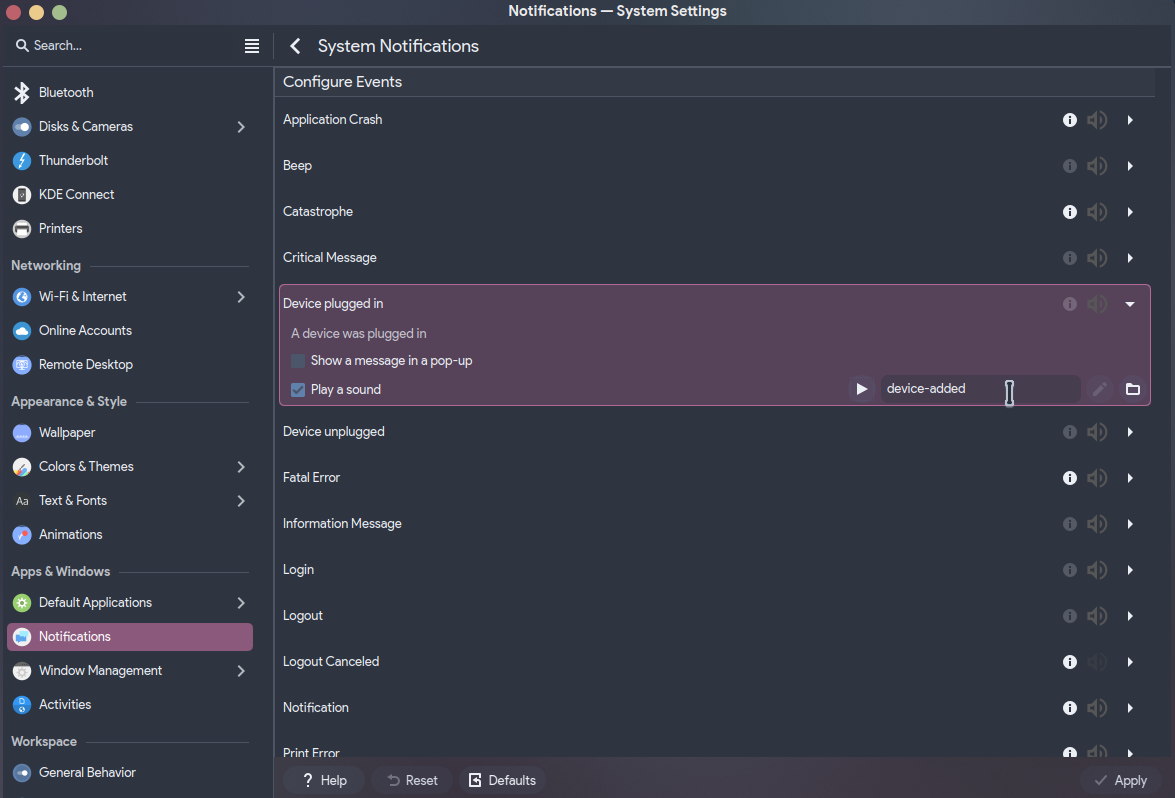
-
Check your volume and mute settings.
-
Make sure notification sounds are enabled in system settings.
-
Restart your device.
-
Update your audio and video drivers.
-
Test with different apps to see if the issue is system wide.
respectfully ive already mentioned this isnt the issue
sound plays just fine (“the only place where sound can be heard is by changing the volume using the volume keys and that works correctly across different sound fonts”)
audio works in all applications
ive also mentioned that the sound preview button will not play the sound, it’s not an issue with the notification sounds being disable (despite them being enabled)
I am having the same issue on 6.4.4 on arch Linux. No sound issues on the system anywhere except for KDE notifications. Been like that for a week or so for me. Same situation where even playing the preview doesn’t work.
System to the notification to the sounds are not playing.
“Youcine: System notification sounds are not playing.for more visite this:

same here. i could verify, that sounds are in place and play well on comand line via paplay
and pw-play as well. i could also verify via qpwgraph that cli commands connect to the same output device as the preview, but preview remains silent, such as it is set to zero volume / muted.
with pavucontrol i was able to verify the latter and could unmute system sounds there.
now notifications are back on fedora 42, Plasma 6.4.4.
Same on Neon. No previews. No system sounds. Never noticed because in Linux there rarely are system sounds, and those that are on, (like the volume raise sound) I turn off as I work late into the night.
Try deleting ~/.local/state/wireplumber and rebooting. You will have to reselect your audio device. This has gotten me to the point where I can hear notifications, but I still am unable to change the notification volume slider.
I’ve had this issue as well. I don’t know what triggers it yet, but based on some other threads (which let me to https://bugs.kde.org/show_bug.cgi?id=456765 that has no resolution and may or may not be related) I’ve found it seems it may have started when I un/plugged some monitors or my TV from/to my laptop.
The last post from @Retalak had me looking into wireplumber then pipewire - I didn’t want to delete all the individual volume settings (I’m guessing each app would be reset to the default volume as a result) and found that the following is a work-around for this situation, at least for me:
systemctl --user restart pipewire
I’m also having this issue. I can play a video or sound file in VLC or YouTube or whatever and get sound, but none of the system sounds like when you delete a file or minimize a window play. I’ve checked that the sound files are there, and that I’ve turned on all the sounds I can think of in system settings.
there is no slider for it under the volume control in the system tray, but if you open the configuration window you will find a separate slider for system notification sounds.
perhaps you need to fiddle with that.
I had this same issue yesterday. Fixed it by simply rolling back to a previous BTRFS snapshot. 
No idea what caused it…
For the OP: You could try System Settings → Colors & Themes → System Sounds and check “Enable notification sounds”
Seems to be fixed in KDE neon after today’s kwin update 
just to close this issue, the problem went away after an update
I’m having the same problem after updating my Kubuntu, and I’m years without any solution going through the same problem as this post.
I reinstalled Kubuntu in 2026 when I migrated from the X11 to Wayland, everything was normal, then some update was installed and all the glitch came back again, and since then never returned to normal.
I checked the system sounds tab in the computer settings, everything is enabled and okay, but all test buttons make no sound. It’s the same situation, my computer sounds, I hear the sound when I change the volume, but all the alert and notification sounds stopped working.
I went a lot deeper into my computer in the control panel of my machine, I found out that mysteriously the notification sound was off in the sound panel of kubuntu (I turned on and this is back to normal now).
I still don’t know how this happened because this was an extremely specific place that would be impossible to me to accidentally disable. But my theory is that this might have been the audio drive on my video card that was turning off that functionality the moment it was first recognized in the first time.