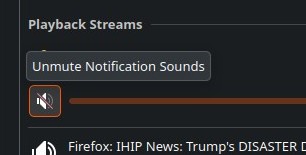
For some reason something keeps muting system sounds. I am not doing it intentionally.
Thats odd but some more details might help.
Are you using some sort of headset? Does it happen if you are running certain applications or is this just random.
No, no headsets. Seems random. I do use multiple output devices that are often switched around. Sometimes I will shunt sounds off to the TV via HDMI through the graphics card, and analog HiFi audio to my HES via my external recording interface (two discrete stereo outputs or 4 discrete mono recording channels, with Stereo A driving my bi-amped KRK near field monitors via XLR on my workstation, and Stereo B driving my Rotel HES hifi via RCA).
Currently I am just using the HDMI to the TV and Channel A. Channel B is active, but not in use unless I turn on the hifi and open an audio app (Audacious).
The built in Intel 7.1 sound is disabled in the bios.
The only other thing I have noticed is that both Haruna and Dragon player think they are VLC. When VLC is muted, so are Haruna and Dragon. Dragon requires going into sound settings to unmute, as trying from the app fails. I keep just about every known video player for testing of media as I do media development professionally (photography, audio engineering, field recording, filmmaking).
Does Plasma think its VLC too I wonder? I will test out VLC mute to see if it triggers the system sound mute.
Well its been a bit since I’ve looked under plasma’s hood but I believe that it is mainly just a front end to something like ALSA. That is what maybe responsible for some of the issues you are having.
I wonder. Is it a situation where you set a device you want to use, and reboot and its set differently or is it just a random change. If it’s randomly changing is it just doing it with say a wireless connection? If it is a wireless connection what might be happening is that the system looses connection wit the wireless device and defaults back to a system based device.
Thanks for the reply. I have been doing more testing and I think the issue is the notification system. It is set to mute sounds and suppress popups when apps are full screen. When I turn on Kodi, which uses the fullscreen on the HES, it appears to be muting system sounds. The problem is, when kodi or other full screen apps are closed, it does not “unmute” the system sounds. I will report this as a bug.
Yep it’s a front-end to pipewire/pulseaudio
I’d like to help but it’s not quite clear, what exactly do you mean by “mute”, and by “system sounds”? Is it possible you mean “don’t play” and “notification sounds”?
By this description, it seems as though you are referring to the ‘Do Not Disturb Mode’ of the notifications:
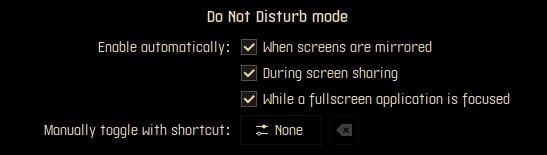
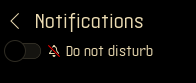
But this doesn’t mute anything, it just prevents the notifications from popping up and playing audio (no muting, they just don’t play). So I’m not sure how it could stay in effect other than if DND mode is still engaged. You’d be able to tell by looking at the icon, or by clicking it and looking at the toggle: