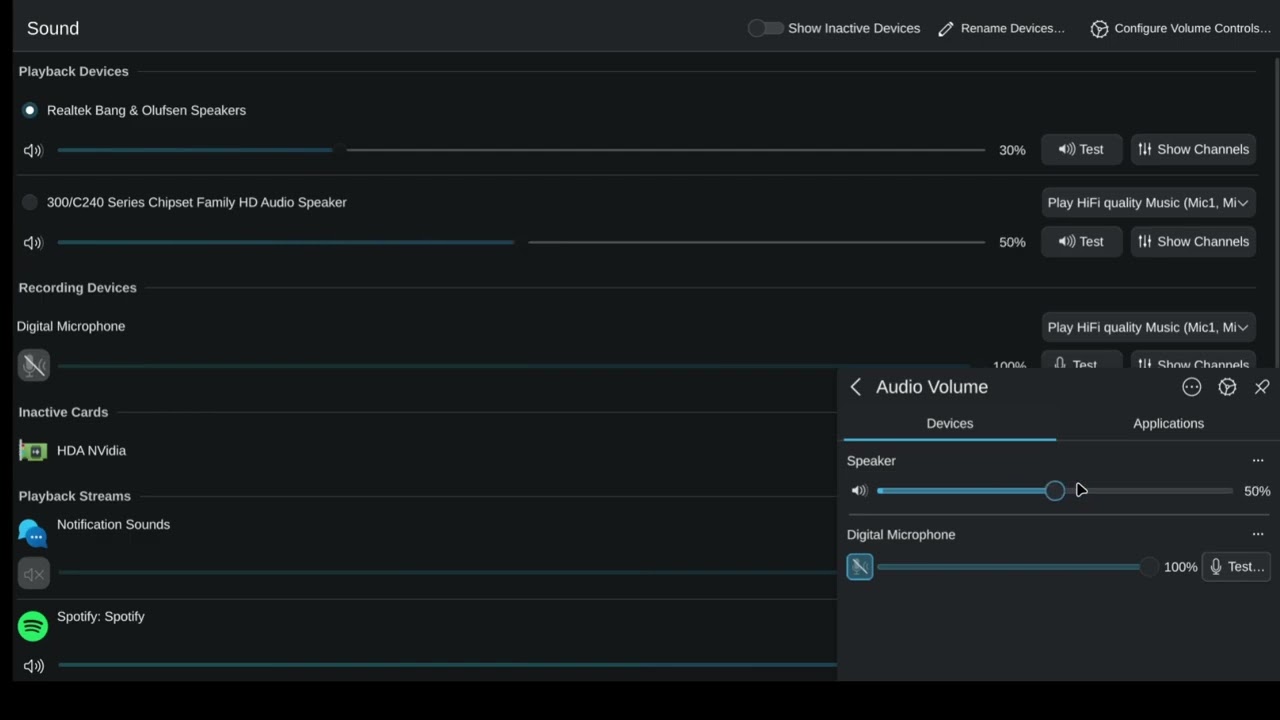
When changing my audio via the system tray, it will change a different speaker’s volume compared to my function keys for doing such, as shown in the video:
How can I make it only control one speaker, specifically the Realtek Bang & Olufsen Speakers?
I’m pretty sure KDE’s shortcuts will always affect the default device.
To change volume on a specific device you could try to define shortcuts via System Settings → Keyboard → Shortcuts → Add New → Add Command
The commands should be something like wpctl set-volume 34 5%+ and wpctl set-volume 34 5%-
Where 34 is the node ID. To get it, use wpctl status and look for Audio → Sinks
wpctl is part of wireplumber which is probably installed by default. If your distro uses something older, you will need different commands.
I think you might’ve misunderstood. What I want is for the volume slider to control my Realtek speaker output, instead of the Series Chipset one. Right now, it’s only my function keys that do so.
It seems like after an update and restart, it works the way I want it now.