I’m very much a newbie here so apologize for any dumb questions. I’m cleaning up my old mp3 library which has 1000’s of songs ripped from CD’s ages ago, most of them have been tagged and rated. I noticed an issue where I could see tags in apps like Musicbee or MP3Tag, but not in other apps. Using Kid3, I found that I could see the tags when I am using the id3libMetadata, but not when I use the TaglibMetadata, though there were a few rare instances where I couldn’t see them with either of them.
My first question is why would I only see tags with one library but not the other. As far as I can tell they’re referencing the same frames. Second question, if id3lib is what’s causing some programs to not read the tags, can convert the data in the id3lib frames to Taglib?
Sorry, I should’ve mentioned that these are all v2.3 tags. The difference happens when I switch which plugin is active under Settings → Configure Kid3 → Plugins.
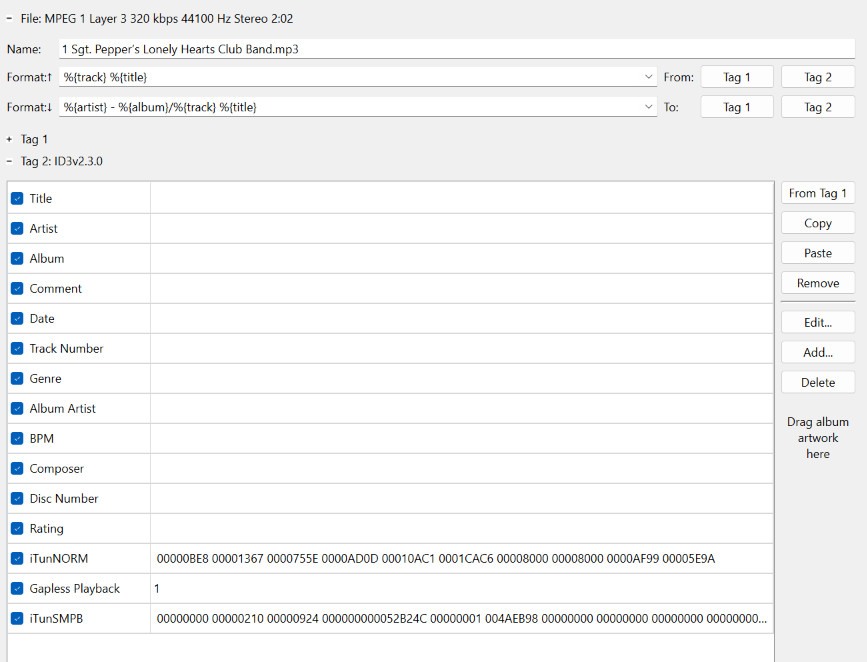
Here’s an example of what it looks like with just id3libMetadata enabled.
This is strange. The times where TagLib could only read ID3v2.4 but not ID3v2.3 are long gone, so with TagLib, you should be able to read all ID3 tags. A file can have zero or one ID3v1 tag at the end of the file and either an ID3v2.3 or an ID3v2.4 tag (or none), which are most of the time located at the begin of the file.
The fact that you can only see a subset of the frames (iTunNORM, Gapless Playback, and iTunSMPB) when using TagLib could be caused by all other frames being invalid and thus being ignored by TagLib, it is a bit strict concerning incorrect tags. Another reason could be that there are duplicate tags, and TagLib is only seeing the one with only three frames.
To stop guessing, I would recommend that you feed your file to “MP3 Diags”, I always use this tool to verify my MP3 files. If this is not possible, you could try on a copy of such a “problem file” to use Kid3’s “Rewrite Tags” action (with the plugin active which can read the tags), this will simply rewrite all the tag frames, maybe this will write them in a correct way, so that they are readable afterwards in TagLib.
If this still not helps, you could provide us the beginning of such a problem file, for example by dumping it using `xxd filename.mp3 | head -50` in a terminal, so we could reconstruct the ID3v2 tag and try to reproduce the problem.
I think you’ve led me to a solution. I checked out MP3 Diags which did show a number of stream and frame issues. I tried fixing the issues in MP3 Diags, but couldn’t seem to do it without losing the data in the bad tags.
Your other solution of using Rewrite Tags looks like it’ll work great though. Taglib could read the tags afterwards, and all the MP3 Diags issues were resolved in the process.
In case you’re curious, this is a file with a similar problem and the messages that MP3 Diags provided.