Please add a way to toggle the fuzzy search functionality or a way to prioritize aliases. I rely on applications aliases to open results and fuzzy search breaks this. I used to be able to open Konsole by simply typing cmd and pressing enter. Now the first result is Cmake.
2 Likes
You can also type in “ko” for konsole, that’s not the same shortcut, you might have to rewrite for your muscle memory.
But this seems like a very unique niche use case, a setting is probably not what we want.
Can’t stop but thinking about:
A legitimate issue here though seems to be that your shortcut is exactly cmd but cmake is picked.
Exact matching should get priority.
That would be worth bug reporting for krunner.
2 Likes
But aliases were introduced to serve a purpose. I agree that exact matches should have priority but maybe there could be a way to order priorities based on preference?
1 Like
Yes there is, go to the krunner settings.

Then the button at the button. You can turn on/off the plugins and change the order of some things.
Or search krunner in kunner, that’s the first entry.
1 Like
That setting is to order plugins. There’s no way to prioritize aliases over names.
What are your aliases exactly ? How do you define them ?
I’m sorry I should have used the correct term. They are “keywords” and can be found in the .desktop of the application. For example, cmd is a keyword for Konsole, and notepad is a keyword for kwrite. You can add your own, but both of these examples are defined by the developers.

2 Likes
That’s interesting - I get cm=cmake but then cmd=konsole.
Some flexibility is a good idea here… cmd sounds so offensively Windows that I’d never have found that out.
To open Konsole CtrlAltT is really the way.
ko⇒ Konsolesol⇒ konsoleTerbrings up many options for Terminals… I should purge a couple…
You can add alternative keywords to the Description or Comment… but you can’t really take the ‘cm’ out of ‘cmake’.
1 Like
I also want to be able to turn this off. “ter” used to bring up terminals, now “ter” and “term” match to Steam. This feels like some windows search “I know what you want better than you” functionality.
2 Likes
I like to open my terminal by typing “bash”… as seen in xplatinum ‘s screenshot, it is a keyword for konsole. Now “LibreOffice Base” and “Crashed Process Viewer“ are favored, whilst “bash” is a perfect match for the mentioned Keyword.
If there is a way to favor the Keywords over the fuzzy search, please enlighten me  I can’t find it myself.
1 Like
Hi everyone, I’d like to report the same issue. After one of the recent updates, I noticed a change in how KRunner finds applications based on the text entered in the search bar.
Now, when I type ‘teams’, the first result I get is Steam, and only the second one is ‘MS Teams’. The same thing happens with ‘gimp’: the first result is LibreOffice Impress, while Gimp appears second.
I should also mention that (unfortunately) I haven’t opened Steam in months, whereas I use Teams every day.
Thanks everyone!

2 Likes
A bug needs to be reported to krunner.
There is already one: https://bugs.kde.org/show_bug.cgi?id=511078
This is clear something needs to be done.
The solution is not to add an option but improving the result of matches.
4 Likes
Plasma 6.5.1 will already have some adjustments, will have to see what’s left to fix, once people have tested the new krunner version.
Fuzzy search in KDE can sometimes prioritize partial matches over exact ones, which can be confusing. Adding a toggle to disable it would let users choose between faster fuzzy results or precise matching. It’s a small change that could really improve usability.
3 Likes
This should be the default, not an option… as stated already, it needs fixing given the number of folks who are finding their searches broken.
1 Like
…but why do I get “Protracker” when I’m typing “back[up]”?
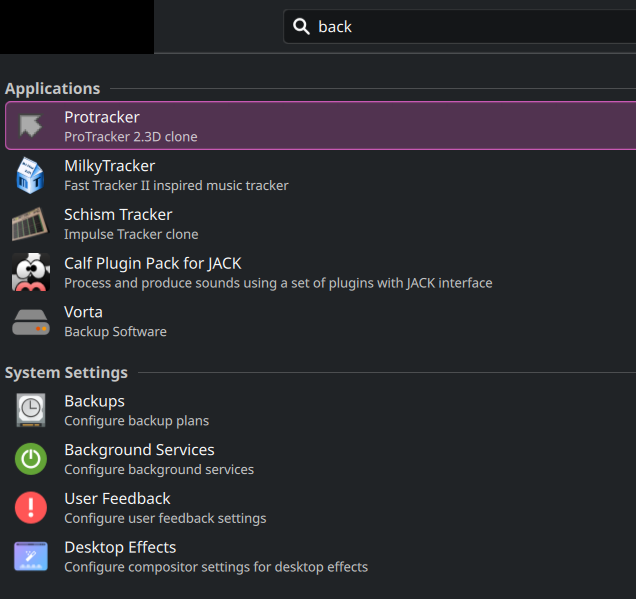
like, really, WTF, there’s even no “back” anywhere at all, I’m confused:
[Desktop Entry]
Name=Protracker
Comment=ProTracker 2.3D clone
Comment[fr]=Clone de ProTracker 2.3D
Exec=protracker %F
Icon=protracker
Terminal=false
Type=Application
Categories=AudioVideo;AudioVideoEditing;
Keywords=tracker;amiga;
MimeType=audio/mod;
ಠ_ಠ
Operating System: Debian GNU/Linux 13
KDE Plasma Version: 6.5.2
KDE Frameworks Version: 6.18.0
Qt Version: 6.9.2
Fuzzy search is basically broken. A few examples:
GIMP (okay, let’s pretend it’s because the description does not say “GIMP” but “GNU image…”)

1 Like
All of these issues should be fixed in Plasma 6.5.2. The GIMP/Impress issue specifically is one we have a test for now.
2 Likes
6.5.2 helped, but I’m still having a bit of a problem.
I have Deluge installed on my system, and currently the search goes like this ( I would post more pictures, but new users can only embed one per post)
Type D → Deluge is in the first spot, Dolphin 2nd, Discover 3rd, and from 5 spot on entries without D as the first letter appear, e.g. MiSide on 5th spot.
Makes roughly sense from my perspective, and I understand that just one letter isn’t much to go by.
Type De →

Now suddenly Deluge gets moved to the 16th spot, and MiSide is the first spot.
Type Del → Deluge is in the first spot again.
It seems a bit weird to me that MiSide gets preferred over Deluge, even though Deluge starts with De and MiSide ends with it. Deluge being in the 16th spot is also def. a lot further down than I would expect it (none of the entries before Deluge start with De, they all just have it in their name).
@ngraham Sorry for the ping, new to the forums and not sure if ppl get a notification without a mention. Is this something that could be improved on in the future, or do I have to learn to live with it ?
1 Like
I’m watching this too - as the fuzzy search still isn’t what it was - right now I had to pin System Settings because it doesn’t show up when typing ‘sett’ as it used to and is trumped by User Feedback and items with ‘set’ in their descriptions… and doesn’t appear at all in krunner on the first results page without scrolling down 2 pages.