Is there a way to tell which icon plasma should use for unity?
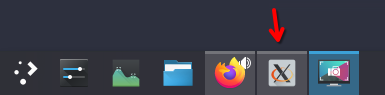
Is there a way to tell which icon plasma should use for unity?
What is unity?
I’m guessing it is not a native application, and is running non-natively on wayland here…
If you don’t know what is Unity, I don’t even know why you try to help me here. Anyway, the question remains, how to assign a custom icon in KDE taskbar?
The link he posted is essentially correct though. Changing the Icon in the desktop file of the application should do the trick.
Alternatively you can create a “.desktop” file manually for it and put it into ~/.local/share/applications or /usr/share/applications. Every app should provide some sort of desktop file out of the box, in some rare cases these don’t get installed automatically.
@Fairplex It is frustrating to see this type of comment. This is a community driven forum. If people take the effort to respond then that should be appreciated not discouraged.
If you cannot explain what you mean by ‘Unity’ then perhaps your post is not worth looking into, a view not aided by your singular response after I had already posted a link explaining how your ‘custom icon’ can be achieved.
Generally, it is important to give details about what application is installed, and also how it is installed - because there are a huge number of variations…
It is quite possible that you’re referring to ‘Unity Hub’ and that you were simply too lazy or ignorant to type it properly. I also see ‘untiy-editor’ in AUR, as well as ‘unity-hub’ - but if that’s the case, then I can only state that this application does not support MY distribution … obviously, your post also lacks any information about your current system which you could provide by pasting the contents of something like inxi --admin --verbosity=8 --filter --no-host --width or even the most basic information abtained by copying the information in the menu item ‘info’… which again, are apparently too lazy or ignorant to manage.
Applications can be run from a binary, it could be an appimage, flatpak, snapd, or repository installation - or even some PPA installation.
You give no information, yet criticise a simple query into the nature of the application for which you show only a cropped screenshot showing a familiar ‘X’ icon in the taskbar.
This icon implies that the application itself is incomplete, or is running under XWayland.
Some older or proprietary apps don’t properly support wayland, leading to missing or incorrect icons.
Plasma relies on .desktop files for proper app identification - and if missing or incorrect, Plasma falls back on the “X” icon.
Wayland requires apps to declare a proper XDG_APP_ID which needs to match Plasma’s expectations to load properly.
You can use xprop WM_CLASS to find out if it’s an X11 app.
However, the most important thing to remember when entering a new forum and attempting to elicit some kind of assistance is that it is really YOUR job to elicit help, best achieved by being friendly and cordial and responding positively to comments.
@ben2talk Sorry if my answer was a bit rude, but your answer sounded like a bot replying with some generic macro…
@Lenzoid Unity Editor doesn’t have a .desktop entry, it is launched directly from the Unity Hub via command, which I guess it is why it is missing the icon when launched. But your first answer worked, Thank you.
What’s wrong with you Ben!!! Eeeeeverybody just knooooooooooows what unity is!!! 
I don’t have an icon for pneumonoultramicroscopicsilicovolcanoconiosis. Surely people like you are gonna tell me I have to elaborate since it’s not running natively on wayland, whatever that may be. You really…strike me as being more of a ben2bot or ben2macro. This is truly disappointing.
I never mentionned having this issue under wayland, so I don’t know why you guys keep thinking its a wayland/xwayland issue. Sorry again @ben2talk I didn’t wanted to sound rude with you.