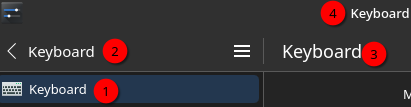
And this design is literally everywhere with the advent of Kirigami. Either you make a “modern” app with customized titlebars (yes you can do it with server decorations too - look at Mac OS) or you dispense with the fixed toolbar entirely like a old school app would if it had basically nothing of substance to put up there. This however is some sui generis third thing specific to KDE and it’s decidedly not good.
This is indeed quite awkward.
We need someone to come up with a better design that works everywhere and won’t take years to rewrite the world, though. So far, no one has been able to do so. Concrete and actionable suggestions that aren’t worse in prominent ways would be appreciated.
4 Likes
Move any contextual menu stuff to the bottom where the OK/Apply/Cancel buttons and get rid of the toolbar. Or implement NsWindow-type decorations (best option by far). Or find more actions to put in the toolbar, though I have no idea which ones (worst option, since it’s seeking justification for a wrong design). These seem like the only options.
Worth thinking about how and why this actually got implemented in every app. It should never have left the drawing board.
Can you stop that quirks-talk, please? That makes me wanna avoid your threads entirely, even if you have a point. Who do you want to get on your side with this passive-aggressive wording? Is it so hard to say “here I found a design issue, can we talk about improving it?”, I’m sure it would be much more successfully.
Especially things like “it should never have left the drawing board”, do you know the whole history how things came to the point they’re right now? Sometimes there are made some little changes here and there and so the overall design get new issues like repetitive titles, which probably nobody planned this way or it has a technical reason like “we want it foldable, but there is also a limitation right now to avoid double titles” etc. Whatever the reason is, if something valid or just a bad idea, it doesn’t matter. It is as it is and if you want to see things improved, talk about it in an adult way as everyone else here does, thanks.
Btw number two is displaying another information, so there are effectively only 3 repetitive things. It’s unlucky that there is a keyboard → keyboard hierarchy chosen, so we’re speaking about two different issues here.
@ngraham: What is the issue with finding a better design “that works everywhere”? I don’t think it’s impossible, but I may do not see something important (maybe back-end related).
4 Likes
I can change the language to whatever people like. I do want to keep the posts tagged though so they’re part of the collection.
The backend issue here is Kirigami, that’s just how these apps are designed for convergence purposes, and getting rid of these convergent toolbars might be a ton of work. That’s why I suggest the NsWindow approach so you don’t have to redesign the whole thing.
Thanks.
I don’t think the convergence purpose is the issue at all. Designers need to put more thoughts in it, but that should be possible without compromising the desktop design. In fact, the apps look like they’re convergent, but they aren’t yet (at least some I tested).
I don’t know NsWindow, can you give me an example, please? I was searching and find more or less useful information, but it’s probably easier if you show what you care about.
NsWindow is how Mac apps have customized yet visually and functionally consistent titlebars. Server draws the shadows, window hints and WM buttons, the app draws the actual titlebar and delegates parts of it for control by the window server. So in this case, the app would leave the right most upper corner region empty for Kwin to paint min/max/close buttons and tell kwin to intercept all drag events in the titlebar besides regions where dragging is needed by the app (slider, volume control, or text box). So it would look like a mac/gnome app but of course the exact style is up to KDE.
This is means developing some protocol if you don’t want it to be a user-side hack but it’s still easier than redoing the entire UI in every app affected by this, and it would have application well beyond these apps - it could make KDE the most consistent and visually appealing desktop outside MacOS, maybe even better.
Ah that thing. Apple has full control about their PCs and so they could just force everyone to use this. They even forced browser makers to use their Webkit engine. I’m saying this, because KDE is not strong enough to force app makers using KDEs system, whatever it will be. Some developers will use it, others refuse it. Try to convince Mozilla to contribute to KDEs system. They do not even allow to set custom shortcuts or to remove the hamburger menu (with CSS-hacks possible).
I don’t say it is a bad idea nor impossible. But it will have limitations Apple do not need to deal with. Also it has to be well thought. In example I need 67% more space on the upper right corner, because I applied another button to keep window in foreground (with spacer in between). Next there should always be an empty space, even if you shrink it to a size of 300px. Looking at Firefox, I can shrink it so much, that I cannot drag the window anymore. That is also a bad design.
When I think about it, maybe it would be a better solution to keep things separated. If enough space is available the header-bar (menu-bar, tool-bar and alike) could merged into the available space of title-bar, while removing things like the title. Or in other words: Kwin tells the applications “you have this amount of space” and the application can decide to use it or not. What do you think?
KDE controls its apps, so no reason why it can’t be implemented there.
It could also be implemented for traditional third party QT apps with a style plugin, where the menubar/toolbar area is relatively predictable. For other apps, users even could supply their own configs and it should generally work well.
Or in other words: Kwin tells the applications “you have this amount of space” and the application can decide to use it or not. What do you think?
That wouldn’t really work because it delegates things like dragging and double click to max to the app, which of course we know apps cannot be trusted to implement properly or consistently. The server must be able to take control over arbitrary parts of the application chrome and it will be different for different apps. Basically, think of it as an titlebar (with drag zones and double-click zones) overlay over the app rather than just border and buttons.
I only argue about third parties, because you say it: KDE controls KDE apps.
No, because the server controls which space the application can use and the server would always keep a minimum amount of space available for the dragging-zone (where you also can right-click, double-click and alike). This idea was especially thought to avoid such conflicts.
If the app wants more space than it can get, it will not be merged.
Only the app knows which areas it can delegate to the server for window management. the server can’t know how many buttons the app has in the toolbar, how much whitespace there is to work with etc. You can’t just rely on apps to not put anything in the right half of the toolbar, that’s not realistic.
The other way around. We need a specific amount of space from title bar for some system wide defaults. When these things are applied, there is a rest space available. The server now tells the app “you can use X amount of space” and what the app puts there or not is up to the app. As you say it, depending on functionalities, the needed space can be different from app to app (and its settings).
And to be clear, how much space the title-bar is reserving should be up to the users settings, but a minimum amount should always be reserved to keep everything functional.
Or can’t the server do this?
The server can only tell the app: I need these pixels for the min/max close. It can’t really dictate anything to the app beyond that. This is a solved problem in MacOS, though their protocol is really sophisticated, more so than what’s required here. The app needs to tell the server which regions the server can use for window-management interactions. That’s if you do it properly, as user hack you could just slap an overlay titlebar on a region and say everything there is draggable and double-clickable, maybe specify some additional crude rules with no app input whatsoever. Like for what you’re proposing no cooperation from the app is really necessary and a user hack can accomplish basically the same thing, including breaking out a dedicated titlebar if the window shrinks below a certain size.
Ban the TROLL. Benn SPAMMING the forum under one name or anther for three days.
1 Like