
If you take my desktop for example, I would like the Clock Widget to be at the top of the page. It can’t however because the upper Panel Widget prevents this. With any other widget I would be able to achieve this.
don’t use a panel then.
just put the system tray and the clock as stand alone widgets on the desktop and position them to the top of the screen

Yes, a possibility, the cloock was already a widget,but then the System Tray will not stay on top.
on top of what?
Any fullscreen program like the panel.
if you want to reserve space at the top of the screen while using a maximized application then you need to use a panel and set the height to how much you want to reserve… and you would put your clock in that panel along with anything else you wanted to be be able to see.
but when using full screen app (as in presenter mode) then not even a panel will reserve screen space for you.
if you wanted to set a widget to always be IN FRONT of whatever is on your screen, then that is a different z-order thing that might be specific to the individual widgets… but as far as i know there is no way to make a panel always IN FRONT
i’ve not played with it but the 3rd party panel colorizer add-on gives you a lot more options in how panels appear in plasma 6.
-
I know all this. I do not want a clock in the panel. I want it to be larger.

This is my implementation at the moment. I just would like the widget to have the ability to stay in front OR a panel that doesn’t take up all the horizontal space. This doesn’t sound as if it would be so difficult for the Devs to program.
so when you place a maximized window on that screen how much of it do you still want to see?
it’s hard to just look at that image and know what’s important to you…. at least you have the clock and system tray at the top like you said you wanted.
Only the System Tray.
- Create a new panel
- Reduce its width using the “custom” or “fit content” settings in the panel configuration thing
- Add a system tray plasmoid to the panel
- Add a clock to the desktop, outside the panel
- Set panel visibility to always visible
Now the system tray will be always visible, but the clock will be hidden when you maximize a window. Does this solve your issue?
i think what OP is saying is that even when the panel is not full width, i still reserves that screen real estate and prevents placement of any widgets along side it at the top of the screen.
but i was playing around on distrosea.com and i think you are onto something.
adding a 2nd panel to the top edge, as long as they are set to fit the content, allows them to be side by side (and different heights)

now to solve the “only want to see the system tray” problem, simply set the clock’s panel to dodge windows and when you open a maximized window… whala!

if you still wanted to see the clock then you would have to accept the reserved area to be as big as the clock panel, unless you use the keep on top option but that would block part of the window
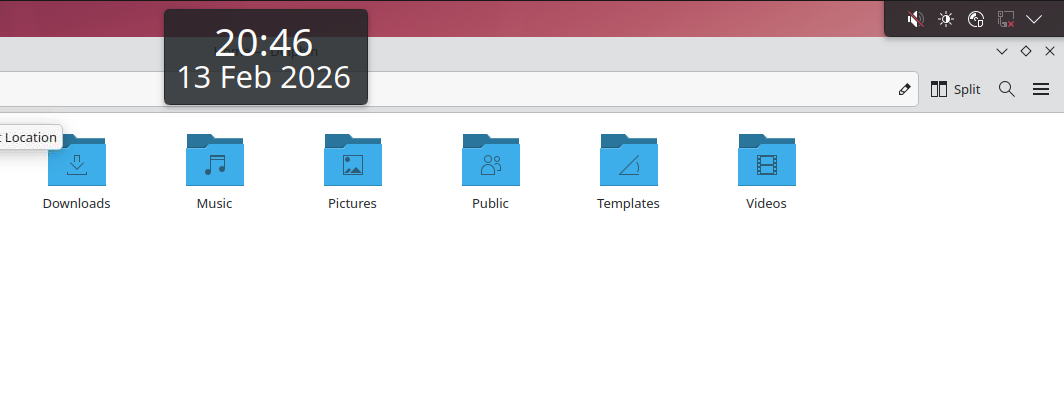
Thank you both for such detail. However, neither of you understand. The clock is NOT in the panel. It is the Clear Clock Widget. Placing the System Tray in the Panel and shrinking it was what I did in my very first post. The problem IS that the panel reserves all the horizonal space so I can not align the Clear Clock Widget to the Top of the screen. Again, all in my first post. We are going in circles.
yes, we are because as i said, once you place a panel at the top of the screen, it will reserve that space and not let any application or widget into that space… that’s by design so that panels reduce the available screen area.
you can share that space with another panel, then you can do that, as i’ve shown.
if you are married to this 3rd party clock widget, then the solution is to add to a 2nd panel on the top edge.
why doesn’t that work?
seems you have a lot of options and are rejecting all of them.
I simply like the format of the Clear Clock widget. That look can not be achieved with any clock that goes into the panel. I am a graphic artist. I want the clock to be aligned to the top. You are offing me alternatives which alter my design which is why I reject them. Ask any designer if that would be acceptable to them. At the end of the day I will have to settle for using the System Tray widget to achieve the look I want. However it is a pity that that widget cannot stay above other windows similar to a normal window. I design in Maximized Windows and require access to the System Tray often. Yes, I can Minimize the screen make the changes I need and reMaximize the screen, but this is not an ideal solution and interrupts the work flow. So again I ask my initial question. Why does the Panel Widget act differently than other widgets (in regard to reserving all horizonal space for itself)? I have yet to recieve an answer other than, because it does.
have you tried? Any widget you have on the desktop can be put into a panel (including your clock widget), and plasma 6 gives you a lot more options on how panels appear (or disappear), if you care to explore the options available.
also, the 3rd party panel colorizer offers even more options for how panels look, including opacity changes which would make the panel disappear visually while still retaining it’s desired behavior for your workflow.
as to your initial question: panels are a containment for widgets, so they need to reserve space on the desktop by reducing the size of the rectangle according to how you set up your panel(s).
you can put more than one containment along a screen edge but that screen size will now be reduced by the size of the largest panel so that a new rectangular area is available to the window manager to place windows… the window manager only thinks in terms of rectangles.
hope this helps.
Thank you. Doesn’t really help. Why does the panel have to think in terms of rectangles? Is it simply to make like easier for the developers? I am laying out a real life scenario for you. I can not afford to loose screen real estate. Why can’t the developers come up with a way, for example, for a particular widget to always be on top? It is merely a Z axis setting no? Or have a way for a plasmoid to exist in it’s own window which could then be forced to stay on top if so desired.
screen managers think in rectangles because of math… even with that notch on your iphone screen, it is still a rectangle just a rectangle to the window manager…they just blackout the notch area so nothing can placed there.
individual widgets can have z-order features just as panels can be set to stay on top, as i’ve shown… if your 3rd party clock developer is still active, perhaps ask them to add the “always on top” feature to it so it can appear on top of other windows.
that still won’t make it appear on top of a panel tho, because you can simply add it to the panel if you want to show it in that space.
I understand the math behind the rectangles, but that still doesn’t address why the panel has to take over all the horizontal space. Does it have something to do with it’s being a container for other widgets?
yes, the panel is a container and reduces the screen rectangle by the size of the largest panel along that edge of the screen
so if you have two panels along the top edge and one is 36px high and the other one is 128px high, then the the height of you screen window display area that the window manager sees is reduced by 128px.
that said you can only fit two panels along one edge if their span do not over lap, which is where the the “fit to content” setting comes in…. you could also adjust it manually.
if in this pic i has set the clock panel to “always shown”, then top edge of the dolphin window would be at the bottom edge of the clock panel and there would be a gap under the system tray because the clock panel it taller.
Brilliant. Thank you.