Hi, this started happening after the big update.
When I try to open timeshift (or other software that requires root permissions), the authentication window opens off-screen and I can’t see it. I always have to click on the taskbar and then press Ctrl + Alt + Arrow keys to bring it onto one of my screens, or use Right click → More → Move.
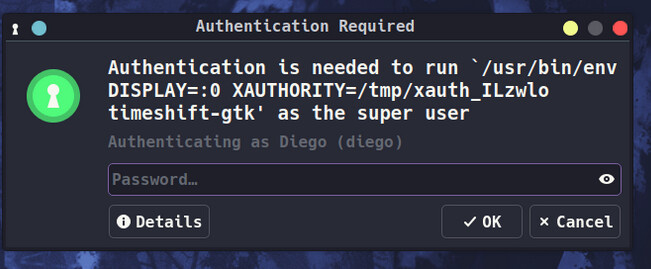
I don’t know what’s causing this, but I’d like the window to appear centered on my screen like it did before.
inxi -zv8
System:
  Kernel: 6.12.61-1-MANJARO arch: x86_64 bits: 64 compiler: gcc v: 15.2.1
    clocksource: tsc avail: acpi_pm
    parameters: BOOT_IMAGE=/boot/vmlinuz-6.12-x86_64
    root=UUID=e8ad0b83-8ba5-4838-bd74-fb0464854b35 rw
    resume=UUID=f868137e-dac2-4bd8-b260-70ad9aef5f1d udev.log_priority=3
    optimus-manager.startup=hybrid nvidia_drm.modeset=1
  Desktop: KDE Plasma v: 6.5.3 tk: Qt v: N/A info: frameworks v: 6.20.0
    wm: kwin_x11 vt: 2 dm: SDDM Distro: Manjaro base: Arch Linux
Machine:
  Type: Laptop System: PCSpecialist product: GM6PX0X v: Standard
    serial: <superuser required>
  Mobo: TongFang model: GM6PX0X v: Standard serial: <superuser required>
    part-nu: 0001 uuid: <superuser required> Firmware: UEFI vendor: American
    Megatrends LLC. v: N.1.09A02 date: 05/15/2023
Battery:
  ID-1: BAT0 charge: 98.1 Wh (99%) condition: 99.1/99.1 Wh (100%) volts: 16.44
    min: 15.48 model: standard type: Li-ion serial: <filter> charging:
    status: not charging cycles: N/A
Memory:
  System RAM: total: 64 GiB available: 62.53 GiB used: 5.16 GiB (8.2%)
  Message: For most reliable report, use superuser + dmidecode.
  Array-1: capacity: 64 GiB slots: 2 modules: 2 EC: None
    max-module-size: 32 GiB note: est.
  Device-1: Controller0-ChannelA-DIMM0 type: DDR5 detail: synchronous
    size: 32 GiB speed: 4800 MT/s volts: note: check curr: 1 min: 1 max: 1
    width (bits): data: 64 total: 64 manufacturer: Corsair
    part-no: CMS5X32G2A48C40A2-PC serial: N/A
  Device-2: Controller1-ChannelA-DIMM0 type: DDR5 detail: synchronous
    size: 32 GiB speed: 4800 MT/s volts: note: check curr: 1 min: 1 max: 1
    width (bits): data: 64 total: 64 manufacturer: Corsair
    part-no: CMS5X32G2A48C40A2-PC serial: N/A
PCI Slots:
  Permissions: Unable to run dmidecode. Root privileges required.
CPU:
  Info: model: 13th Gen Intel Core i9-13900HX bits: 64 type: MST AMCP
    arch: Raptor Lake gen: core 13 level: v3 note: check built: 2022+
    process: Intel 7 (10nm) family: 6 model-id: 0xB7 (183) stepping: 1
    microcode: 0x132
  Topology: cpus: 1x dies: 1 clusters: 12 cores: 24 threads: 32 mt: 8 tpc: 2
    st: 16 smt: enabled cache: L1: 2.1 MiB desc: d-16x32 KiB, 8x48 KiB; i-8x32
    KiB, 16x64 KiB L2: 32 MiB desc: 8x2 MiB, 4x4 MiB L3: 36 MiB desc: 1x36 MiB
  Speed (MHz): avg: 800 min/max: 800/5200:5400:3900 scaling:
    driver: intel_pstate governor: powersave cores: 1: 800 2: 800 3: 800 4: 800
    5: 800 6: 800 7: 800 8: 800 9: 800 10: 800 11: 800 12: 800 13: 800 14: 800
    15: 800 16: 800 17: 800 18: 800 19: 800 20: 800 21: 800 22: 800 23: 800
    24: 800 25: 800 26: 800 27: 800 28: 800 29: 800 30: 800 31: 800 32: 800
    bogomips: 154880
  Flags: 3dnowprefetch abm acpi adx aes aperfmperf apic arat
    arch_capabilities arch_lbr arch_perfmon art avx avx2 avx_vnni bmi1 bmi2
    bts clflush clflushopt clwb cmov constant_tsc cpuid cpuid_fault cx16 cx8
    de ds_cpl dtes64 dtherm dts epb ept ept_ad erms est f16c flexpriority
    flush_l1d fma fpu fsgsbase fsrm fxsr gfni hfi ht hwp hwp_act_window
    hwp_epp hwp_notify hwp_pkg_req ibpb ibrs ibrs_enhanced ibt ida intel_pt
    invpcid lahf_lm lm mca mce md_clear mmx monitor movbe movdir64b movdiri
    msr mtrr nonstop_tsc nopl nx ospke pae pat pbe pcid pclmulqdq pdcm
    pdpe1gb pebs pge pku pln pni popcnt pse pse36 pts rdpid rdrand rdseed
    rdtscp rep_good sdbg sep serialize sha_ni smap smep split_lock_detect ss
    ssbd sse sse2 sse4_1 sse4_2 ssse3 stibp syscall tm tm2 tpr_shadow tsc
    tsc_adjust tsc_deadline_timer tsc_known_freq umip user_shstk vaes vme vmx
    vnmi vpclmulqdq vpid waitpkg x2apic xgetbv1 xsave xsavec xsaveopt xsaves
    xtopology xtpr
  Vulnerabilities:
  Type: gather_data_sampling status: Not affected
  Type: indirect_target_selection status: Not affected
  Type: itlb_multihit status: Not affected
  Type: l1tf status: Not affected
  Type: mds status: Not affected
  Type: meltdown status: Not affected
  Type: mmio_stale_data status: Not affected
  Type: reg_file_data_sampling mitigation: Clear Register File
  Type: retbleed status: Not affected
  Type: spec_rstack_overflow status: Not affected
  Type: spec_store_bypass mitigation: Speculative Store Bypass disabled via
    prctl
  Type: spectre_v1 mitigation: usercopy/swapgs barriers and __user pointer
    sanitization
  Type: spectre_v2 mitigation: Enhanced / Automatic IBRS; IBPB:
    conditional; PBRSB-eIBRS: SW sequence; BHI: BHI_DIS_S
  Type: srbds status: Not affected
  Type: tsa status: Not affected
  Type: tsx_async_abort status: Not affected
  Type: vmscape mitigation: IBPB before exit to userspace
Graphics:
  Device-1: Intel Raptor Lake-S UHD Graphics vendor: AIstone Global
    driver: i915 v: kernel alternate: xe arch: Xe process: Intel 10nm
    built: 2020-21 ports: active: none off: eDP-1 empty: DP-1, DP-2,
    HDMI-A-1, HDMI-A-2, HDMI-A-3, HDMI-A-4 bus-ID: 00:02.0 chip-ID: 8086:a788
    class-ID: 0300
  Device-2: NVIDIA AD107M [GeForce RTX 4060 Max-Q / Mobile]
    vendor: AIstone Global driver: nvidia v: 580.105.08
    alternate: nouveau,nvidia_drm non-free: 550-580.xx+
    status: current (as of 2025-11) arch: Lovelace code: AD1xx
    process: TSMC n4 (5nm) built: 2022+ pcie: gen: 4 speed: 16 GT/s lanes: 8
    ports: active: none off: DP-3,HDMI-A-5 empty: DP-4,eDP-2 bus-ID: 01:00.0
    chip-ID: 10de:28a0 class-ID: 0300
  Device-3: Trust USB Camera driver: snd-usb-audio,uvcvideo type: USB
    rev: 2.0 speed: 480 Mb/s lanes: 1 mode: 2.0 bus-ID: 1-3:3 chip-ID: 145f:0203
    class-ID: 0102 serial: <filter>
  Device-4: Chicony FHD Webcam driver: uvcvideo type: USB rev: 2.0
    speed: 480 Mb/s lanes: 1 mode: 2.0 bus-ID: 1-5:4 chip-ID: 04f2:b7c2
    class-ID: 0e02 serial: <filter>
  Display: x11 server: X.Org v: 21.1.21 with: Xwayland v: 24.1.9
    compositor: kwin_x11 driver: X: loaded: modesetting,nvidia dri: iris
    gpu: i915,nvidia,nvidia-nvswitch display-ID: :0 screens: 1
  Screen-1: 0 s-res: 5360x1440 s-dpi: 110 s-size: 1239x333mm (48.78x13.11")
    s-diag: 1283mm (50.51")
  Monitor-1: not-matched mapped: DP-0 pos: primary,top-right res:
    mode: 3440x1440 hz: 160 scale: 100% (1) dpi: 109
    size: 800x330mm (31.5x12.99") diag: 865mm (34.07") modes: N/A
  Monitor-2: not-matched mapped: HDMI-0 pos: bottom-l res: mode: 1920x1080
    hz: 60 scale: 100% (1) dpi: 94 size: 521x293mm (20.51x11.54")
    diag: 598mm (23.53") modes: N/A
  Monitor-3: eDP-1 mapped: eDP-1-1 note: disabled model: BOE Display 0x0a3b
    built: 2021 res: 1920x1080 dpi: 189 gamma: 1.2 chroma: red: x: 0.647
    y: 0.325 green: x: 0.290 y: 0.620 blue: x: 0.149 y: 0.059 white: x: 0.314
    y: 0.329 size: 344x215mm (13.54x8.46") diag: 406mm (16") ratio: 16:10
    modes: 2560x1600
  EDID-Warnings: 1: parse_edid: unknown tag 112
  API: EGL v: 1.5 hw: drv: intel iris drv: nvidia platforms: device: 0
    drv: nvidia device: 2 drv: iris device: 3 drv: swrast gbm: drv: nvidia
    surfaceless: drv: nvidia x11: drv: nvidia inactive: wayland,device-1
  API: OpenGL v: 4.6.0 compat-v: 4.5 vendor: nvidia mesa v: 580.105.08
    glx-v: 1.4 direct-render: yes renderer: NVIDIA GeForce RTX 4060 Laptop
    GPU/PCIe/SSE2 memory: 7.81 GiB
  API: Vulkan v: 1.4.328 layers: 8 device: 0 type: discrete-gpu name: NVIDIA
    GeForce RTX 4060 Laptop GPU driver: nvidia v: 580.105.08
    device-ID: 10de:28a0 surfaces: N/A device: 1 type: integrated-gpu
    name: Intel Graphics (RPL-S) driver: mesa intel v: 25.3.1-arch1.2
    device-ID: 8086:a788 surfaces: N/A
  Info: Tools: api: clinfo, eglinfo, glxinfo, vulkaninfo
    de: kscreen-console,kscreen-doctor gpu: nvidia-settings,nvidia-smi
    wl: wayland-info x11: xdpyinfo, xprop, xrandr
Audio:
  Device-1: Intel Raptor Lake High Definition Audio vendor: AIstone Global
    driver: snd_hda_intel v: kernel alternate: snd_soc_avs,snd_sof_pci_intel_tgl
    bus-ID: 00:1f.3 chip-ID: 8086:7a50 class-ID: 0403
  Device-2: NVIDIA AD107 High Definition Audio vendor: AIstone Global
    driver: snd_hda_intel v: kernel pcie: gen: 4 speed: 16 GT/s lanes: 8
    bus-ID: 01:00.1 chip-ID: 10de:22be class-ID: 0403
  Device-3: Trust USB Camera driver: snd-usb-audio,uvcvideo type: USB
    rev: 2.0 speed: 480 Mb/s lanes: 1 mode: 2.0 bus-ID: 1-3:3 chip-ID: 145f:0203
    class-ID: 0102 serial: <filter>
  API: ALSA v: k6.12.61-1-MANJARO status: kernel-api with: aoss
    type: oss-emulator tools: alsactl,alsamixer,amixer
  Server-1: JACK v: 1.9.22 status: off tools: N/A
  Server-2: PipeWire v: 1.4.9 status: active with: 1: pipewire-pulse
    status: active 2: wireplumber status: active 3: pipewire-alsa type: plugin
    tools: pactl,pw-cat,pw-cli,wpctl
Network:
  Device-1: Intel 700 Series CNVi WiFi driver: iwlwifi v: kernel
    bus-ID: 00:14.3 chip-ID: 8086:7a70 class-ID: 0280
  IF: wlo1 state: down mac: <filter>
  Device-2: Realtek RTL8125 2.5GbE vendor: AIstone Global driver: r8169
    v: kernel pcie: gen: 2 speed: 5 GT/s lanes: 1 port: 3000 bus-ID: 3a:00.0
    chip-ID: 10ec:8125 class-ID: 0200
  IF: enp58s0 state: up speed: 1000 Mbps duplex: full mac: <filter>
  IP v4: <filter> type: dynamic noprefixroute scope: global
    broadcast: <filter>
  IP v6: <filter> type: noprefixroute scope: link
  IF-ID-1: docker0 state: down mac: <filter>
  IP v4: <filter> scope: global broadcast: <filter>
  IF-ID-2: tailscale0 state: unknown speed: -1 duplex: full mac: N/A
  IP v4: <filter> scope: global
  IP v6: <filter> scope: global
  IP v6: <filter> virtual: stable-privacy proto kernel_ll scope: link
  Info: services: NetworkManager,sshd
  WAN IP: <filter>
Bluetooth:
  Device-1: Intel AX211 Bluetooth driver: btusb v: 0.8 type: USB rev: 2.0
    speed: 12 Mb/s lanes: 1 mode: 1.1 bus-ID: 1-14:10 chip-ID: 8087:0033
    class-ID: e001
  Report: rfkill ID: hci0 rfk-id: 0 state: up address: see --recommends
Logical:
  Message: No logical block device data found.
RAID:
  Message: No RAID data found.
Drives:
  Local Storage: total: 1.86 TiB used: 644.05 GiB (33.8%)
  SMART Message: Unable to run smartctl. Root privileges required.
  ID-1: /dev/nvme0n1 maj-min: 259:0 vendor: Solidgm model: SSDPFKNU020TZ
    size: 1.86 TiB block-size: physical: 512 B logical: 512 B speed: 63.2 Gb/s
    lanes: 4 tech: SSD serial: <filter> fw-rev: 002C temp: 26.9 C scheme: GPT
  Message: No optical or floppy data found.
Partition:
  ID-1: / raw-size: 120 GiB size: 117.81 GiB (98.17%) used: 98.14 GiB (83.3%)
    fs: ext4 dev: /dev/nvme0n1p2 maj-min: 259:2 label: N/A
    uuid: e8ad0b83-8ba5-4838-bd74-fb0464854b35
  ID-2: /boot/efi raw-size: 301 MiB size: 300.4 MiB (99.79%)
    used: 308 KiB (0.1%) fs: vfat dev: /dev/nvme0n1p1 maj-min: 259:1 label: N/A
    uuid: 539B-5961
  ID-3: /home raw-size: 1.34 TiB size: 1.31 TiB (98.35%)
    used: 545.9 GiB (40.6%) fs: ext4 dev: /dev/nvme0n1p4 maj-min: 259:4
    label: N/A uuid: 49795415-6145-464f-af91-3da018e865f9
Swap:
  Kernel: swappiness: 60 (default) cache-pressure: 100 (default) zswap: no
  ID-1: swap-1 type: partition size: 8 GiB used: 0 KiB (0.0%) priority: -2
    dev: /dev/nvme0n1p3 maj-min: 259:3 label: N/A
    uuid: f868137e-dac2-4bd8-b260-70ad9aef5f1d
Unmounted:
  Message: No unmounted partitions found.
USB:
  Hub-1: 1-0:1 info: hi-speed hub with single TT ports: 16 rev: 2.0
    speed: 480 Mb/s (57.2 MiB/s) lanes: 1 mode: 2.0 chip-ID: 1d6b:0002
    class-ID: 0900
  Device-1: 1-2:2 info: Trust Primo Deskset type: keyboard,mouse
    driver: hid-generic,usbhid interfaces: 2 rev: 1.1 speed: 12 Mb/s (1.4 MiB/s)
    lanes: 1 mode: 1.1 power: 100mA chip-ID: 145f:0328 class-ID: 0301
  Device-2: 1-3:3 info: Trust USB Camera type: video,audio
    driver: snd-usb-audio,uvcvideo interfaces: 4 rev: 2.0
    speed: 480 Mb/s (57.2 MiB/s) lanes: 1 mode: 2.0 power: 500mA
    chip-ID: 145f:0203 class-ID: 0102 serial: <filter>
  Device-3: 1-5:4 info: Chicony FHD Webcam type: video driver: uvcvideo
    interfaces: 4 rev: 2.0 speed: 480 Mb/s (57.2 MiB/s) lanes: 1 mode: 2.0
    power: 500mA chip-ID: 04f2:b7c2 class-ID: 0e02 serial: <filter>
  Device-4: 1-6:5 info: Integrated Express ITE Device(8233)
    type: keyboard,HID driver: hid-generic,usbhid interfaces: 2 rev: 2.0
    speed: 12 Mb/s (1.4 MiB/s) lanes: 1 mode: 1.1 power: 100mA
    chip-ID: 048d:7000 class-ID: 0300
  Device-5: 1-8:6 info: Integrated Express ITE Device(8176) type: keyboard
    driver: hid-generic,usbhid interfaces: 1 rev: 2.0 speed: 12 Mb/s (1.4 MiB/s)
    lanes: 1 mode: 1.1 power: 100mA chip-ID: 048d:5000 class-ID: 0301
  Hub-2: 1-9:7 info: Realtek RTS5411 Hub ports: 5 rev: 2.1
    speed: 480 Mb/s (57.2 MiB/s) lanes: 1 mode: 2.0 chip-ID: 0bda:5411
    class-ID: 0900
  Device-1: 1-9.3:9 info: LG USA 27UP850 - WK.AEUDCSN External Monitor 4K
    type: HID driver: hid-generic,usbhid interfaces: 1 rev: 2.0
    speed: 12 Mb/s (1.4 MiB/s) lanes: 1 mode: 1.1 chip-ID: 043e:9a39
    class-ID: 0300 serial: <filter>
  Device-2: 1-10:8 info: Integrated Express ITE Device(8291)
    type: keyboard,HID driver: hid-generic,usbhid interfaces: 2 rev: 2.0
    speed: 12 Mb/s (1.4 MiB/s) lanes: 1 mode: 1.1 power: 100mA
    chip-ID: 048d:ce00 class-ID: 0300
  Device-3: 1-14:10 info: Intel AX211 Bluetooth type: bluetooth
    driver: btusb interfaces: 2 rev: 2.0 speed: 12 Mb/s (1.4 MiB/s) lanes: 1
    mode: 1.1 power: 100mA chip-ID: 8087:0033 class-ID: e001
  Hub-3: 2-0:1 info: super-speed hub ports: 10 rev: 3.1
    speed: 20 Gb/s (2.33 GiB/s) lanes: 2 mode: 3.2 gen-2x2 chip-ID: 1d6b:0003
    class-ID: 0900
  Hub-4: 3-0:1 info: hi-speed hub with single TT ports: 2 rev: 2.0
    speed: 480 Mb/s (57.2 MiB/s) lanes: 1 mode: 2.0 chip-ID: 1d6b:0002
    class-ID: 0900
  Hub-5: 4-0:1 info: super-speed hub ports: 2 rev: 3.1
    speed: 10 Gb/s (1.16 GiB/s) lanes: 1 mode: 3.2 gen-2x1 chip-ID: 1d6b:0003
    class-ID: 0900
Sensors:
  System Temperatures: cpu: 44.5 C mobo: N/A gpu: nvidia temp: 42 C
  Fan Speeds (rpm): N/A
Repos:
  Packages: 1885 pm: dpkg pkgs: 1 pm: pacman pkgs: 1810 libs: 432
    tools: pamac,yay pm: flatpak pkgs: 59 pm: snap pkgs: 15
  Active pacman repo servers in: /etc/pacman.d/mirrorlist
    1: https://mirrors.manjaro.org/repo/stable/$repo/$arch
    2: https://manjaro.mirror.wearetriple.com/stable/$repo/$arch
    3: https://mirror.telepoint.bg/manjaro/stable/$repo/$arch
    4: https://mirror.dkm.cz/manjaro/stable/$repo/$arch
    5: https://mirrors.up.pt/pub/manjaro/stable/$repo/$arch
    6: https://repo.ialab.dsu.edu/manjaro/stable/$repo/$arch
    7: https://mirror.hostiko.network/manjaro/stable/$repo/$arch
    8: https://mirrors.tuna.tsinghua.edu.cn/manjaro/stable/$repo/$arch
Processes:
  CPU top: 5 of 552
  1: cpu: 17.7% command: firefox pid: 4834 mem: 654.8 MiB (1.0%)
  2: cpu: 4.4% command: kitty pid: 11765 mem: 137.3 MiB (0.2%)
  3: cpu: 3.9% command: kwin_x11 pid: 2357 mem: 297.3 MiB (0.4%)
  4: cpu: 3.2% command: started-by: electron pid: 3098 mem: 236.2 MiB (0.3%)
  5: cpu: 3.1% command: Xorg pid: 1530 mem: 138.4 MiB (0.2%)
  Memory top: 5 of 552
  1: mem: 654.8 MiB (1.0%) command: firefox pid: 4834 cpu: 17.7%
  2: mem: 637.2 MiB (0.9%) command: firefox pid: 5652 cpu: 2.2%
  3: mem: 558.0 MiB (0.8%) command: plasmashell pid: 2523 cpu: 2.0%
  4: mem: 437.1 MiB (0.6%) command: electron pid: 3643 cpu: 2.9%
  5: mem: 398.2 MiB (0.6%) command: firefox pid: 6374 cpu: 0.8%
Info:
  Processes: 552 Power: uptime: 14m states: freeze,mem,disk suspend: s2idle
    avail: deep wakeups: 0 hibernate: platform avail: shutdown, reboot,
    suspend, test_resume image: 24.98 GiB services: org_kde_powerdevil,
    power-profiles-daemon, upowerd Init: systemd v: 258 default: graphical
    tool: systemctl
  Compilers: clang: 21.1.6 gcc: 15.2.1 Shell: Zsh v: 5.9 running-in: zellij
    inxi: 3.3.40
``
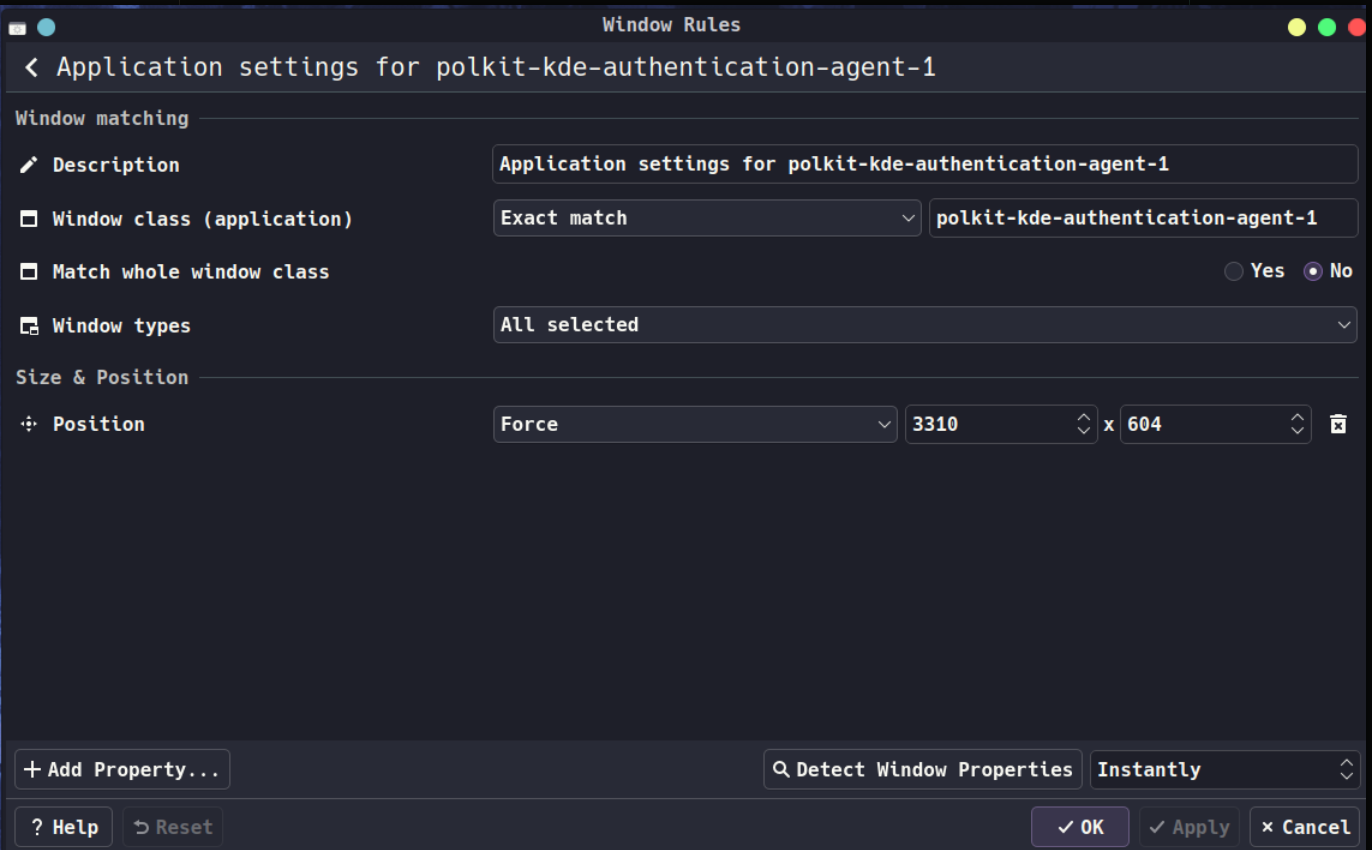
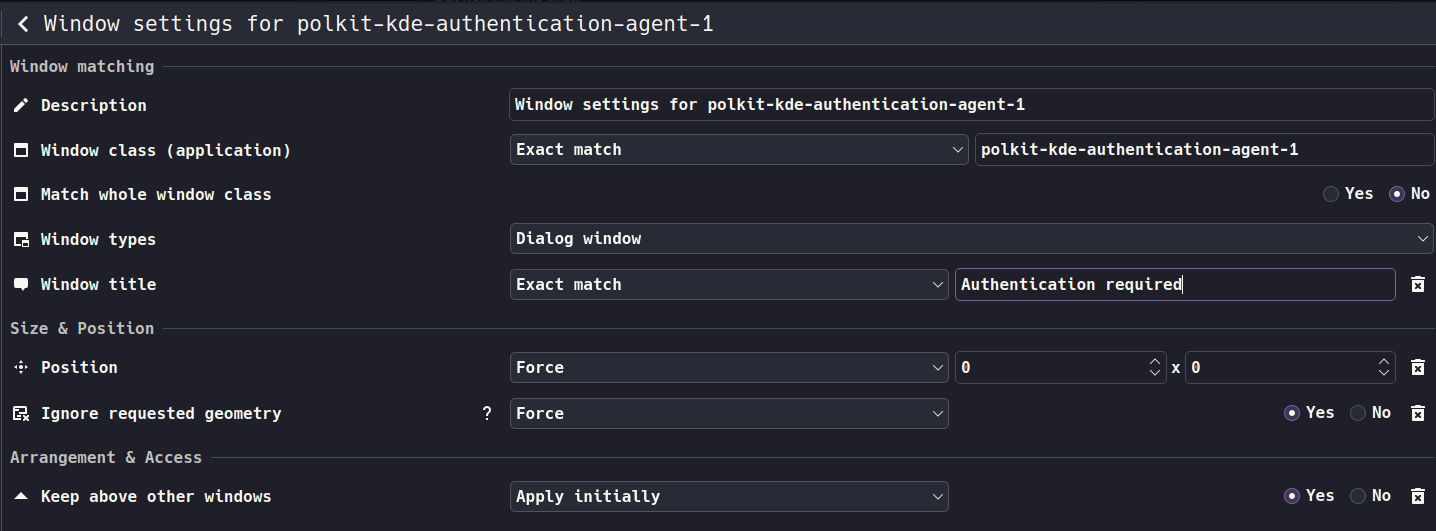
Also I tried to apply rules in the window but it doesn’t work. And I don’t have others rules in my system
Any help would be appreciated.
Thanks!