Where y_i is the initial vertical position of the pointer (when at the edge of the monitor on the left) and y_t is the target vertical position of the pointer (where it will be at the edge of the monitor on the right).
Similarly for right->left movement and for top->bottom and bottom->top in case of vertical placement
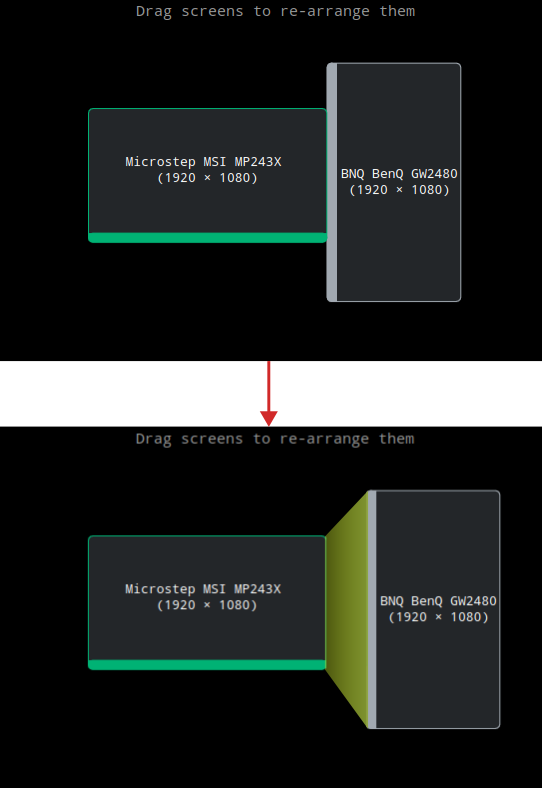
Using this, something like the following will also be possible.
Of course, even though the graphic makes it look like there is a gap, there should be no real gap during actual usage (at least not from this setting) and I’d say it is better to not show the gap (and the transfer trapezium) when in monitor placement mode and only show it during transfer selection.
I am not calling it “teleporting”, because otherwise the current default behaviour is also “teleporting”. The proposed behaviour is just an augmented translation function and nothing particularly fancy.
But I understand the window dragging problem that was being talked about in the “Cursor Teleport” discussion.
One simple answer is to just transfer everything using the same transfer function…
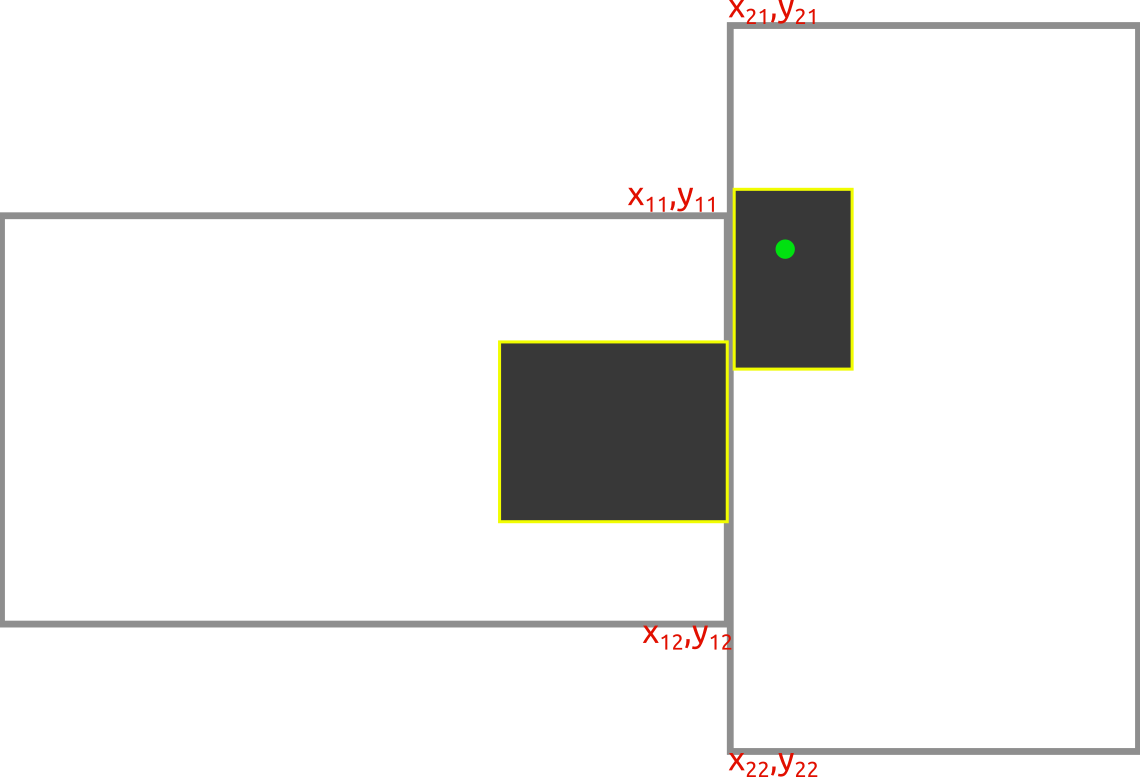
In this graphic, monitors are marked with grey border and the application window is painted grey, with a yellow border. The light-green circle denotes the position of the mouse cursor/pointer and the point coordinates are as given.
Corresponding to the originally given transfer function, in this case, since we are dragging the window along, we instead use y_w1 as y_i, so:
y_w1’ = y_21 + (y_w1 - y_11) * T_lr
round y_w1’ to int
… an alternative is to just not use the transfer function when dragging and simply block the cursor on edges, as it does currently, but I feel like we will miss a point over there.
Another possible option, which seems like it will end up being much simpler, is that if the cursor is going out of bounds on a shared edge, then teleport it to the closest adjacent edge onto the other monitor, but if it is not going out of bounds, then let it pass as it does normally.
Orange arrow shows tendency of input-device; blue arrow shows target position the cursor moves to.
And this will work, even if you decide to drag windows along.
I understand that while I would prefer the transfer function for cases when I keep the monitors at a distance, it makes more sense to have the teleport function when the monitors are close by, which only works in out of bounds cases.
Actually, no. When the monitors are actually side-by-side, the user would be able to feel when the cursor will move to the other screen and when not, so one wouldn’t require (hopefully) either of them when the monitors are physically side-by-side.
I would actually be fine with this, because the only time I will be using the transfer function is when the monitors are not side-by-side, i.e. most of the time in my setup. 1 monitor is at 0.5m from my eyes and the other one is at ~1m, so I don’t feel anything being off.
But there is another way.
Set an anchor point somewhere on the touching edges of the monitors and calculate distance from there instead.