The “file exsists” dialog confuses me.
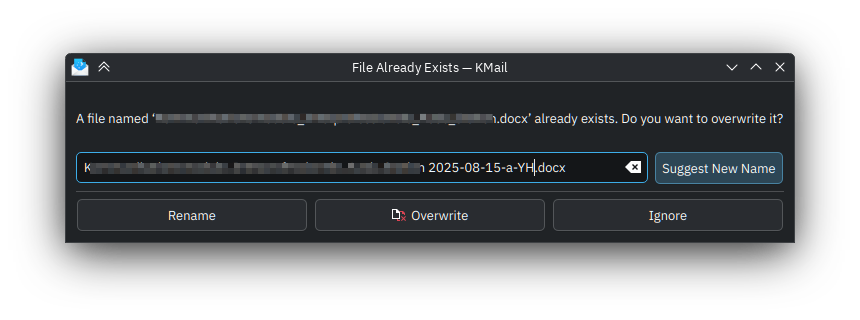
I think it’s because the three action buttons are unaware of what the user does with the file name. Also, the default action (invoked by ENTER ) is “Suggest New Name” which adds to my confusion when I have just changed the file name myself.
- When I change the name of the file manually and hit ENTER, a “1” is appended to the file name, but nothing else happens.
- When I change the name of the file, I have to read the button labels and target the one to the right, “Rename”.
- When I change the file name, but am drawn to the middle button “Overwrite” with its icon that draws my attention, the file is overwritten despite me having entered a different name.
- With “Ignore”, the dialog is closed, but the file has not been changed.
The behavior that I (for one) would expect is:
- Show the message informing me about the file name conflict.
- Have a button “Overwrite”, possibly with a visual clue (red color?)
- Once the file name is edited by the user, have the button change its label (or, alternatively, enable a different button and disable the “Overwrite” button)
- Have a “Cancel” button that conveys the same meaning as in other dialogs, i.e. to cancel the current operation.
- “Suggest New Name” should not be the default action when the file name has already been manually edited.
I was going to file a bug report, but I was unsure which component of the KDE Plasma ecosystem to file it against.
I would appreciate to hear thoughts about this issue as well as the bug filing.
Operating System: Fedora Linux 42
KDE Plasma Version: 6.4.4
KDE Frameworks Version: 6.17.0
Qt Version: 6.9.1