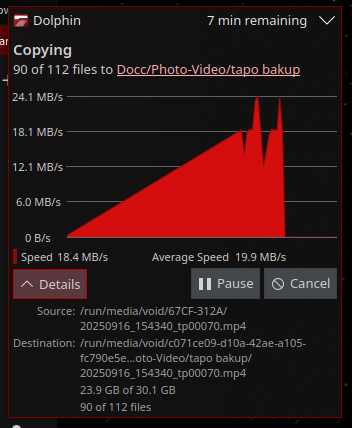
Hi all, I have an idea for an improvement to the dolphin file transfer thing.
Rather than a notification that is always above windows and in a fixed position on screen, I think it would be better if it is a separate floating window. That way you can move it around, have it in some empty space on the other monitor.
I could just turn my head to see the progress rather than clicking on the notifications icon on the bar.
I like the new graph, but it resets whenever the notification is hidden.
I like the way gnome does it too, where it appears at the bottom of the sidebar of the folder window, it’s still limited since the overlay is anchored to its parent window, but the window is still movable. No graph though, kde better
I hate to say it but the way ms windows did it is the best, where there’s a graph and it’s a movable window.
What do other people think? How do you use this feature?
The file transfer notification appears where notifications normally do, but with meta+mouse drag or drag from the area at the top where it says “Dolphin n min remaining”, you can move it
What I did was to have it minimize to the task bar. That way it will be available to see anywhere at any time. You can set this up in the config for notifications.
That’s completely doable, all that’s in the notitfication are Dbus messages.
It is just outside of KDE Plasma/dolphin scope where we focus on GUI.
Please open a feature request. Currently we focus on the simple case, which is the essential case. Depending on demand, that could change but I would consider very low priority.
What is your use case that uses that much copying and expanding details in the notification is then not suitable for ? I am curious, do you use many HDD ?
Start/Resume is already supported, queeing is a different feature request independently of UI.