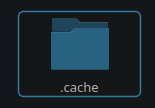
I did an update last night and today I opened Dolphin to play music I see that the highlighted item has an outline (image below) which makes sense for a double click to open system but for me it’s kinda annoying, so I’d like to switch it off but I can’t find a setting in Dolphin’s configuration GUI (unless I’m blind?), please help.
3 Likes
I set Breeze.
I see an underline on the Label under the icon, not an outline.
However, it’s important to know WHICH icon is currently selected (whether in single or double click) because Linux is not exclusively operated with a mouse.
Hitting ⏎ Enter will open the selected item… it is nothing to do with using a mouse; becoming annoyed at being able to see anything on the screen which doesn’t directly relate to your workflow is a major source of complaints.
I would suggest that this isn’t a problem, or an issue.
I’m in the same boat. I find it annoying.
1 Like
First of all, I want to explain the rationale of the focus decoration:
It’s an accessibility feature. There are people who use keyboard controls for everything due to inability to use mouse etc. That focus ring is essentially same as hovering over a file with your mouse, but for keyboard users.
Disabling it should be possible by going to System Settings → Application Style → click the pen on top of Breeze style → uncheck “Draw focus indicator in lists” → OK
Now if that does not work, that’s a bug and someone (likely me  ) will have to fix it. So please make a bug report if that setting does not work!
Side tangent: I actually disliked these focus indicators at beginning too (before this change it was small underline under the text). But over time I came to appreciate them, since there are times I can’t use a mouse to go through files. And then I had the focus indicators turned off.. So I was essentially not knowing which file I was on.
10 Likes
I see the outline in Breeze. It may be new in 25.08?
1 Like
Ah, then this maybe a response to the earlier argument that if you highlight an icon, the highlight is obvious - but if you enter a folder then return (back) then the highlight is too subtle…
Either way, not a genuine issue or reason for complaint I think. I think the outline is a good solution and better than the subtle underline.
Can’t please everyone… but everyone can change their theme and adjust colour schemes.
Doesn’t work. Icons still have the indicator.
Edit: sorry, meant to reply to @akselmo
2 Likes
Welp, adding it to my bugs-to-fix list.
Can someone nice person make a bug report of it and add their system information as well? Just so that it’s logged and I don’t forget.
1 Like
Sure, under dolphin?
Yup!
[Post must be at least 15 characters]
Done. Although I did forget to remove the part it explicitly tells you to remove when making a bug report. Don’t drink and compute.
2 Likes
It happens. Thanks for making the bug report!
(And sure i could just start working on fixing the bug without one but i have so much stuff on my plate i would forget without it)
3 Likes
I understand that it’s an accessibility feature and I support it’s existence for that reason, I just wanted to know where the toggle was because I want to turn it off, thank you for pointing me to it. I’ll eagerly await the bug fix.
4 Likes
@akselmo, you can bypass that with an HTML comment, like:
Yep! <!-- aaaaaaaaaa -->
By the way, y’all might consider the undermentioned to be usefully relevant:
Speaking of the ouline i would like to know if this behaviour is a bug or a feature because it look wierd imo
1 Like
Just got the update to 25.08.0.
A tiny bit blurry, maybe, not really sure as I already have an appointment to get new glasses  . But overall I like it. IMO looks better than the underlined and/or highlighted name only, at least for people that use the double click to open like I do.
1 Like
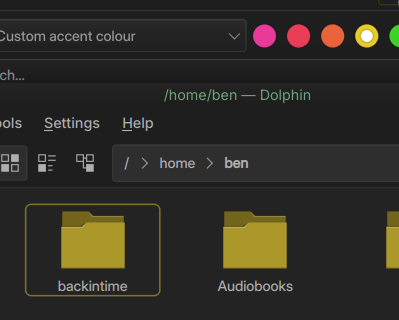
i like the new outline but how do i change the color of it? it clashes with my theme. editing kdeglobals so far does not work.
Double-click is not relevant - it simply shows the current focus, which is different to currently selected.
If you enter a folder, then return to the parent, you’ll see this secondary highlight - previously it was too subtle and drew sharp criticism for that.
The only ‘BUG’ I see here is that it doesn’t disappear for you (as it does for me) on the new version of Plasma - something that’s being looked into now.
This sounds like a problem with your system - the outline matches the accent… which usually changes for me with every wallpaper (accent from wallpaper set) but it certainly matches whatever highlight scheme I choose.
This thread certainly is going around the houses.
This thread should be closed and marked solved at this point:
2 Likes
It’s very ugly and annoyng. Please revert it as it was 