Is there any way to go back to the old 5.1.x KMyMoney if your distribution has upgraded you to 5.2? I’m on Manjaro and the UI of 5.2 is a definite downgrade for me and making it really difficult to use. Even things as simple as tags don’t seem to be displayed with transactions anymore.
That’s a question for your distro i.e Manjaro/Arch, “how to downgrade a package in X distro” “How to set X package to keep version”
I actually did manage to install the older 5.1.x version but the plugin which loads the kmy file at startup fails to load - I think its trying to use Qt5 libraries which have been replaced in Qt6. Strangely enough besides that it seems the rest of the program works. However its obviously not of use if you can’t load your kmy file and use it.
I’m also having a problem downgrading to v5.1.3. The downgrade does happen, but if I try run v5.1.3 it says “error while loading shared libraries: libalkimia5.so.8: cannot open shared object file: No such file or directory” but Manjaro is not allowing me to downgrade alkimia at all. So I am stuck.
In my case, the latest update to KMyMoney v.5.2.0 has somehow reset the decimal separator to a comma, despite the main OS being set to a decimal point. But that is not the worst issue. Every time I type in any value like 581.14 KMyMoney converts it to 58114,00 and if I type in 581,14 it converts it to 58,11 so I just cannot enter any value right now. Which is why right now, I also need to get back to an older version.
oh you can install that from arch linux archives. however theres a bigger problem if you look at my manjaro forum post (theres a shared object file which you cant install).
i also tried to compile the older KMM from source but it didnt work. So we could be stuck 
Dont know why they changed it so much, the old one worked great!
1 Like
What I’ve seemed to notice as causing my problem going to the new version, is it seems to be around the currency rounding option. It was set to rounding to 4 digits, and I think this is why I’m seeing extra zeros added and the number changing. So in the end I’ve set that to only two digits and never round off. Even so I now have to enter something like 345,560 and then it drops teh zero but keeps the correct amount at 345,56. It is really odd and my eyes are glazing over at seeing a comma everywhere as a decimal separator. This all worked in sync with my OS regional settings before. That said there was a KDE update that also came this week (along with the updated KMyMoney) so not sure if that also messed things up. I did have to also change my regional numeric locale settings back to what it was before the update, but even after rebooting, that has not come right inside KMyMoney.
Well, in other parts of the world it is just the opposite and the dot causes that behavior 
What is your setting for the currency since that is what KMyMoney uses to display amounts?
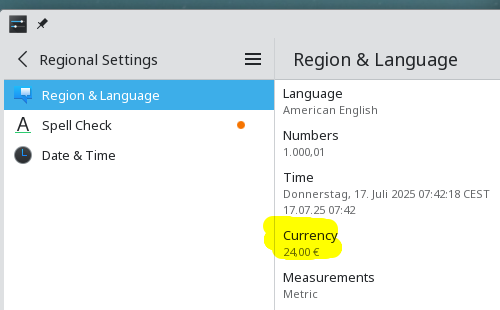
Thanks for your guidance. That was the issue. It seems the KDE update reset my locale settings to ZA _en_ZA differs from the other languages such as af_ZA and no idea why), whereas I had mine for the ISO standard for ZA. But some tampering with it has got the currency and date correct now. And interestingly, the issue then with the cents rounding has also corrected itself (although I had tested that previously with both the comma and period, and neither had worked).
I’ll try to adapt to the layout chnage on v5.2.0 as it is at least all working fine now. Thanks for your pointer.
1 Like
@sigma1 it would be interesting to know specifically why you wanted to downgrade, as the feedback could be useful to the devs? I’ve solved my issue at least with getting the new version to work, but I do have some specific irritations with the new version which is really hampering me:
- New Transaction: Feels like the mouse has to travel a lot from top left then down again. Old UI had the new button just above entry fields.
- Focus insists on being in the date field, but it also does not seem to default to today, so I’ve found quite a few transactions I added, ended up in the past without me noticing that. The UI shows a date when entered and then also a transaction date, and I only saw the date entered so did not even realise the transaction date was in the past (I’ve disabled that Entry column now). If I start up the app it should always default to today’s date, and not to the date of the previous transaction last entered.
- I don’t understand Transfers at all: I only see add a new transaction, and from previous transactions it seems the acc I’m transferring to, appears in the Category field, but Payee field is empty. I just don’t understand that logic for a transfer.
- Reconciliations: I used to be able to just click on the transaction to mark it has cleared, now nothing happens. I have to go look up that I must press Ctrl-Alt-Space. That’s clunky.
- Reconciliations: Can’t seem to add missing transactions at all. In the past, when you got down to a missing transaction like say interest received, you just clicked on New Transaction and you could add it. Now I have to postpone and come back in, Very clucky as well.
So, yes, certainly not flowing nicely for me like the older version. I’m not too sure how these changes work better or smoother for others. But these are the one’s taht really stick with me.
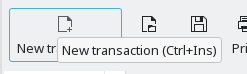
There are multiple other ways to start the new transaction
- Click the empty transaction at the end of the ledger
- Press Ctrl+Ins on the keyboard
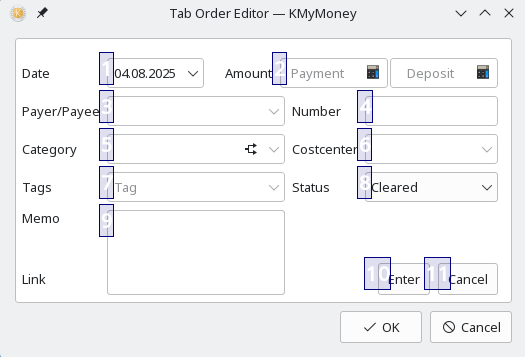
There is feature called TabOrderEditor to rearrange the way the focus takes when pressing TAB. To open it, press Alt-Ctrl-T (from 5.2.1 on this will be Alt+Meta-T by default because on KF6 Alt-Ctrl-T opens a terminal).
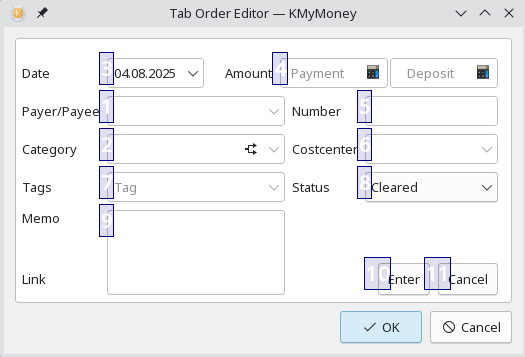
Clicking the blue boxes in the order you desire changes the order to your liking. Here’s how this looks like after changing the first two fields to be payee and category:
You are right about the default value. Getting today’s date into the date widget is as simple as pressing T on the keyboard when the focus is on the date widget.
Please take a look at the handbook section about Basic Accounting. The actual usage of the field labeled category is technically the so called counter-account. A counter-account can either be a category (in case it is an income or expense transaction) or another asset or liability account (in case of a transfer between two of your accounts). That’s all, no magic.
The payee field is purely optional for any transaction and that did not change compared to previous versions of the application.
That function has not been removed. Once you click on the column C for that transaction, the reconciliation status changes as in prior versions. If that does not work for you, it may have something to do with your environment or settings.
You are right: the button for New Transaction as well as the keyboard shortcut Ctrl-Ins don’t work during reconciliation (while they should do). Clicking on the empty transaction at the bottom of the ledger is available and working, though.
1 Like
I am not sure if i understand what you mean.
When i enter a new transaction in the ledger from account 1 to account 2 and also set a payee, this payee appears on both sides of the transaction, i.e. in both ledgers of accouns 1 and 2.
(KMyMoney Version 5.2.0-2cbd7a8, OS: Debian bookworm).
If you don’t set a payee for a transaction, it doesn’t appear, sure.
Would it be possible that you expect the account you are transfering into to appear in the payee field?
in the software, categories are also accounts in an accounting meaning. They are not bank account obviously but they are technically similar. The online Help shows this:
Categories
These represent non-managed income and expense accounts that do not have a value. The total value of transactions is shown against each category. A category or transfer account is required for each transaction.
I can click with left-mouse button in the column C of the ledger and the flag value switches then to:
- empty
- C
- R
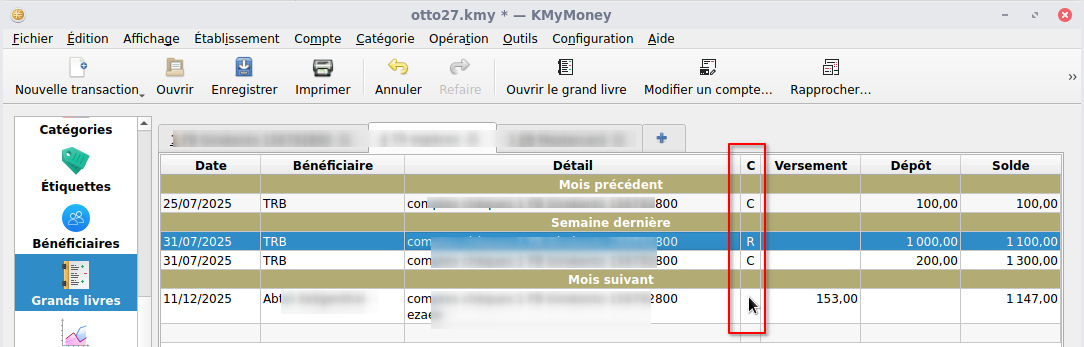
so i again am not sure to understand the issue it, i cannot reproduct the issue
So something has changed in my environment because it used to work but now it doesn’t. Maybe the version of Qt?
I’m currently using 6.10.0 beta 2 with KMM built against 6.9.1. I couldn’t see anything in the Qt bug tracker that is obviously to do with this, but I’m no Qt programmer.
kmymoney-5.2-4600-linux-gcc-x86_64.appimage works OK (using Qt 6.8.3
Thanks, yes @ipwizard ‘s explanation also helped clarify it. The transfers just used to be more intuitive in the older UI. I can’t remember now exactly but think it had a payee field and there we selected the account to which to transfer. I see it does say “A category or transfer account is required for each transaction”. I just don’t think of managed accounts as categories. I suppose if the field was labelled “Category/Account” it would have got past my mental block.
Yes that reconciliation marking is very odd on my side. What you describe is exactly what I used to do, which is now not working. But I have also switched to using Wayland from X11, so maybe this had something to do with that. The mouse always worked perfectly for that.
OK I’ll try clicking on the empty transaction instead. I do think I was able to add once so that was maybe what I did, and did not realise it. I kept trying to use the New Transaction button.
I do think that on app startup, it shoud always default to the current day (pretty sure it used to). Thereafter if dates are set to older for catch up entries, it defaults to the older date last used, and resets on app startup again to current date. It’s little things, when enteringa few entries, can can go unnoticed.
Not sure. I currently use KF5 (5.115.0) / Qt5 (5.15.12) on X11 and KF6 (6.16.0) / Qt6 (6.9.1) on Wayland (inside a VM) and both do work as expected. That is openSUSE Leap 15.6 and openSUSE Tumbleweed with no local KF and Qt compilations
I just fixed that in the upcoming KMyMoney 5.2.1. It was not only the New Transaction that did not work but most of the actions accessible via the context menu simply did not work. it was a one line fix, though
That makes sense. From what I see, the only that is missing is resetting to current date upon application start. That should be easy to fix. And I now know, why it seems to work for me: I have not manually entered transactions in ages which means that no recorded date is present and in that case KMyMoney takes the current date.
Thanks for that @ipwizard it sounds like the next update may at least address two minor issues. I’ll test again with my next reconciliations for the clearing. Paul also commented above that his recon clearing click was not working.
I think the layout change of the new transaction pane has confused me with transfers. So what I did was to go back to previous transfers I had done, and duplicate one of those. What I’d noticed from that was, the older transfer had a blank payee/payer field, and had the account entered in the Category field. So that was how I got it to work. I can’t see the old layout now, so cannot really remember what the field label was for the other side account. I don’t it was the category field, as I recall somethimes using Micellaneous as a categoryt for some transfers.
I’m just thinking any newer user is probably not going to guess that Category is where the account name goes  Payee would be the first thought, as that is where the funds are “going to”. But my muscle memory will probably adjust to using the Category field.
I’m very disapointed by the 5.2 UI changes. Why edit “inside” the list ? The missing click for Reconcoliate is big regression. The lose of the buttons in the "old edit area”…
All these look like regression for us. A list is a list. Edit area have all for do the job before.
This version is not on my desktop, but mon my friend one. I don’t test new transation system yet but I don’t want to update to 5.2.
Do accounting is not a “pleasant” task. That kind of change makes usage worst.
PS: Sorry for first “negative” comment here but usability must take precedence over aesthetics.
What is the Meta key under Windows 11? I haven’t managed to start the Tab Order Editor, neither using Ctrl-Alt-t, nor using Windows-Alt-t. Should this always work or only when I’m editing a transaction?
I don’t know what the Meta-Key on Windows is. I have setup an alternative shortcut on the Win10 system I have access to for testing to Alt+Shift+T.
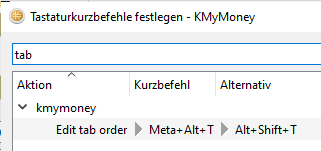
The function itself is only available when one is editing a transaction (can be a new one).
Amazing, thank you!
Btw, is there a shortcut for pressing the “Enter” button (like ESC is synonymous with the Cancel button)? In the memo field, the enter key goes to the next line. It’s not critical as I have now changed the tab order so I can just press TAB-Enter.
Another question: is there a way to set a transaction to “Imported”? I used the imported flag basically as todo-list, and filter. But sometimes I want to correct something about a transaction but I’m not does with it, so I would like to do a change without already resetting the “imported” flag… I know there is also reconciled and cleared, but I found them a bit more cumbersome…
How about using the tag feature for that?