It was suggested I post here. Two buggy behaviors noted:
using master cl-msvc win, 3238 was last master I tried, I found any action related to scheduled transactions would cause app to suddenly crash. In the register/ledger, trying to enter next or edit caused the crash. Have not gone back to a master, since this makes program too difficult to use for my needs. This crash is not happening on the 5.1 - 3218 that I am now using and scheduled transactions function normally.
the non-master 5.1-xxxx versions have been writing a debug.log to my win desktop with the following line: [0511/120533.095:WARNING:resource_bundle_qt.cpp(119)] locale_file_path.empty() for locale
From debug view - only thing that looks relevant are these 3 lines:
81
1.345508
21616
kmymoney.exe
Qt WebEngine resources not found at C:/Program Files/KMyMoney/bin/resources. Trying parent directory…
82
1.345646
21616
kmymoney.exe
Installed Qt WebEngine locales directory not found at location C:/Program Files/KMyMoney/bin/translations\qtwebengine_locales. Trying application directory…
83
1.345689
21616
kmymoney.exe
Qt WebEngine locales directory not found at location C:/Program Files/KMyMoney/bin\qtwebengine_locales. Trying fallback directory… Translations MAY NOT not be correct.
Notes:
Searching shows that under …/bin, there is no /translations, no /resources and no qtwebengine_locales. There is a /bin/data/locale.
To the best of my recollection, the last “master” I tried did not write this debug.log to my desktop. But had the sch’d trx crashes.
This only appears on my desktop pc - was win 10pro, now win 11pro, no difference. Does not appear on my win 10pro laptop - looks like same subfolder structure.
(Thanks for posting this here. It will likely get more eyeballs, just in case someone else can thing of anything new.)
I don’t think we have any current solution to the crashing with scheduled transactions in master, nor the unwanted log file in the 5.1 version.
Just to be sure - are you running the exact same versions on the desktop and laptop? Since both are now Win11pro, it may be hard to tease out the relevant difference, but there certainly is one, if only we can find it and then figure out how it contributes to the problem. If I remember from previous discussions about this, the cause is likely not in KMyMoney code directly, but in one of the underlying Qt or KDE libraries being called.
Desktop was win10 pro, now on win 11 pro as of a few days ago - kmm appears unchanged, was on a 3xxx then tried a master again, no debug on desktop, but crashing persisted so reverted back to 3218 - debug.log has been appearing for quite some time. Its better than the crashing.
Laptop is win 10 pro and has not changed due to age and only option is to force a win 11 upgrade which I am not up for at present. Anyway, kmm on laptop was a slightly older 3xxx version which I just updated to be same as desktop - 3218, and I can confirm no debug.log is appearing on desktop - I’ll chk temp locations next time I use it. I had been using laptop routinely for a couple of months during relocation and never got a debug.log on desktop.
I want to “waste” my resources on trouble-shooting the crash with the schedules rather than figuring out how that debug.log file is created.
I have 86 schedules here in my production environment and don’t see that problem (even if running on a Windows PC). I expect this to be happening due to a special something in your data which does not harm the 5.1 version but has this severe impact on master. BTW: Does it happen on all or only some of the schedules?
Can you please create an anonymized version of your file and check if the problem with editing/entering of schedules persists when you open the anonymized file? Please post the result here and I will think about how to proceed. TIA.
Agree log on desktop is a minor issue, just odd only happens on desktop machine. Does not happen with master releases. May try full uninstall, clean out reg, clean out left overs, then reinstall.
I have under 10 scheduled trx- two deposits and I think 4 routine pmts, i just tried the two dep’s that were ready to post 2 days prior to the scheduled date and one had changed so I tried to edit the date to post, app crashed. Tried to edit the splits/amts on the second, app crashed. retried both a few times with same crash so gave up and went back to 3218. Best I recall the crash was when I hit save or enter. Updated to the latest master, same crashes. Went back to 3218 and all scheduled trx work perfectly.
No crashes with 3218, so I’ll have to revert back to a master release to try an anonymized file - will try before I clean out for fresh install.
Just loaded current master to test scheduled transactions. None are set to auto-post in the ledger since all can change they are checked off as estimated. Opening the scheduled transactions tab on left and using them or editing them from the tab seems stable - none crashed and I could edit and enter next without issue.
The crash only happens when trying to use the scheduled transaction that displays with the yellow warning symbol in the ledger. In the config, I set scheduled trx to display in ledger 5 days in advance. Its these that cause the crash.
Note: trying to open the anon.xml causes app to crash, trying to create new book causes app to crash.
5.2 versions fixed the debug log on desktop issue… other issues with colors and themes but can be worked around to some extent by tweaking theme (Win 11). BTW that debug log did not appear with 5.1 on my win 10 laptop. Have not yet tried 5.2 on win 10 - guessing it will have same color/theme issues. Anyway, only big issue with color scheme is some simple one color icons in toolbar don’t show up well so I just used txt now. Reconciliation window appears to have white text on white background with only date and the two balances sowing up as light text on black background.
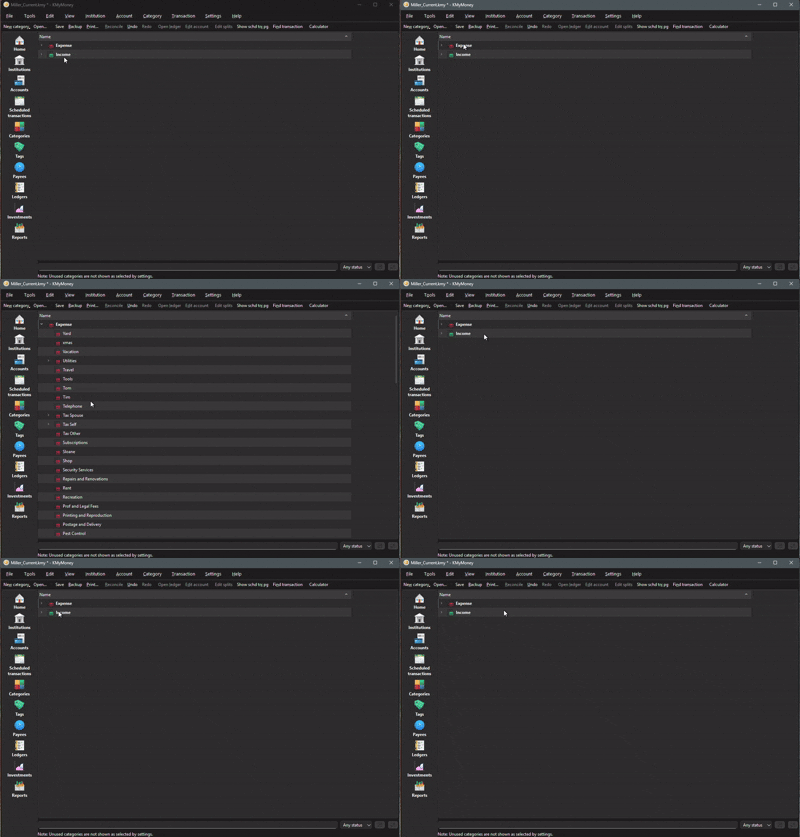
New bug: click on categories and window opens with expense and income. Nothing happens when clicking to expand either, then after some time, double clicking pretty much anywhere on the page will expand expense categories but none can be selected or edited. Double clicking on page collapses expense categories but nothing works to expand income categories - entering a new category from ledger with a typo is now stuck that way until this glitch is fixed. I submitted a bug report for it.
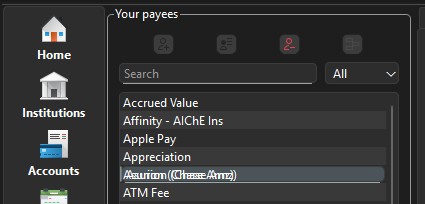
New bug: Trying to rename a payee creates a multiple text duplication out of register so cursor is impossible to see making renaming pretty much impossible. Selection of text does not highlight it when trying to rename.
For the payee renaming issue, can you post a screen-shot, as I am not really following what is happening. Are you in the Ledger View or in the Payees View?
I tried several times to get a screenshot but when I move my cursor out of the payee window, it reverts to the normal text. It’s only when moving the cursor into the particular payee text to select the characters to edit. This is in the payee view. The payee view seems to work ok otherwise by pulling up the transactions for it.
Does it help if you make a screenshot configured with time lag?
For example, Greenshot (free software) has a setting set to 100ms which can be changed: Milliseconds to wait before capture.
If you set the time lag to 5 seconds, you press on “Prnt Screen” and then you have 5 seconds time to click the “scene” you want to see on the screenshot.
then you could try this easy-to-use software: https://www.screentogif.com/
It records your screen activity and produces a .gif file (several images in one file).
The updated windows snipping tool has a delay option now, so here is the screenshot - the next to last payee I double clicked to rename and it went into the out of registered doubled text. It is messed up in many ways - at first double clicking puts cursor at the end of the text and it looks fine, but click the cursor to a character within the text to edit it and then it goes into the out of registered doubled text. Cannot click and drag to select any of the text - if it does any selecting of text, it is not highlighted so cannot determine if selected or not. Just no good work around other than trying to delete all the characters to rename it. Its hard to tell what was deleted because the characters do not disappear when backspacing to delete or if successful to put cursor at beginning , then using delete appears to remove the doubled characters, leaving a set of characters which then disappear when you hit enter.
Here is the reconciliation popup window - my win 11 theme is a customization of a dark theme that seems to work well with the ledger and pretty much all the other pages I use regularly:
Here’s the categories window glitch where Income refuses to respond - only the Expenses will expand or collapse regardless of cursor position. This also results in no ability to select a category and no ability to expand or collapse any of the categories with subcategories:
Here’s the categories window glitch where Income refuses to respond - only the Expenses will expand or collapse regardless of cursor position. This also results in no ability to select a category and no ability to expand or collapse any of the categories with subcategories. Also note that my settings are not checked to hide unused categories but note says it is - without seeing the ledger for each one, I cannot be sure but it appears that the program is hiding the unused categories regardless of my settings:
Tried the 5024 update and still none of these issues are fixed. Also note that Accounts partially behaves like categories - Asset and Favorite will not expand. Equity expands and collapses like normal, I don’t have any Liability to test. But several under Asset and Favorite which I can now only access from the Home screen or the ledgers section.
.5042 version fixes the Payee editing font bug. All others I reported are unchanged. Also note that Accounts window behaves like categories - only the first on the list will expand or collapse - in my case its the Equity that opens and closes. Assets, Liabilities, etc do nothing - cannot access those accounts. If they are not shown on the home page, then I see no way to access them.