If this matters, I’m running Plasma 6.3.6. I setup folder view widgets on taskbar and run into 4 different issues. The order below is random and numbers just help to track things on discussion.
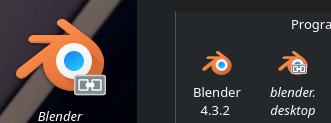
Naming: In view mode list it shows the file name. In view mode grid it shows the application name. It would be great to have an option to select if file name or application name should be selected. In list mode renaming becomes an issue once I add a version number like 5.6 to the filename, because it becomes the file type 6 (which is not existing).
Tooltip: If enabled it can appear on top of the folder view or above the icon which creates a Z-fight. Cursor on icon creates tooltip, cursor is now on tooltip and so removes it, now cursor is on icon again , so repeating over and over again. That also makes it hard to start an application (especially with double click enabled). That Z-fight behavior happened once on the first item on grid mode of the bottom horizontal taskbar. It happened on every list item of the left vertical task bar and on those grid items, that are close enough to the taskbar, because the tooltip tries to get applied left to the icon, but aligns with taskbar.
Folder Reference: Clicking on the name just gives a notification error that it cannot be opened. My folders are in ~/.local/share if that matters. Same issue appears when right click and open with Kate is clicked.
Single/Double Click: On Dolphin I use the double click behavior. On Folder View Widget that is attached to taskbar I want it to act like a menu → single click. Not sure if this should be a default behavior, but at least there should be a boolean in settings. I read on web search that other people have similar issues.
Copy File into FVW: Always I copy a file into that folder via drag and drop into the widget, the widget shows 6 items. One is real and 5 are visual bugs. Closing the widget does not solve this, reloading however does solve it. It also just applies to the widget where the drop was done (tested with 2 widgets referencing the same folder).
Icon Reference: When an icon is selected it is “impossible” to find this icon again. The icon name should be referenced somewhere (it would be enough when clicking on “select icon” to pre-selected it or note somewhere “currently used [name]”). It helps to manually duplicate the widget for example for the taskbar of another monitor or to find related icons.
The settings contain no scrollbox. So the window has to drag to the top of the screen and has to be resized to access all settings.
For me the annoying things are Number 1), 3) and 4), because that are the things that happens on daily basis and not just on setup. But these are all no things that make that widget unusable or bad. The widget is far over 10 years old when I see people writing about it 2012 - I can’t belief that some of these kind of issues exist after such a long time. But I don’t want to blame anyone. In fact I’m thankful for that widget and want to address this to help improving the quality.
you may have spent more time with this widget than the developer
this all good feed back and well organized… i would encourage you to break each point out into their own bug report at bug.kde.org since this is a widget that comes preinstalled with the plasma desktop (at least on my distro).
item 4 may be more of a wish list (feature request) than a bug.
I don’t think so. I’m not even using KDE for a whole week. And that’s also the reason I want to discuss it here first: if something is my fault for any reason, people have the chance to give additional information. Maybe also about bug fixes on 6.4 or later.
Another reason is to give attention that there is a widget which doesn’t met the overall quality of Plasma (it’s also shipped to my distro by default). And the last reason: I need some time for the bugtracker that is not very intuitive for someone new. Before I open an issue I want to check for existing reports. But I will forget half of my points when I do not write them somewhere together.
all valid points, and if i used that widget for anything i would likely have something to add to your observations, but i will have to leave that to others.
setting up an acct and filing your first bug reports are kind of the right of passage for a new KDE user, so feel free to jump right in…. if your bug reports end up being duplicates, or are already fixed, they will be marked as such in fairly short order – no need to be shy.
the amount of thought and organizing you have already put in is an order of magnitude beyond the quality of most bug reports… my only suggestion is that they each need to be separated for easier tracking and faster resolution.
That wouldn’t be my first report. I already did one a half year ago (used an app on Mobian). So no worries I will do it at some point soon (and of course separated).
To point 1) I was digging deeper. I also had the same issue somehow on grid mode later. I think that may happened through syncronizing issues the widget has, similar to 8). However I found a workaround when versioning the name: put a space behind the last sign. This may works, because file types never have a space sign and so the system knows it’s a name, not a file type.
So I think 1) is also no bug, but a feature request like 4). Are feature requests also placed on bug tracker or where is the right place?
the file manager will consider anything after the last . to be a file extension.
you can see this behavior by add the file extension column to your details view and try some renaming… this is by design and don’t know that you can turn this off.
and i would also say that adding space at the end of a file name is a poor habit to get into for a number of reasons…. one of those “just because you can, doesn’t mean you should” kind of things.
anyway, when filing a bug report you will get to a drop down for the priority or severity (whatever it’s called) and one of the options there will be “wish list”
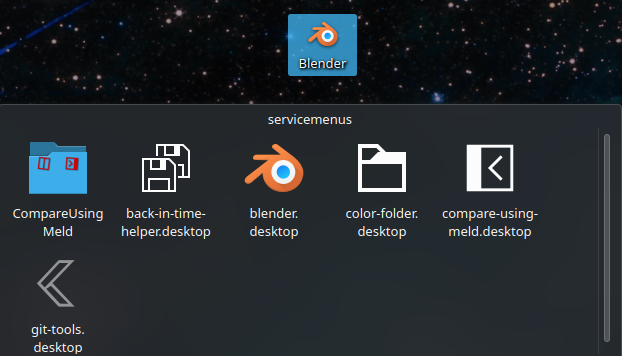
As long as it matches the file extension conventions. As I said, it’s a workaround. The Folder Viewer however is no classic file manager. It’s a widget that is also used as desktop itself. And there it already has the functionality to make for example blender.desktop to Blender. But once you move it to a dedicated Folder View widget, it becomes blender.desktop again.
I mean on desktop the link will be displayed with the actual name from the name property inside the desktop file. See Blender on the left. But once I move it into a dedicated folder view the file name appears, see Blender on the right. And as I said before, the desktop itself is a folder view with some extra functionalities (like background image).
The mid Blender icon is what I created with the workaround and what I wanted to achieve. I just wish there would be a setting to choose between file name and property name. The empty space in between is the vertical taskbar of the second monitor - just to help understanding the picture.

 I’m not even using KDE for a whole week. And that’s also the reason I want to discuss it here first: if something is my fault for any reason, people have the chance to give additional information. Maybe also about bug fixes on 6.4 or later.