I don’t know if this can be somehow a new feature for Accesibility section in System settings. 
Regards
I don’t know if this can be somehow a new feature for Accesibility section in System settings.
Regards
That’s a nice thought  but this is what I meant when I said this:
Things like swapping between input devices, and scripting inputs, are something I’ve always done, just because I was a power user and it makes you faster and go for longer… Just a generic way to higher performance. When you’re disabled, being high-performance might mean being able to perform at all, so it’s a bit more critical. But it’s still important for able-bodied people, it’s not so much of an exclusive a11y feature.
This is why I still bemoan the death of Mouse Gestures - not sure if you used them much in the past…
For any action that I could think of a shape for, I could assign keyboard shortcuts, I could write a script, to make almost any action (or series) available from keyboard or mouse gesture.
Starting in the early days with Opera and Firefox eventually using easystroke to extend it to the entire (X11) desktop.
Sometimes I think many normal users are very restricted in the way they approach things - they think you’re ‘either’ a keyboard or mouse user…
I’m a blend, and I’m extremely lazy - I feel that I’m failing when I forgot a shortcut and have to reach for the mouse, and annoyed when I’m using the mouse and can’t execute a keyboard shortcut without letting it go.
What’s important is that you can do the whole job with either one or the other, not both… the idea of pressing a shortcut AND THEN clicking with the mouse is a wrong idea.
This is why my current preference ignores the shortcut and mouse clicking - F4 is my current go-to… so this work is important in trying to bring the GUI up to a standard where it can genuinely take over, for everyone’s benefit.
 I used them a lot, and migrated back to linux full-time from windows for the superior graphics and audio and of course, freedom… The time seemed right because I can’t use X11, but I read that Wayland input was a solved problem, only to discover it definitely wasn’t.
I’m just gonna ctrl+x the rant you just sent me on  And leave this link GitHub - taj-ny/InputActions: Linux utility for binding keyboard/mouse/touchpad actions to system actions
I don’t see why they should be mutually exclusive. Mixing them works very well, in general (obviously this thread’s issue being an exception).
An example I use a lot is to rightclick something to select it and open the context menu there, but select the menu item using the keyboard anchor (rightclick, c = copy). It’s nice because you can locate the object quickly by pointing at it (sometimes easier than keyboard navigation), while getting your hand in position (often it already is) to hit the keyboard (usually easier than the higher precision needed to click a menu). Perhaps I’ve misunderstood you, I think.
FWIW, the context menu you get with the keyboard (using the Menu key, or Shift-F10) works the same way as the context menu you get with the mouse in (what should be) current git master.
So both methods are directly available with the keyboard and the mouse, and not significantly more cumbersome:
I understand that, but this is the kind of inconsistency which becomes a problem. It is not that one is significantly more difficult than the other (although, it is, the targets are 1/4 the size and in three locations and has to be clicked three times, compared to a toolbar button.), just that the two are not the same. When you are the kind of user who uses them all interchangeably, splitting the existing feature into two instantly deletes half of your interface to that feature… and in this case, it’s deleted maybe the two most easily accessed interfaces, the keybind, and the toolbar button.
It is not that one is significantly more difficult than the other (although, it is, the targets are 1/4 the size and in three locations and has to be clicked three times, compared to a toolbar button.), just that the two are not the same.
If we assume that people in general will sometimes need to do either - sometimes create a folder in the current subfolder, sometimes in the selected one - then you need to have different ways of activating them.
This is also like other things work, such as pasting.
It might be a good idea to actions for creating a folder as a subfolder of the current item, so people can also add it as a toolbar button or access it from the menu if they prefer that one.
Having both on the same keybind, distinguished only by some internal state that does get changed implicitly rather commonly, does seem a bit confusing.
I was avoiding suggesting this because I thought it might be too much like an ‘option’ but I really like the idea.
I was avoiding suggesting this because I thought it might be too much like an ‘option’ but I really like the idea.
It’s not really an option, it would be a feature. The option would be adding it to the toolbar/adding a dedicated keyboard shortcut, but those are different kinds of “options” - it’s not something that needs to be explicitly put into a Settings dialog, and the toolbar/keyboard shortcuts dialog is just a searchable list of actions anyway.
The problem would be figuring out which actions should have an “in subfolder” variant, how to label them, and (of course) implementing this. Create Folder certainly, Paste as well. Maybe Create File and Create New?
An upside here would be that the labels in the context menu could be a bit more precise - right-click on the background and right-click on a folder will both say “Paste x files”, but do different things - one pastes in the current folder, the other into the right-clicked folder. Would be even clearer if the labels were “Paste x files here” and “Paste x files into ‘Folder Name’”.
Nate’s just marked the bug as resolved/intentional 
I think it’s just that the linked bug report is very specific about the intended behavior, and the behavior it wants was tried but found not an improvement generally.
Doesn’t mean that there couldn’t be other ways to solve the underlying issue without doing the requested behavior, but may need some additional thinking to clearly figure out what the underlying problem is. Repurposing a bug report that deals with a particular solution and is already very long to be about something related but different is usually not a great idea, it makes it more confusing.
I think you’re right. I’ve been asked to make a new one, and I’ve made sure to keep the ‘expected behaviour’ kinda loose so there’s room for clever devs to do something clever if they want
A new bug has been opened with the goal to change how CTRL+SHIFT+N works.
Please do not change the default behavior of CTRL+SHIFT+N. It has been confirmed as INTENTIONAL.
Should the “Create Folder” shortcut action be the same as the context menu:
In details view, Should the newly created folder be selected after creation:
Regardless, in details, the new folder will be expanded in view.
This should make clear how to best fix:
https://bugs.kde.org/show_bug.cgi?id=512020 https://bugs.kde.org/show_bug.cgi?id=508196
If I get clear 50/50 split I might add an option, but I really would like not to, this is a very nitpicky behavior, once right all users should have an easy time accomplish their folder creation in a predictable manner.
I’m not so sure. Just because it’s popular, doesn’t make it best. Remember that some of the people voting don’t understand how selection works in a computer’s UI, or the difference between the capabilities of Dolphin and Windows Explorer. They might not be the best pilot through solving a problem related to selection in something which doesn’t apply to Windows Explorer at all. Also, trolls live here.
With respect Meven, I always abstain from such polls. Last time I voted, we got a politician, despite the fact that nobody who voted likes those people and they all spent the past 4 years complaining about them 
It seems to me that the challenge here is not, to gauge user expectations (which this poll would achieve), but to find a solution which is technically sane but doesn’t break user expectations even if they are not technically sane.
the 1st question wording is a bit confusing and i’m not sure it provides the proper insight… i think most ppl want them to both behave the same depending on what is selected (if anything).
the 2nd question overwhelmingly resolves what to do after the folder is created… that is dolphin should do nothing:
I have implemented this in:
I only intend in detail view to expand the directory hierarchy, so the new folder is visible.
I still very much doubt this.
If a folder is selected, that could be because of a million reasons, in my case 10 out of 10 it’s because I activated the window by clicking into it and a folder was there.
Every file operation should happen in the current working directory. If you want to create a folder within another, go into it.
i could agree with this for the icon and compact views.
but i very much disagree with this when it comes to the details view because you are now working with a tree and could be focused on something several levels deeper than the current directory view.
having the shortcut create a new folder within a selected folder makes sense in the context of a tree view… i was just trying to avoid having the behavior different for details view than from the other views.
in icon or compact view your created folder would not be shown, so that is an argument in your favor as it could be confusing when nothing obvious has happened… but the same thing happens when you use the context menu in those views – it creates a folder buried in the selected folder – and is also not obvious that something has happened.
so at least in that respect they are equivalent and what ppl are already used to.
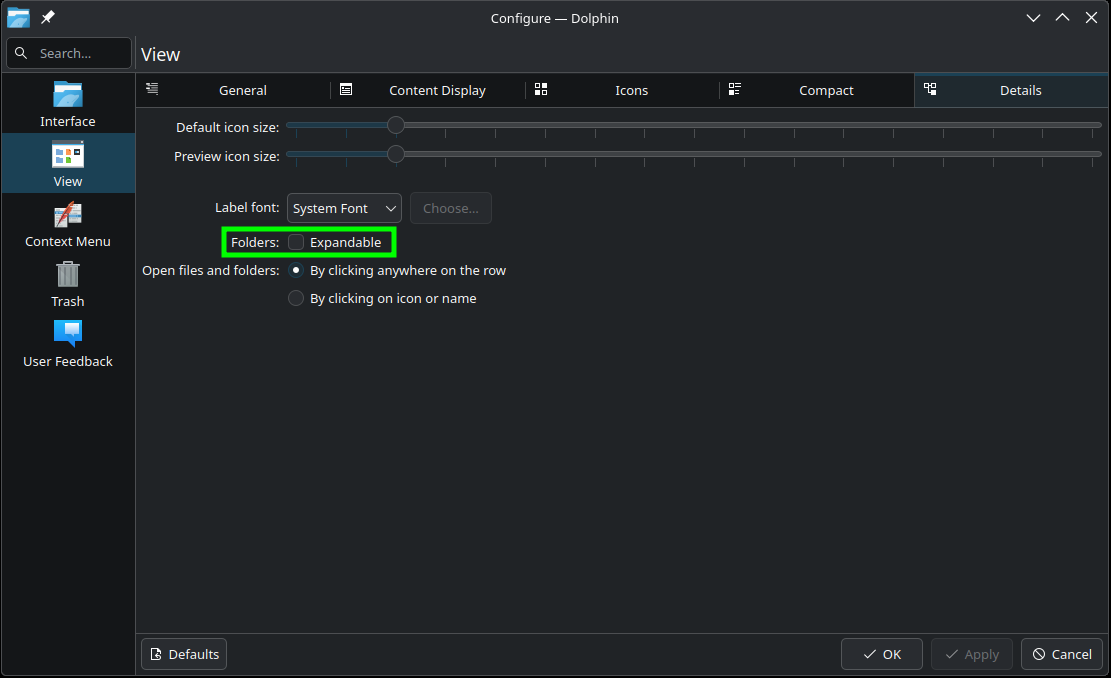
Keep in mind, Dolphin actually has 4 view types:

The Details view includes an option called “Expandable” in its configuration. In my daily workflow I use view modes 1, 2, 4. I keep Expandable disabled because I don’t need a folder tree. I prefer to see only the folders within the current directory.
That said, there are users who rely heavily on the Expandable Details view when working within a sub-tree of the current directory. That corresponds to option 3, and as far as I know it’s the only view mode that provides a file-system tree with expand/collapse functionality.
Dolphin is an excellent file manager and far ahead of most alternatives in terms of features. I’d love to see it continue to lead not only in capabilities, but also in intuitiveness.