Slightly strange behaviour in Dolphin

Well you could narrow this down to three; then further down to two:

  1. Icons and Compact are essentially simply icon views…
  2. Details/tree (expandable).
  3. Details/not expandable - maybe considered another ‘icon view’.

I would suggest that the Details (not expandable) should be treated as another Icon view - so essentially there are 2 main view types.

Something worth consideration maybe:

  • If we right click a folder and ‘create new folder…’ upon creating a new folder (inside) then it should be expanded (for the expandable view) or entered (for the icon type views).
1 Like

Beware also of Blinkered viewing of this issue… Dolphin is unique, context clicking is unique… Most of us also have phones and tablets, some have Playstations and TV sets. There are many file browsers that do things a little differently.

They all seem ‘correct’ in their own way. What’s different with Dolphin?

Depending on your settings, let’s assume you’re in your icon view, you also have maybe the toolbar ‘add folder’ icon, and always the keyboard shortcut. These items are often available also on other file browsers, on Android (My Files) a dropdown menu, also in Google’s Files and always the option to ‘Create a new folder’ is only available when folders are not selected.

The minute that you SELECT any folder, the option to ‘create new folder’ disappears and is replaced by a different, contextual header/toolbar/option set.

You MUST enter a folder to create another folder inside.

Despite the open bugs, this is entirely natural on a TV, a phone or tablet, or Big Screen (Playstation) file browser.

In Dolphin, you can do this by context clicking ON a folder and creating a new folder - this is an advanced option, and possibly it’s a bug that when you do this, you should be automatically entering that folder to see your New Folder.

The interface is creating it’s own issues by having more options available which cannot always follow a totally logical path.

I hope I’m making more sense - as this is essentially a simple issue confused by the interface. I urge you to go play with another file browser to see the difference and review the bug status.

initially, i was persuaded to this view – that dolphin should assume the user wants to work with the newly created folder – otherwise why create it, right?

but i came around to idea that the user has already declared their intent by choosing a view and selecting within that view (or not selecting, as the case may be).

so dolphin should respect that choice and not try to anticipate the users intent

  • views should not change
  • selections should not change
  • folders should be created where the user has indicted they want the folder created, and do nothing else

that said, if dolphin wants to check the details setting for expanded and proceed to auto expand the selected folder to show the newly created folder, then that would be great (above and beyond, in my view) as long as the selection remains solidly with the original folder.

2 Likes

The user selected it, or Dolphin automatically selected it. What are the other 999,998? Magic selection faeries aren’t real, they can’t hurt you :smiley:

Yeh “there” as in “under your mouse cursor when you clicked”.

Software can’t be coded for “the user could click anywhere at any time. Ignore them, but only when they didn’t mean to click there”. How is Dolphin supposed to determine whether the user clicked there on purpose or just because they weren’t paying attention, or mistakenly thought it didn’t matter where they clicked?

And what about other stuff like say, delete, or rename? Should it just ignore whether you have a folder selected for that? (a rhetorical question for your thought experimentation)

That’s the one you selected.

How bout no. I have the view I have, because that’s the view I want. I can select a folder within that view and I should be able to perform operations on that selection. Just like how selection works everywhere, and how it works for other operations like delete and rename.

If you don’t want to create a folder within another folder, don’t click on that folder to instruct Dolphin to create a folder there.

The user can’t make the new folder their selection to express their intent to operate on it, before the folder exists.

When we discussed this earlier, the real deciding factor here was how hard it is to change to the other behaviour. If the folder is selected but you didn’t want it to be, you can go back to the view folder really easily with ‘esc’. But if the folder is not selected and you did want it to be, it might be a matter of navigating through some complex tree structure to get there.

I guess the problem is that pressing ‘esc’ won’t return to the original selection, if the original selection was not the view folder!

We could put the selection in the history, but that will mess with history as we know it and seems like it would be hard to code… We could focus the new folder but not select it, but that seems familiar :laughing:

I can’t imagine any good solution to this, and I agree with your logic of “the user said so, so do that”. I think that’s a good mechanic if all other concepts fail. It would be nice to think of a way to solve that problem though, to avoid a navigation problem for that “I created that folder to do stuff with it” use case.

Comparing it with a file browser on a phone might help clarify why I think ‘ignoring the selection’ is the best option. On other devices, the option to ‘create new folder’ will generally be hidden when you select a folder, selecting folders often changes the entire UI to follow that action… so it might just be a limitation on Dolphin always having the option available.

Needing to press Escape is a stretch, I would rather just thumb the spacebar to confirm a selection (e.g. when entering, then exiting a folder the selection is cleared, but not the focus).
With most file browsers, you must enter a folder to create a subfolder.

we might be talking about two different things.

the selection is the folder within a view that the user intends to operate on.

if that operation is to create a new folder, then the new folder should be created within that folder… but the selection should remain with the original folder selection.

of course once the new folder is created, the user could navigate to it or select it in order to operate on that newly created folder, but that would require action on their part because dolphin does not know – nor should it be in the business of predicting – what the user wants to do with that newly created folder.

i’ve been used to right clicking on a folder and having the option to create a new folder within it on every desktop operating system i’ve ever used (linux, windows, geoworks, os2)… it’s muscle memory at this point.

i don’t think tying one hand behind my back by emulating a cellphone UX is the right choice for dolphin… if i wanted that i would be using gnome.

In what filemanager? In my 30 years of using Windows, Linux and Mac, never saw a filemanager that does this. Not Windows Explorer, Windows/Total Commander, Finder, ForkLift, Double Commander, Gnome Nautilus and Dolphin. I don’t even find an option in any of these.

So I’m absolutely curious where did you develop that muscle memory

pretty sure it didn’t come out of thin air… right click, add new folder has been a thing for as long as i can remember…. seems as natural as breathing

but i haven’t really used windows since win7, so maybe windows has changed since then.

I have WinXP, Win7, Win10 and Win11 VMs. If you select a folder, the right click menu doesn’t even have the “New” submenu. In neither of these.

You have to right click to an empty part of the window to even have a “New…” menu (which automatically deselect everything)

1 Like

hah! found it!

(it’s in hungarian, but you can see it)

so yes, if I use this nested view on the left side, it’s there (which I have never used :smiley: ) and yes, it creates a subfolder within the selected one. but it’s nowhere to be found in the main part of the window.

1 Like

that must be it then, i’d forgotten about that stupid side bar (another among many windows things i happy to forget), but i do remember having to rely on it way too much.

Interestingly, this option isn’t available in the Dolphin’s (F7) Tree panel… something sorely overlooked in the entire discussion (especially with regard to ‘the it’s the same everywhere’ argument’).

However, there I would kind of expect two options to appear if right clicking on a category or folder…

  • Create new folder
  • Create new SUBfolder

Maybe the context menu needs to change to reflect what’s going to be created, new folder (PWD) or new subfolder (nested)?

Then the behaviour isn’t changed, so much as made more explicit…

And now I’m wondering if the behaviour should vary between ‘click to select’ and ‘click to open’ modes…

yeah, i keep that panel closed for PTWD reasons.

1 Like

So, after updating to Dolphin 25.12.0 it seems like this behavior came back against what I thought (from being a silent reader so far) was the consensus, so I had create an account and chime in.

As a developer: I get it. You want “consistency” because it feels right.

But as a user, especially a user of list view, I just want to reinforce how incredibly frustrating this is. For at least a week after this behavior was first implemented I firmly believed it was a bug, because I could not fathom this to be intentional. I’m working with creating folders a lot, and even now after knowing it is intended I still end up creating folders in some random sub folder all the time.

I kind of get the use case for details view, really. Because it’s a tree and after creating the folder you can expand the node and show your new folder. But in the case of list or icon view you’re creating folders which you won’t be seeing, and since this new behavior is completely unique to dolphin new user won’t even understand what happened and probably end up finding empty folders all over the place some time down the line.

Please understand that this is not an issue of what gets selected on which action or any of the other workarounds, this is just plain bad user experience and I don’t know if I can even keep on using dolphin if it stays.

Also, I’m pretty sure this introduced a hang up / core dump crash which I already reported on the bug tracker.

2 Likes

Wow, that is a ‘Stable’ version I’m guessing - I’m with 25.08.3-1 right now…

I would recommend you try using F4 to pull up a terminal - it’s just sure, quick and easy and the terminal/pane locations are synchronised, so you also see and can click when you like.

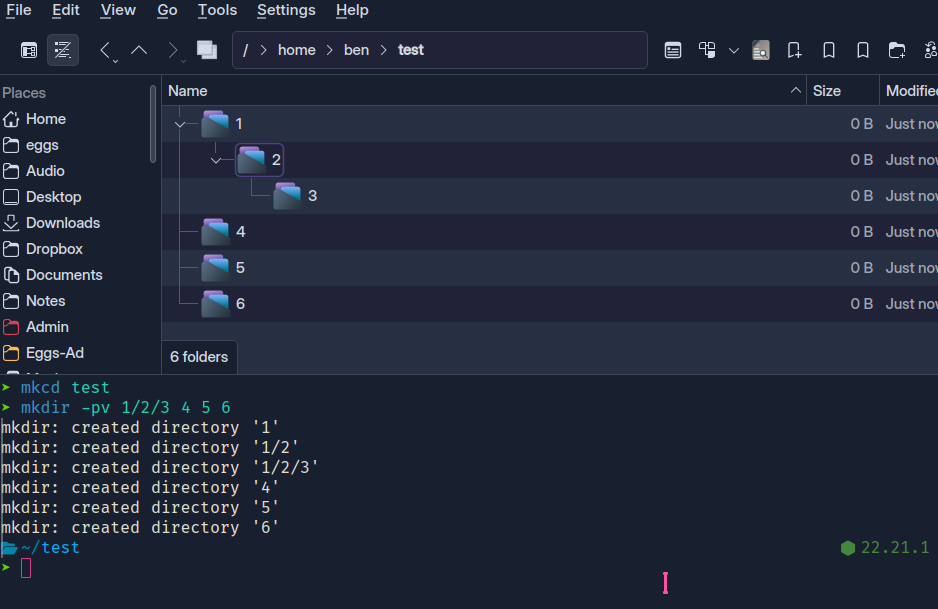
First of all make and enter a quick test directory:


I have an abbreviation so that mkdir = mkdir -pv and then I have a function so that mkcd makes and then enters a directory…

Also look at zoxide for managing jumps (maybe you want to go dual pane, you can hit F3, F4 terminal, then ‘z’ to jump to whatever folder).

So depending on the actual workflow, it’s just more convenient, totally predictable, and simple.

But yes, overall - your comment is valid. I’m just happy that it never really affected my workflow too much.

The main issue you seem to have is that new folders get selected, consequently the new ctrl-shift+N will create a folder in the newly created folder.

So without changing the current behavior “shortcuts apply to the selection context”, we need a way to no impact the icon view users creating multiple adjacent folders in the current folder.

A simple workaround is to deselect the newly created folder after each folder creation. Not ideal, adding a click in the mix. As a reminder the new folder dialog states what is the parent folder for the new folders.

Other than that, either we’d need a way:

  • to create multiple adjacent folder at once, having a second button “create another”, or a mode where you can interpret space as separators in the folder name input “foldera folderb/folderc”, would get you two folders “foldera” “folderb/folderc” instead of currently it would give you a folder “foldera folderb/folderc”.
  • or not select the newly created folder, like by pressing a modifier at the time as clicking on the create button or having an option.
  • have different behavior based on view mode, that’s doable but I wonder about the consistency for users. This might be strange.

(those ideas we already discussed here).

1 Like

No. No, it’s not. The issue I have is that new folders get created out of the current view in the selected folder in the first place. It’s not a selection issue, it’s not about wanting to create multiple folders, I’m happy with creating a single one in the place I expect. I’ve followed the thread over the weeks it was active and read all the “solutions” and I’m telling you, if the solution to a problem that was introduced is “well, users should be more careful what they select from now on!” then that’s the definition of bad UX design.

Instead of harping on about how to work around the problems this change brought in, can you please at least come up with a single use case it solves for me?
When would a user ever even want to create a folder inside another one in list or icon views? Create a folder and then what, do nothing with it? Maybe to create multiple sub folders at once? Oh, I just tested that, I guess selecting multiple folders makes the new one get created in the current working directory, so we already got another inconsistency going there.

I realize I’m getting a bit pissy and I’m sorry about that, but I just don’t know how else to convey how bad and illogical this change is for a normal user. I’m working in an office where multiple people use KDE (I’m lucky, I know) and everyone thought this was absurd or a bug.

So again, please reconsider the use case, discuss with people who are versed in UX design to come up with a better solution or roll back the whole thing because creating new folders was a perfectly fine process in the first place that did not need change. Thank you for reading my rant.

This was confusing - especially in the icon views. With the details view, you’ll only see it if you expanded the selected folder already.

If ‘Documents’ is selected, then ‘create new folder’ (as with a context click) will create a new folder inside…

It’s automatic to think that it’s wrong to be like that, but not necessarily true… it’s one reason the Desktop paradigm has been pretty stuck for over 20 years already.

I would suggest that if you click or select a folder (in ANY view) then choosing to Create a new folder should do a ‘mkcd’ and open that folder or tree to expose it immediately.

Then you’ll soon learn to hit escape after checking if anything’s selected or not.

when you right click on a folder in icon or compact view and choose Create New… from the context menu.

this whole thing started because the dialog that comes up when you do that is the same dialog that comes up with you type Ctrl+Shift+N so the issue was they should behave the same regardless of which way the user got to that dialog box.

both paths need to be aware of what is selected (if anything) and both paths should exit with the same result (selection is unchanged, view is unchanged).

consistency is how you achieve a good UX

yes, this might result in someone creating a subfolder that they can’t see without changing their view… that’s fine, and may very well be the intention for all anyone knows.

it’s not dolphin’s business to be guessing at that when the dialog box is pretty explicit about what is about to happen when you press OK.