Slightly strange behaviour in Dolphin

Haha well this is healthy, after an initial knee jerk (of which I’ve been guilty many times) it’s quite often the case that we’re just feeling bad because our muscle memory over what can be a terrible workflow is disrupted by a genuine improvement.

I personally don’t like being forced to reach for the ‘Escape’ key ( Which is a long reach, but I have also mapped it to ⇧Shift ⇪CapsLock to deselect a folder - but hitting spacebar to confirm selection is trivial.

Confusion is rife - Nate himself mentioned that it was a PITA that when he goes up to a folder, it’s deselected (marked active) and that he had to hit an arrow key to move, then another key to move back to select… completely overlooking the Spacebar.

DISCOVERABILITY is the main problem, any changes need to be completely transparent - and I’m not sure many people know that if you go back to a parent folder (and your folder isn’t selected, simply marked as the active folder) hitting Space marks it selected… so you can go up to a parent folder, and hit delete (protected, it won’t delete) and hit Space to select, then Delete to move it to the recycling.

Every now and then I go back to testing the better ‘single click to open’ option in Behaviour, because I’m completely entrenched in double-click paradigm which I’m assured (and partly believe) is actually better… but I keep going back.

Well, I’m arguing that there was no need to reconcile them, because they were entirely different things in the first place, seeing how there still are many inconsistencies left after the change.

For example, as I already mentioned before, what about selecting multiple folders? In the context menu, the “create” option suddenly disappears, makes sense, I guess? Oh, but the toolbar button and shortcut still continue to work. What do they do? Create a folder in the current directory. If you want to be consistent, that should be disabled as well. Then we’ve seen all of the discussions about what should get selected when, which were utterly confusing and did not really come to a consensus, but where no issue before because it worked as expected.

There’s also another feature which I use a lot: paste text to create a new file. I’m mentioning this because it has all the “problems” create new folder has: ctrl+v always pastes in the current directory. The context menu creates the file in the selected folder (which I would never want to do, as illustrated in detail earlier). But it gets even more fun when you select multiple folders: the context menu “paste clipboard content” stays and goes back to creating in the current folder, even though I explicitly selected and clicked on folders, what’s that about?

So really, I can see we’ve got a lot of inconsistencies going on and understand the wish to do something about it, but I argue that it’s being done from the wrong direction. The inconsistencies, in my eyes, come from the context menu, which introduced features that make no sense.

No user wants to create folders (or files) in a sub folder, I will maintain that stance because so far no one has managed or even tried to convince me otherwise. Even if you can up with a scenario, it’s going to be incredibly niche compared to the use case of “create in current directory”, which got more complex due to this change. In a file manager, I’m always working in the current directory, same as when doing “mkdir foldername” on the cli. Hell, if I really wanted to create a subfolder, I could always already add slashes to the “new folder” dialog, just like I can with mkdir, that’s enough consistency, if you ask me.

Well someone might want to SELECT their ‘Audio’ folder and create something inside… but then they can enter to do it, it’s an un-necessary feature I think unless it’s added in the context menu as ‘Create SUB folder’.

Yes, sorry, I did not word that right. You’re completely correct, of course I want to create subfolders, but to do that I will enter the folder and then create the new subfolder, so that I can see what I’m doing instead of being “blind”.

1 Like

both of you are operating from the mindset of the icon or compact view in dolphin… which is fine but not the only consideration.

for the details tree view (which i prefer) there are all sorts of scenarios where i would want to make a folder several levels deep from the current working directory without having to navigate to it.

the tree view gives you the power to operate on folders way below your current working directory and limiting the creation of a new folders to only that directory would pretty much negate the benefit of having a a tree view in the first place.

i need to be able to use the context menu to create a new folder wherever i have selected in that tree view (including the current working directory) and i don’t want dolphin to change my selection for me.

it would be preferred for the new folder to auto expand in the tree, but that’s not a deal breaker.

if the diehards don’t want to let Ctrl+Shift+N do the same thing then break them apart and keep them separate.

I would definitely be glad with an option “create new directory in the CWD”, and a separate “create new directory in the selected one”

1 Like

Ok, then the behaviour should change according to the view in use… and the label ‘Create New Folder…’ is inadequate if it doesn’t make clear WHERE that folder is to be created.

It shouldn’t be implied - it should be specific and understood… This why I couldn’t find an answer from looking at an Android browser - because the whole UI is tied down to offer only clear and specific options - with absolutely no ambiguity or ability to create hidden folders; that would be an advanced operation best handled by power users.

The popup from the button should mirror a context click, but offer options to ignore or use… if I have Pictures selected in my Home folder, then ‘Create New Folder…’ should prompt… and perhaps an option in settings could satisfy folks who don’t want that prompt.

So if you’re in Home, and you clicked Pictures, then click ‘Create New Folder’ the option can have the same Name entry - with a checkbox or keypress to select ‘Pictures’ or ‘In View’

i’m coming around to the position that Ctrl+Shift+N and the Create New… should be separated and the shortcut label removed from the context menu to avoid confusion between these two very different UX.

Ctrl+Shift+N will always and forever only create a new folder in the current view and it will select that newly created folder automagically regardless of the view type (for the diehards).

Create New… from the context menu should create a new folder in the current view if nothing is selected, and create a nested folder if a folder is selected (regardless of the view)… it should also NOT automagically select anything or change my view.

this goes against my instincts about how keyboard and mouse UX should be cohesive, but it solves the issue with the least amount of disruption or unexpected outcomes.

to more clearly differentiate the two functions in the UI, perhaps Ctrl+Shift+N could be labeled “Create Folder in View” since that’s all it ever does.

1 Like

In my very first post I mentioned from the get go that the current behavior can make sense in Detail Tree view, and I think it’s perfectly fine to see this view as a separate use case, because it really works quite differently compared to icon and list views.

Personally, when trying to create a sub folder in a specific location in details view, I would definitely use the mouse and open the context menu on the target folder, because it can be a bit confusing what my current working directory even is when you’re multiple levels down expanded tree nodes. My one suggestion for this would be: expand the parent folder after the new folder got created (and maybe even select the new subfolder?), because I still think creating files or folders out of sight should not happen, or maybe to generalize: actions triggered through UI should always show the result, or else the user gets confused what or if anything happened.

1 Like

Something interesting I just noticed concerning ctrl+v for pasting a file/folder: it already does exactly that.

  • ctrl+v always pastes into the current working directory, independent of selection
  • opening the context menu on the cwd background shows “paste one file (ctrl+v)”
  • but opening the context menu on a folder just shows “paste one file” without any mention of the short cut

So there already exists a precedent for this behavior and it makes complete sense for “new folder” to do the same.

3 Likes

After a system update I noticed that the unexpected behavior is back in Dolphin, I have Dolphin v25.12.0 at the time of writing.

Creating new folders in sequence in current working directory is no longer working. It was just fine before, but it is broken again. ( Why? :slight_smile: )

Now I have to press the ESC key every single time ( Why?? :smiley: ) after I created a new folder. The newly created folder is selected by default, which is fine, and it should be like that. However the CTRL+SHIFT+N keyboard shortcut is expected to create new folder in Current Working Directory.

If a significant number of users want to create new folders INSIDE the selected folder, why not add an option into the settings or a new context menu for that? Why force such a change like this without any options to stick the classic behavior? Is it really that hard to write an “if-else” statement in code and add a new checkbox in settings or just introduce separate context menu?

Please don’t tell me you guys want to change CTRL+V too without introducing an option to stick to the original behavior… Please… :smiley:

1 Like

Yes, I hate having to reach for Escape - when I started practicing with VIM, and testing out Helix editor, I wanted it more local… if I had a keyboard with a split spacebar, I’d put an escape key in between the two halves of the spacebar.

You can actually set CapsLock to do ‘Escape’ (both shifts can activate capslock).

I think it’s more likely a blunder than a deliberate change… but sure, then using the keyboard Ctrl Shift N Capslock each time to deselect and create a new folder in the view…

Annoyingly, the dialog would let you create 1/2/3 nested, but not 1_2_3 in the view - because it won’t work like the terminal.

Is there no sensible solution to that scenario? I’m much more likely to want to create - let’s say ‘png’ ‘jpg’ ‘gif’ folders in the current (image) folder…

1 Like

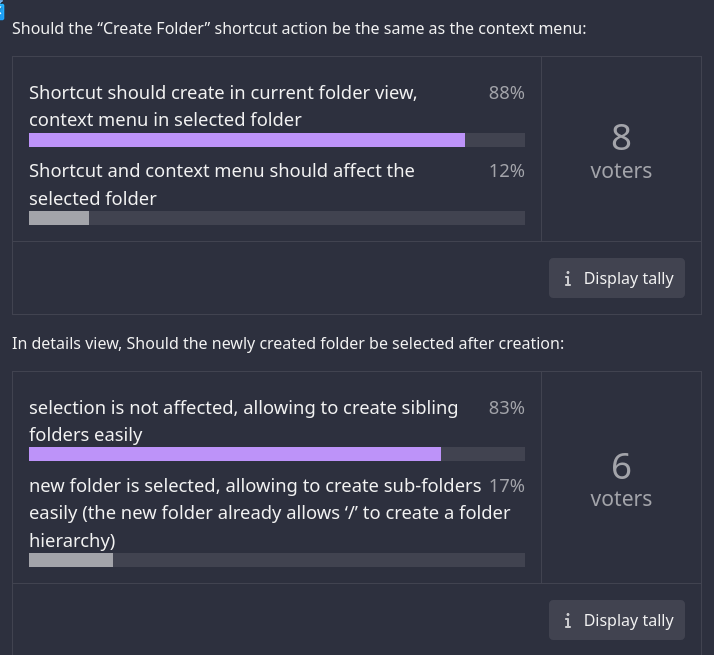
I do hope it is just a bug, at least this is the result of the poll:

Well the actual bug is this:

If you select a folder, and then ‘create a new folder’, then your selection was ignored.. and the new folder appeared in the view, instead of inside the selected folder.

So - create folder (result, folder appears in view) then ‘create folder’ again - result, no folder appears (as the created folder is selected, the next folder appears inside that one) and the folder is de-selected.

The next time you do ‘create folder’ it appears once again (toggling each time) in the view… so you get a folder in view, then subfolder, then folder in view…

But now, the selection isn’t affected. If a folder is selected, ‘create folder’ will put a subfolder in that selection. If no folder is selected, it will put a folder in the current view.

It is now consistent -whether you like it or not - and it’s time to mark this issue as solved.

Where’s this coming from now? Because I’m pretty sure just a few posts earlier we came to a completely opposite consensus.
It is not consistent, the change created more inconsistencies than it supposedly corrected and the bug is far from resolved. And anyway “it is what it is, so suck it” is not a particularly good form to end a discussion on.

2 Likes

I just tested it again to clarify…

The previous issues were as follows:

  1. If you Click to select a folder and then Click to create a new folder, that new folder should appear inside the selected folder (previously, the selection was ignored).
  2. When the update came, the selection was respected, so the new folder was created inside - but then if you clicked ‘create’ again, a new folder was created outside - because the folder was de-selected.

Now the behaviour IS consistent - if you click ‘create new folder’ when a folder is selected, it will create it inside… though my preference would be for that function to change once a folder is selected to read ‘create new subfolder’. If you click 3 times, you get 3 consistent folder - no more flipflop between ‘subfolder - folder in view - subfolder’.

So now, as long as you check the selection status, it is consistent and that bug is fixed.

That was the ‘strange behaviour’.

So it is an entirely new argument whether that behaviour should change back to the state where you re-instate the bug (ignores selection) and also restore the previous consistency (ignores selection)…

That would actually be my preference - so I think I would vote to add it as a preference, but not as the default (which is wrong).

Ctrl+Shift+N (Nothing Selected)

  • BEFORE :- Creates a folder in the present view
  • AFTER :- Creates a folder in the present view
  • This behavior remains unchanged.

Ctrl+Shift+N (Folder Selected)

  • BEFORE :- Created a folder in the PWD , ignoring the selection (this was the reported ‘bug’).
  • AFTER :- Creates the new folder inside the selected folder

This is the key change. It matches the behavior of the “Create New” context menu on a selected folder…

The ‘strange behaviour’ brought up in this thread:
Focus After Creation The new folder was automatically selected for immediate renaming - and this can result in a “blurry state of focus” where focus is split between the new folder and its parent, which developers have acknowledged as a problem to be resolved

This is not necessary, as the folder name is already ‘edited’ when it is created… as ‘create new folder’ brings up a dialogue where you must type the name.

The new issue:
After creating a folder, it is not only marked ‘active’ but also ‘selected’. This means it’s ‘ready to use’ - hitting Enter will take you into your new folder…

However, it also means that if you wish to create another folder in the PWD (view) you must de-select first.

Nested Folders

The new behaviour is better - though I don’t think it was really needed because you could type a full path for the new folder name like `1/2/3/4’.

Multiple Folders

The new behaviour now is worse, as you must de-select each new folder before creating the new one.

Comparison:

Whilst not decisive in ‘correctness’ a useful view:

  • Windows is not consistent… the folder always ignores the current selection, but creating with a context click creates a subfolder. This is how it was before the changes in Dolphin. You cannot state that this is ‘correct’ because the logic is infallible.

  • MacOS has a different paradigm - the shortcut is ONLY active when you’re inside a folder (not when an item is selected) and the ‘New Folder’ is always created in the current view.

Overall, I agree that this is not a good decision - I think that MacOS has it better… and obviously, Android not being a desktop OS doesn’t suffer from the same issues.

I think that ‘Create New Folder’ should only be made available when it is going to create a new folder in the current view - but a context menu click directly ON a folder could bring up a new contextual option to ‘Create New Subfolder’.

I think an entirely new thread needs to be opened if you wish to discuss that, as this thread has already gone WAY off topic - and we’re into entirely new territory.

This issue has been fixed, we’re discussing our distaste for the new behaviour now… It doesn’t personally affect me, because if I want three folders ‘1 2 3’ I’l just do F4 mkdir 1 2 3 because it’s just slicker.

Similarly with nested folders, I would do the same thing… I like it verbose, so I have abbr mkdir=mkdir -pv so that mkdir 1/2/3 works fine.

Another (real world type) example - this is what you should consider before suggesting changes…

➤ mkdir -pv 1/2 3/4; mkcd Pictures && mkdir -pv jpeg gif png
mkdir: created directory '1'
mkdir: created directory '1/2'
mkdir: created directory '3'
mkdir: created directory '3/4'
mkdir: created directory 'Pictures'
mkdir: created directory 'jpeg'
mkdir: created directory 'gif'
mkdir: created directory 'png'

Yes, if we were to circle back to this specific “flipflop” behavior, it is indeed fixed in a way (I’d still argue otherwise[1]) but we are long past this point and the discussion has already shifted to the so called “entirely new argument” quite a while ago, so I don’t see the point of you bringing the old one up again in the first place.
If you really wish we could start a new topic, but I don’t personally see the point seeing how this thread has already become the go to place to discuss the issue of “should the new folder shortcut create subfolders”. And it has already been for a long time considering how long a go the poll @ggggeri91 referenced was taken.

[1]: If you click “create folder” 3 times but start without a selection, the first folder is created “outside” and the following two are created in the first one you created, with is still far from “consistent”, but I’d rather not argue about this benign use case (which has no real fix) in favor of the bigger picture.

edit: I just noticed you edited/extended your post, so keep in mind this was a reply to the earlier version.


  1. 1 ↩︎

1 Like

Yes, it’s a regression if you want to create 1 2 3 not nested… I definitely agree with this.

I’m afraid that I always found GUI clicking to be clumbsy for many tasks - and I would prefer it just ignore the current selection altogether and make it a more manual task;

Click to enter a folder if you want to work inside it.

3 Likes

Well, this is something I (any many others, it seems) can agree with. So I think we should go back to discussing how we can improve the UX while still rolling back this change in its current form.

I think the suggested changes to the context menu and making a clear distinction between it and the “create new folder (in current view)” shortcut/toolbar button we discussed earlier are the way to go.

2 Likes

YES! Exactly this!

3 Likes